
Smart plugs are one of the simplest ways to add automation to a home without replacing outlets, switches, lamps, or appliances. Plug one into a standard wall outlet, connect a compatible device, and you may gain app control, schedules, voice commands, timers, energy monitoring, and integration with a broader smart-home system.
But choosing a smart plug in 2026 involves more than checking whether it works with Alexa.
Buyers now need to think about Matter compatibility, Wi-Fi versus Thread, electrical load limits, energy monitoring, ecosystem support, physical size, indoor or outdoor use, and whether advanced features require the manufacturer’s app.
A plug that works perfectly for a bedside lamp may be unsuitable for a high-power appliance. A Matter logo may improve interoperability but does not guarantee every feature will appear identically across Apple Home, Alexa, Google Home, or SmartThings.
For this guide, Best Marshall analyzed current smart-plug specifications, manufacturer documentation, platform requirements, safety information, smart-home standards, and recurring patterns in publicly available customer feedback.
Here is what to evaluate before buying.
What Is a Smart Plug?
A smart plug is a connected adapter that sits between a wall outlet and an electrical device.
At its most basic level, it acts like a remotely controlled power switch.
Instead of physically unplugging a lamp or switching it off by hand, you can typically control the outlet through:
- a smartphone app;
- a schedule;
- an automation;
- a compatible voice assistant;
- another smart-home device.
Common uses include lamps, fans, coffee makers, holiday lights, chargers, humidifiers, and other appliances that resume normal operation when electrical power is restored.
That last point is important.
A smart plug can only control the electricity reaching a device. It cannot necessarily control the device itself.
For example, a traditional lamp with a mechanical switch usually works well because restoring power turns the lamp back on. An appliance with an electronic touch panel may remain off after power is restored, making smart-plug automation much less useful.
How Do Smart Plugs Work?
Most smart plugs contain an internal relay that physically switches electricity to the connected appliance.
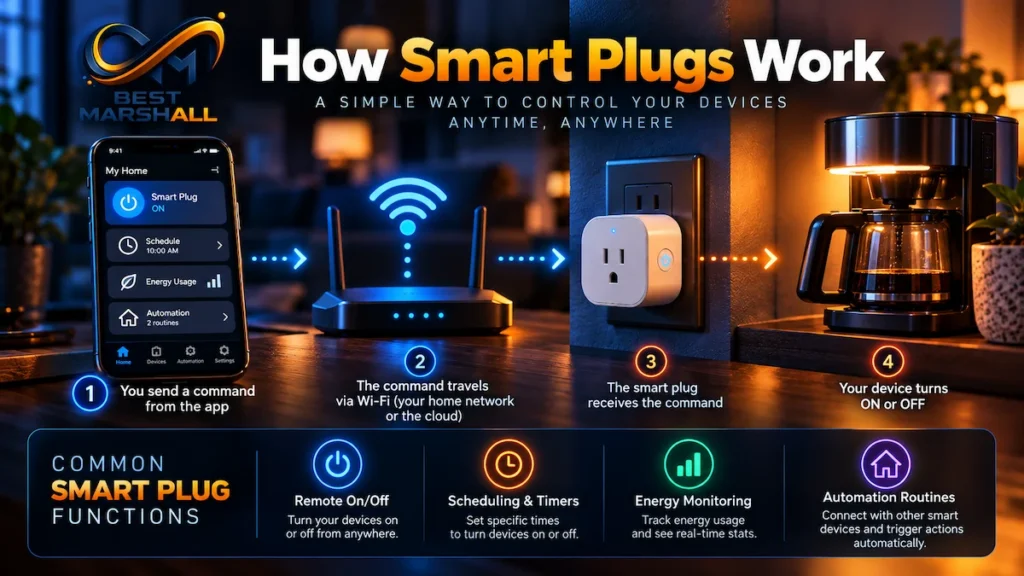
The plug then communicates with a network or smart-home controller through a wireless protocol.
Wi-Fi Smart Plugs
Wi-Fi models are extremely common.
Many connect directly to a home’s 2.4GHz Wi-Fi network and communicate with the manufacturer’s app or cloud service.
Their biggest advantage is simplicity: many require no separate hub.
The trade-off is that a house filled with large numbers of Wi-Fi smart devices can add more devices to the router, and cloud-dependent features may rely on internet availability.
Thread Smart Plugs
Thread is a low-power mesh networking technology increasingly used in modern smart homes.
A powered Thread smart plug may also help relay traffic for other Thread devices, strengthening the network.
Thread devices generally require a compatible Thread Border Router for full smart-home integration. Depending on the ecosystem, that function may be built into products such as certain smart speakers, streaming devices, or routers.
Matter
Matter is not another version of Wi-Fi.
It is an interoperability standard designed to let compatible smart-home products work across multiple ecosystems.
Matter smart plugs can commonly integrate with platforms such as:
- Amazon Alexa;
- Apple Home;
- Google Home;
- Samsung SmartThings.
Matter also supports multi-admin functionality, allowing one compatible device to be shared across multiple supported smart-home platforms.
However, buyers should not assume that every feature is identical everywhere.
Basic on/off control may work across Matter platforms while functions such as detailed energy monitoring, advanced scheduling, firmware management, or special automations may still depend on the manufacturer’s own app.
Smart Plug Specifications That Actually Matter
Rather than comparing dozens of minor specifications, focus on the characteristics that affect compatibility and safety.
| Specification | What to Look For |
|---|---|
| Voltage | Designed for U.S. 120V household power |
| Maximum current | Commonly up to 15A, but verify the exact model |
| Maximum wattage | Often up to 1,800W for resistive loads at 120V |
| Wireless connection | Wi-Fi, Thread, or another supported protocol |
| Wi-Fi band | Many models require 2.4GHz |
| Matter support | Useful for cross-platform smart-home compatibility |
| Energy monitoring | Optional; useful for tracking consumption |
| Physical size | Should not block the second outlet |
| Indoor/outdoor rating | Outdoor models need appropriate weather protection |
| Safety certification | Look for recognized third-party electrical certification |
| Manual power button | Useful when the app or network is unavailable |
These numbers require context.
A rating of 15A / 1,800W is common among U.S. smart plugs designed for general resistive loads, but that does not mean every 1,800-watt appliance should automatically be connected.
Motors, compressors, heaters, and other devices can behave differently from simple resistive loads.
Always check both the smart plug’s electrical specifications and the connected appliance’s requirements.
How to Choose the Right Smart Plug
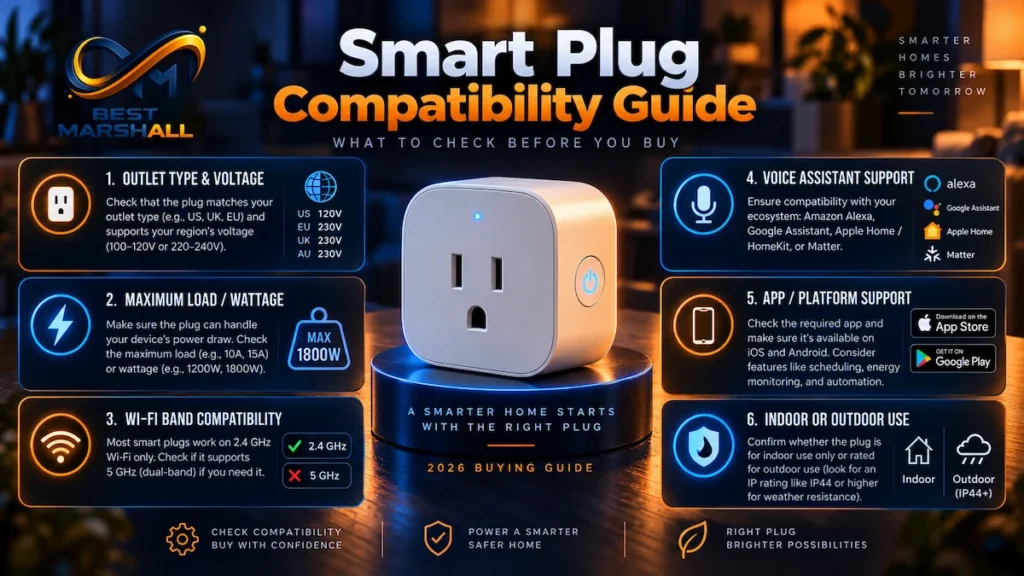
1. Start With Your Smart-Home Ecosystem
Before comparing brands, decide which platform you actually use.
If your home is built around Alexa, confirm Alexa compatibility.
Apple Home users should look for Apple Home, Matter, or HomeKit compatibility depending on the product and setup.
Google Home and SmartThings users should do the same.
Matter can make future ecosystem changes easier, but it should not replace checking the specific features you care about.
2. Decide Whether Matter Is Important
For a new smart-home setup, Matter support is increasingly valuable because it reduces dependence on one ecosystem.
It is especially useful if different family members use different platforms or if you expect your smart home to evolve.
A non-Matter smart plug can still be perfectly useful if it works reliably with your chosen ecosystem and provides the features you need.
Matter should therefore be considered an interoperability advantage—not an automatic requirement for every buyer.
3. Check the Electrical Load Rating
This may be the most important safety consideration.
Before connecting an appliance, compare its electrical requirements with the smart plug’s ratings.
Look for:
- maximum amperage;
- maximum wattage;
- resistive-load rating;
- motor or horsepower rating when applicable.
Do not assume that a smart plug suitable for a lamp is appropriate for a space heater, portable air conditioner, large motor, or other high-load device.
Use those appliances only when the smart-plug manufacturer explicitly supports the relevant load and application.
4. Decide Whether You Need Energy Monitoring
Some smart plugs track real-time and historical electricity consumption.
Depending on the model and software, you may be able to see:
- current wattage;
- daily consumption;
- weekly or monthly energy use;
- estimated electricity cost.
This can be useful for identifying devices that consume more energy than expected or measuring standby consumption.
But not every buyer needs it.
If the only goal is turning a lamp on at sunset, paying extra for detailed power statistics may provide little practical benefit.
5. Check the Physical Size
Compactness matters more than it sounds.
A bulky smart plug can cover the second receptacle in a standard duplex wall outlet.
Mini smart plugs are designed specifically to reduce this problem.
If you plan to place two plugs in the same outlet, compare dimensions before purchasing rather than assuming both will fit.
6. Choose Indoor or Outdoor Hardware Correctly
An indoor smart plug should not be placed outdoors simply because it is under a covered porch.
Outdoor models are designed with weather protection and wider operating-temperature ranges.
Look for a published ingress-protection rating such as IP64 or IP65, depending on the product.
Outdoor models may also include protective outlet covers and multiple independently controlled sockets.
Follow the manufacturer’s installation requirements to maintain the intended weather resistance.
Once you know which features matter for your setup, compare our selection of the best smart plugs in 2026.
How to Set Up and Use a Smart Plug
Exact steps vary by brand, but the process generally looks like this:
- Plug the smart plug directly into a compatible wall outlet.
- Install the manufacturer’s app if required.
- Create or sign in to the appropriate account.
- Put the plug into pairing mode.
- Connect it to the required Wi-Fi network or smart-home controller.
- Scan the Matter QR code if configuring a Matter-enabled device through a compatible ecosystem.
- Give the plug a descriptive name such as “Living Room Lamp.”
- Assign it to the correct room.
- Create schedules, timers, scenes, or automations.
- Test both app control and the physical power button.
If setup fails, confirm the Wi-Fi requirements first.
Many smart plugs still support 2.4GHz Wi-Fi only, which is one of the most common sources of setup confusion.
Firmware should also be kept current, particularly for smart-home products connected to the network.
Main Benefits of Smart Plugs
Smart plugs can provide meaningful convenience without major electrical work.
Automation: Lights and compatible appliances can follow schedules automatically.
Remote control: Supported systems can let users check or change outlet status away from home.
Voice control: Compatible assistants can switch connected devices on and off.
Energy awareness: Models with monitoring can show where electricity is being consumed.
Smart-home integration: A plug can become part of larger routines involving sensors, lights, thermostats, or other devices.
Low-cost smart-home entry point: Smart plugs allow conventional appliances to participate in automations without replacing the appliance itself.
Things to Consider Before Buying
Not Every Appliance Works Well With a Smart Plug
Devices with mechanical on/off controls are usually the easiest to automate.
Products with electronic power buttons may not restart automatically after electrical power is restored.
A smart plug cannot press an electronic Start button for you.
Smart Plugs Usually Do Not Dim Lights
A standard smart plug is primarily an on/off switch.
If you need brightness control, use a smart dimmer, dimmable smart outlet, smart bulb, or a plug specifically designed for dimming.
Connecting an ordinary smart plug does not make a lamp dimmable.
Connectivity Can Determine Reliability
Public customer feedback across smart-plug brands frequently shows that network configuration and Wi-Fi strength are major factors in user experience.
A reliable product can still perform poorly if installed at the edge of Wi-Fi coverage.
Thread-based models can solve some networking problems, but they introduce their own requirement for compatible Thread infrastructure.
Safety Certifications Matter
Smart plugs directly control household electricity, so safety should carry more weight than minor software features.
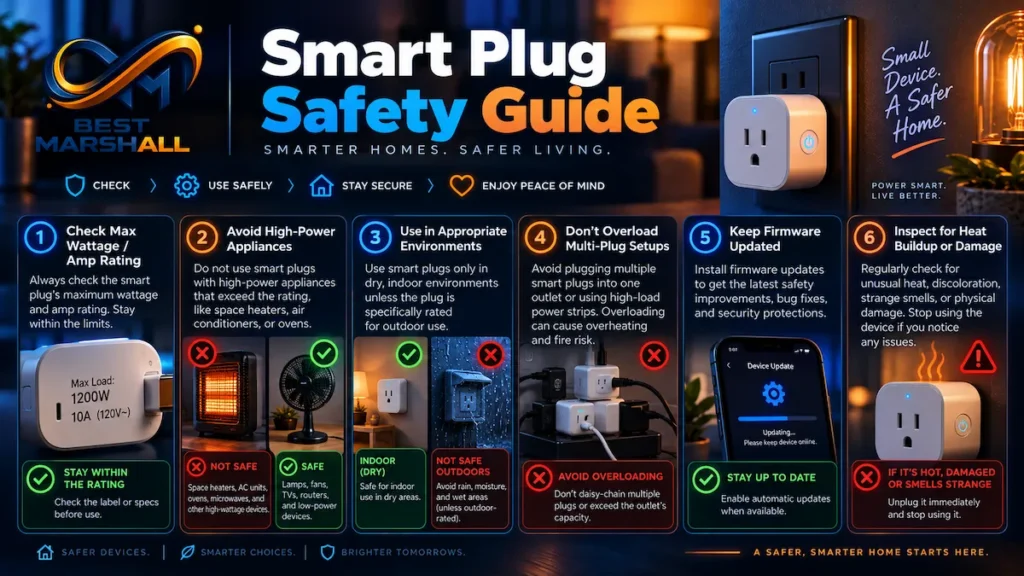
For the U.S. market, look for products evaluated by recognized testing organizations and check for marks such as UL or ETL, depending on the model.
Also verify the actual product listing and manufacturer documentation rather than relying only on marketing images.
Flame-retardant housing, overload protection, and other protective features are useful, but they do not replace correct load selection and proper use.
Warranty and Support
Warranty coverage varies considerably by brand and model.
Before purchasing, check:
- warranty length;
- whether support is available in the United States;
- firmware-update history;
- availability of setup documentation;
- whether the manufacturer still actively supports the app;
- requirements for proof of purchase.
Software support matters more with smart-home devices than with conventional outlets.
A smart plug may physically continue working for years, but cloud services, mobile apps, security updates, and ecosystem integrations can affect its long-term usefulness.
If purchasing through Amazon, verify the current seller, listing details, warranty information, and applicable return terms before placing the order.
What Are Users Saying About Smart Plugs?
Across publicly available customer feedback, several themes appear repeatedly.
Buyers commonly praise schedules, remote control, voice commands, compact size, and the convenience of automating ordinary lamps and appliances.
Energy-monitoring models also receive positive feedback from users who want clearer insight into appliance consumption.
The most common frustrations tend to involve:
- initial Wi-Fi setup;
- 2.4GHz network requirements;
- devices occasionally appearing offline;
- manufacturer-app issues;
- plugs large enough to obstruct adjacent outlets;
- ecosystem features that differ from what buyers expected.
Matter improves interoperability, but current user experience still depends heavily on the quality of the manufacturer’s firmware, app, wireless connection, and support.
Are Smart Plugs Worth Buying?
For many smart-home users, yes—but only when the plug matches the intended appliance and ecosystem.
Smart Plugs Make the Most Sense For:
- lamps;
- fans;
- holiday decorations;
- chargers;
- simple appliances with mechanical switches;
- users building Alexa, Apple Home, Google Home, SmartThings, or Matter-based automations;
- people who want schedules without changing existing wiring;
- users who want energy monitoring from compatible devices.
You May Want to Skip a Smart Plug If:
- the appliance does not restart automatically when power returns;
- the electrical load exceeds the plug’s specifications;
- you need dimming rather than simple on/off switching;
- the appliance manufacturer discourages external power switching;
- you need a permanent hardwired automation solution.
Final Buying Advice
The best smart plug is not necessarily the model with the longest feature list.
Start with electrical safety and appliance compatibility, then evaluate the smart-home ecosystem, wireless protocol, Matter support, physical size, energy monitoring, and software features.
For a new smart home in 2026, Matter compatibility can be a meaningful advantage, especially if you want flexibility across Alexa, Apple Home, Google Home, or SmartThings.
But Matter alone should not make the decision.
A reliable 15A smart plug with the right safety certification, strong manufacturer support, appropriate load rating, compact dimensions, and the features you will actually use can be more valuable than a more complicated model with features your setup does not support.
If a smart plug matches your appliance, electrical requirements, and smart-home ecosystem, check its current pricing and availability on Amazon before making your final decision.
See examples of excellent options:
Frequently Asked Questions
Will a smart plug still work if the internet goes down?
Sometimes. Basic manual control through the physical button should still work, and some locally stored schedules or Matter-based automations may continue operating without internet access. However, remote control from outside your home, cloud-based routines, notifications, and certain voice-assistant features may stop working. If offline reliability matters, check whether the smart plug supports local control rather than depending entirely on the cloud.
Can I use a smart plug with a space heater or other high-power appliance?
Only if both the smart plug and the appliance are compatible with the required electrical load. Space heaters, air conditioners, kettles, and similar appliances can draw substantial current, so their wattage and amperage requirements should never exceed the smart plug’s rated limits. Some manufacturers specifically restrict certain high-load appliances. Our smart plug safety guide covers these considerations in more detail.
Is a Matter smart plug worth choosing in 2026?
It can be, especially if you want flexibility across smart-home ecosystems. Matter is designed to improve interoperability between compatible platforms and devices, reducing dependence on a single brand ecosystem. However, Matter support does not automatically mean every advanced feature will appear in every app. Features such as detailed energy monitoring may still depend on the manufacturer’s own software or platform support.
Do smart plugs need 2.4 GHz Wi-Fi?
Many Wi-Fi smart plugs still use 2.4 GHz because it generally provides longer range and better wall penetration than higher-frequency Wi-Fi bands. A dual-band router can usually support these devices as long as its 2.4 GHz network is enabled. Before buying, verify the plug’s network requirements instead of assuming that support for Wi-Fi means compatibility with every wireless band.
Do smart plugs use electricity when they are turned off?
Yes, but typically only enough to keep their wireless connection and internal electronics operating. Turning the outlet off stops power to the connected appliance, but the smart plug itself remains active so it can receive commands, follow schedules, or reconnect to the network. For most buyers, this standby consumption is more relevant as a technical consideration than as a major factor in choosing between models.
Can I plug a smart plug into a power strip or surge protector?
Possibly, but the safest configuration depends on the electrical ratings and instructions for all devices involved. Adding adapters, smart plugs, extension cords, or power strips does not increase the circuit’s available capacity and can complicate load management. Avoid daisy-chaining power accessories, and always follow the manufacturer’s installation and load-limit guidance. See our smart plug safety guide for a deeper explanation.
Is energy monitoring worth having in a smart plug?
Yes, if understanding appliance consumption is useful to you. Energy-monitoring models can help identify how much electricity individual devices use and may provide historical consumption data through their apps. If you only need scheduled on/off control for a lamp or similar device, however, the feature may add little practical value. Our Best Smart Plugs roundup can help compare models with and without energy monitoring.
One thought on “How to Choose a Smart Plug: Complete Buying Guide for 2026”