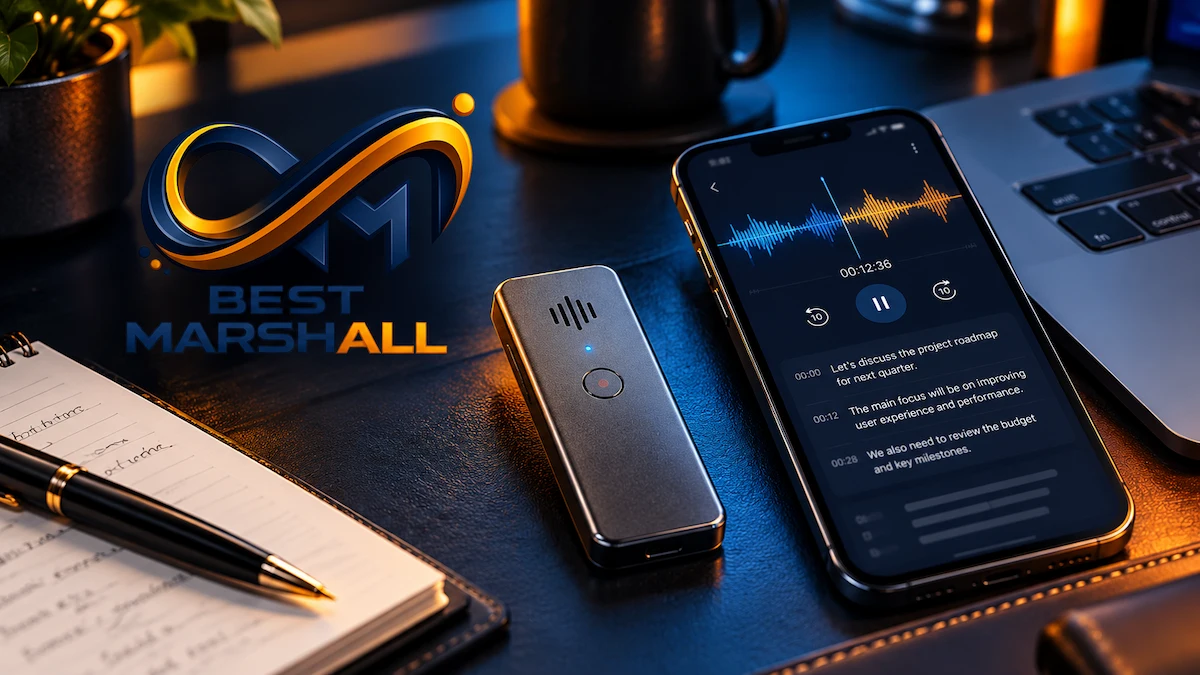
The PLAUD Note Pro is a credit-card-sized digital recorder built around a specific workflow: capture conversations with dedicated hardware, transfer the recordings into the Plaud ecosystem, transcribe them, and use AI to turn the resulting text into summaries, action items, structured notes, and searchable knowledge.
That sounds straightforward, but the technical details matter.
The Note Pro is not simply a microphone with ChatGPT attached. Audio capture occurs locally on the device. Phone-call recording uses a different physical capture method from room recording. Transcription is not performed in real time. AI processing requires an internet-connected workflow, and transcription capacity depends on the selected Plaud membership tier.
The hardware also operates in different recording modes that trade pickup distance against battery life and storage consumption.
For professionals working with interviews, meetings, phone calls, lectures, research, sales conversations, or client discussions, understanding these distinctions is critical. Recording range, speaker overlap, language consistency, consent requirements, cloud settings, data-processing policies, and subscription minutes can affect the usefulness of the system more than its physical dimensions.
This guide draws on Plaud’s current technical and support documentation, security materials, independent professional evaluations, and established audio-transcription principles to explain how the PLAUD Note Pro works and which technical limitations buyers should understand before relying on it.
What Is the PLAUD Note Pro and How Does It Work?
The PLAUD Note Pro is a dedicated digital voice recorder combined with a cloud-assisted transcription and AI-analysis ecosystem.
It performs three fundamentally different tasks:
- Capture — microphones and contact-sensing hardware record conversations.
- Transfer and transcription — recordings move into the Plaud software environment and are converted into text.
- AI interpretation — language models generate summaries, action items, templates, answers, and other structured outputs.
Keeping these layers separate is important.
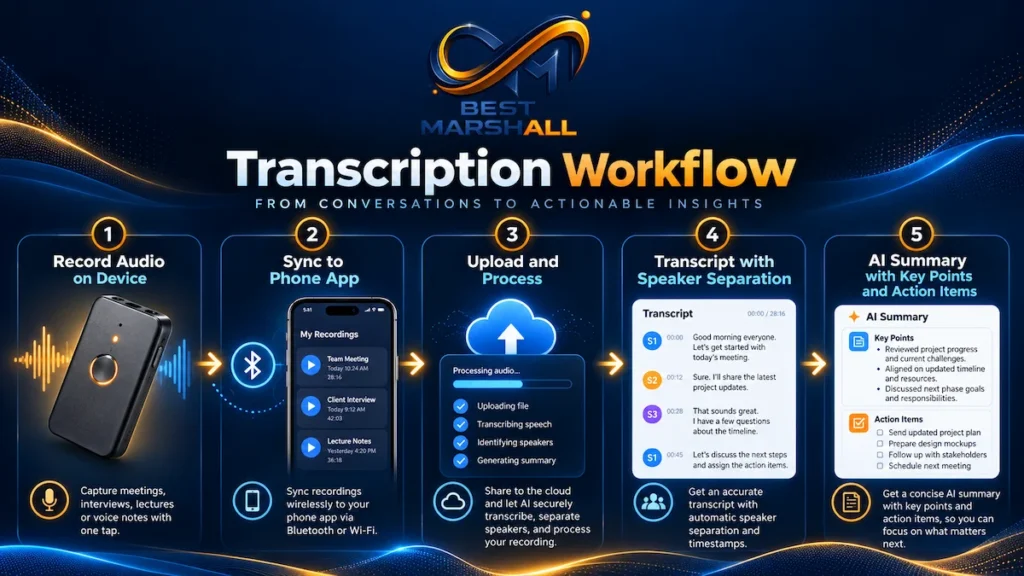
The device itself can record without an active internet connection because audio is stored locally. However, the complete AI workflow is not fully offline: transcription and summarization require data processing after the recording has been transferred.
If you are still deciding whether the device itself is right for your workflow, our PLAUD Note Pro review examines its strengths, limitations, value, and who should consider buying it.
PLAUD Note Pro Core Specifications
| Specification | PLAUD Note Pro |
|---|---|
| Dimensions | 3.37 × 2.13 × 0.12 in / 85.6 × 54.1 × 2.99 mm |
| Weight | Approximately 1.06 oz / 30 g |
| Microphones | 4 MEMS microphones + 1 VPU |
| Maximum stated pickup range | Up to 16.4 ft / 5 m in Enhance Mode |
| Local storage | 64GB |
| Battery | 500mAh |
| Enhance Mode runtime | Up to 30 hours |
| Endurance Mode runtime | Up to 50 hours |
| Standby | Up to 60 days |
| Display | 0.95-inch AMOLED InstantView Display |
| Display brightness | Up to 600 nits |
| Display protection | Corning Gorilla Glass |
| Bluetooth | BLE 5.4 |
| Wi-Fi | 2.4GHz and 5GHz |
| Charging | Proprietary four-pin charging interface |
| Charging time | Approximately 2 hours |
| Recording modes | Smart dual-mode for in-person conversations and phone calls |
| Transcription | 112+ supported languages |
| Apple Find My | Supported |
| Local recording without internet | Yes |
| Real-time transcription | No |
These specifications explain only part of the product.
Its practical value depends heavily on how the microphones, software, AI processing, and subscription system interact.
Quick Answer: Does PLAUD Note Pro Transcribe Offline?
No. The PLAUD Note Pro can record and store audio locally without an internet connection, but transcription and AI-generated summaries require the recording to enter Plaud’s processing workflow. The device itself is therefore an offline recorder, not a fully offline transcription engine.
This distinction is critical for users working in restricted networks, confidential environments, or locations without reliable internet access.
How the Five-Microphone Recording System Works
The Note Pro uses:
- four MEMS microphones;
- one VPU, or Voice Pickup Unit.
What Are MEMS Microphones?
MEMS stands for Micro-Electro-Mechanical Systems.
These are extremely small microphones built using semiconductor-style manufacturing techniques. MEMS microphones are common in smartphones, earbuds, laptops, and compact recording electronics because they combine small physical size with consistent performance and relatively low power consumption.
In the Note Pro, four MEMS microphones are distributed across the device.
Multiple microphones allow Plaud to perform spatial processing and beamforming-style voice capture rather than relying on a single microphone pointed toward the room.
Plaud specifies an effective pickup range of up to 16.4 feet in Enhance Mode.
That should not be interpreted as meaning that every speaker within a 16.4-foot radius will be transcribed with identical accuracy.
Audio quality still depends on:
- speaker volume;
- room reverberation;
- microphone orientation;
- background noise;
- multiple people talking simultaneously;
- distance;
- acoustic absorption;
- obstruction of the microphone ports.
A person speaking quietly from 15 feet away in a noisy restaurant presents a very different signal than someone speaking clearly across a quiet conference table.
What Is the VPU and Why Is It Used for Phone Calls?
The fifth capture component is the VPU, or Voice Pickup Unit.
For conventional in-person meetings, the MEMS array captures airborne sound.
Phone calls present a different problem.
A compact recorder attached to the back of a phone cannot directly access the phone’s internal digital call audio in the same way a native call-recording system might.
Instead, Plaud’s phone-call recording system uses contact-based pickup to capture vibration and sound transmitted through the phone.
This is why physical placement matters.
The Note Pro attaches to a phone using its included magnetic case. MagSafe-compatible phones can use the case directly, while other phones can use the included magnetic ring.
The device itself does not contain the attachment magnet; the magnetic case provides that function.
Smart Dual-Mode Recording: What “Automatic” Actually Means
The Note Pro can automatically distinguish between:
- ambient/in-person recording;
- phone-call recording.
Internal sensing allows it to select the appropriate capture mode without requiring the physical mode switch used by the original PLAUD Note.
However, this feature is easy to misunderstand.
Smart dual-mode does not mean the Note Pro automatically records every phone call.
The user must still intentionally start recording.
Current operation is straightforward:
- Long-press the Record button to start.
- The device vibrates to confirm recording.
- Short-press during recording to create a Highlight.
- Long-press again to stop.
Automatic mode detection determines how the recording is captured, not whether recording begins without user intervention.
That distinction also matters for privacy and recording consent.
Enhance Mode vs. Endurance Mode
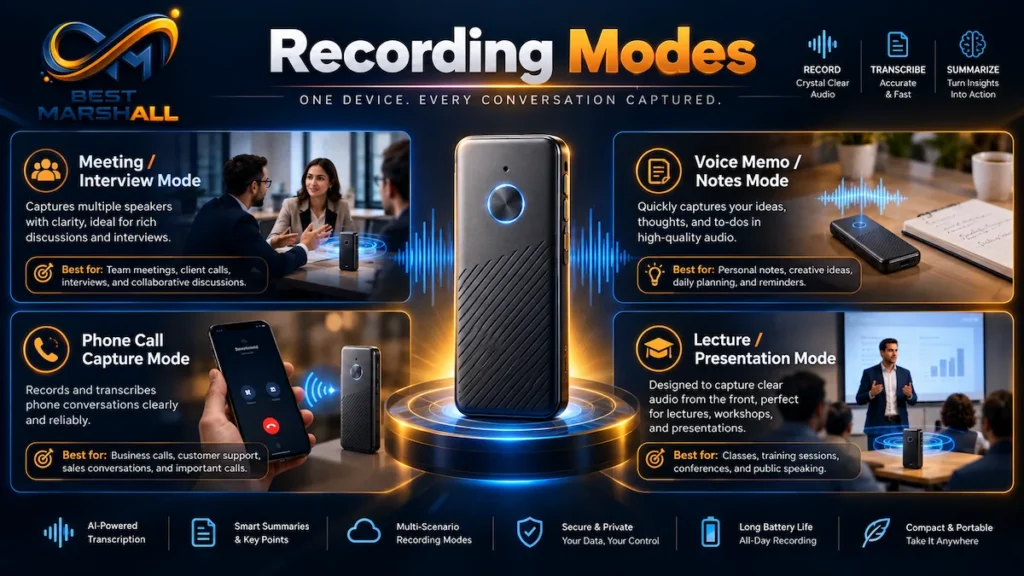
The Note Pro provides two primary recording-performance profiles plus an Adaptive option.
Enhance Mode
Plaud specifies:
- up to 16.4 ft / 5 m pickup;
- up to 30 hours continuous recording.
This mode prioritizes capture performance.
It is the more logical choice for:
- conference rooms;
- interviews;
- meetings with multiple participants;
- environments where speakers sit farther from the recorder.
Endurance Mode
Plaud specifies:
- up to 9.8 ft / 3 m pickup;
- up to 50 hours continuous recording.
Endurance Mode uses more efficient recording parameters to extend runtime.
The trade-off is reduced capture performance and range.
Adaptive Mode
Current firmware also provides an Adaptive mode that can transition between Enhance and Endurance behavior based on remaining battery capacity.
Plaud documentation states that the device prioritizes Endurance Mode when battery charge falls below 20%.
Why This Matters
The phrase “up to 50 hours” should not be interpreted as the Note Pro simultaneously providing maximum battery life and maximum 16.4-foot pickup performance.
Those figures correspond to different operating priorities.
This is a classic technical trade-off:
greater capture performance consumes more resources; greater endurance requires reducing recording demands.
How Much Recording Fits on 64GB?
Plaud currently states that the Note Pro’s 64GB of internal storage holds approximately:
- 30 hours in Enhance Mode;
- 50 hours in Endurance Mode.
At first, that may sound unusual: 64GB would normally be capable of storing far more compressed voice audio.
However, the relevant figure is the capacity Plaud specifies for its own recording implementation and operating modes, not the theoretical capacity of generic MP3 storage.
Once recordings are transferred into the Plaud App, they no longer occupy the same active device storage, allowing the recorder to continue being reused.
For professionals with consecutive interviews or meetings, regular synchronization is therefore part of practical storage management.
InstantView Display: More Than a Cosmetic Upgrade
The Note Pro adds a 0.95-inch AMOLED display, which the standard PLAUD Note does not have.
Plaud specifies brightness up to 600 nits and Gorilla Glass protection.
The display communicates information such as:
- recording status;
- audio waveform;
- Highlight markers;
- battery level;
- connection status;
- pending file transfers;
- Bluetooth or Wi-Fi transfer status;
- firmware-update progress;
- storage-full warnings.
This addresses a significant usability problem with minimalist voice recorders: uncertainty over whether recording actually started.
When capturing a legally or professionally important conversation, clear recording-state feedback has practical value beyond aesthetics.
What Does “Press to Highlight” Do?
During an active recording, a short press of the Record button creates a Highlight marker.
This does not alter the underlying conversation.
Instead, it adds contextual information telling the Plaud software that a specific point in time deserves additional attention during later analysis.
Useful moments to highlight include:
- decisions;
- deadlines;
- commitments;
- numerical information;
- objections;
- action items;
- important quotations;
- follow-up requirements.
The concept is technically interesting because it combines human judgment with automated processing.
AI does not have to determine entirely on its own which moment mattered most: the user can provide that signal while the conversation is happening.
However, Highlights must currently be created during recording. They cannot simply be retroactively inserted into the hardware recording after the session ends.
How PLAUD Note Pro Transcription Works
The transcription workflow is post-recording rather than live.
A simplified process is:
- Record audio on the Note Pro.
- Store the recording locally.
- Connect the device to the Plaud App.
- Transfer the recording.
- Select automatic or custom generation.
- Send the content for transcription processing.
- Generate speaker labels, summaries, or additional AI outputs.
- Edit or export the results.
Bluetooth and Wi-Fi Transfer
Standard file transfer begins through Bluetooth.
The Note Pro uses BLE 5.4.
For larger recordings, Plaud provides Fast Transfer through Wi-Fi. The Note Pro supports both 2.4GHz and 5GHz Wi-Fi.
This is an important improvement over the original PLAUD Note, which uses BLE 5.2 and 2.4GHz Wi-Fi.
Current iOS software also supports optional background Auto-transfer when the appropriate app and firmware requirements are met.
On other workflows, files transfer when the device reconnects through the Plaud App.
Does PLAUD Note Pro Provide Real-Time Transcription?
No.
Plaud’s current system focuses on processing the conversation after recording rather than displaying a live transcript while participants are speaking.
That matters if you need:
- live captions;
- real-time accessibility transcription;
- instantaneous subtitles;
- live courtroom transcription;
- real-time meeting translation.
The Note Pro is not designed primarily for those applications.
Its strength is post-conversation transcription and analysis.
Transcription Languages: What “112+ Languages” Really Means
Plaud currently supports transcription in 112+ languages and regional variants.
The system can:
- automatically detect the primary language;
- allow users to select the language manually;
- recognize different English variants;
- process numerous European, Asian, African, and other languages.
However, there is an important limitation.
One Primary Language Per Recording
Plaud currently does not provide reliable multilingual transcription within a single mixed-language recording.
If participants frequently alternate between English and Spanish, for example, transcription quality may become inconsistent.
The recommended approach is to:
- use one dominant language per recording;
- or split multilingual conversations into separate recordings when practical.
This limitation matters considerably for international teams.
Transcription Is Not Translation
Plaud also states that the platform is not currently designed as a translation service.
Selecting another transcription language may sometimes produce translation-like output, but the manufacturer does not characterize that as reliable translation functionality.
If accurate cross-language translation is essential, use a system specifically designed and validated for that task.
Speaker Identification and Diarization
A transcript becomes much more useful when it identifies who said what.
Plaud uses speaker diarization to separate voices.
Initially, speakers may appear as labels such as:
- Speaker 1;
- Speaker 2;
- Speaker 3.
Users can rename those labels.
Plaud also provides Auto Speaker Labeling, which can learn frequently encountered voices over time.
What Affects Speaker Recognition?
Speaker separation works best when:
- voices are clearly audible;
- participants take turns speaking;
- speakers do not overlap heavily;
- background noise is limited;
- the recorder is positioned appropriately.
Cross-talk remains difficult for automated transcription systems.
If two people speak simultaneously, the acoustic signals overlap physically before software receives them. AI can sometimes separate parts of the conversation, but it cannot reliably reconstruct information that was never captured distinctly.
Custom Vocabulary for Technical Work
Plaud supports Custom Vocabulary for terms such as:
- people’s names;
- company names;
- acronyms;
- legal terminology;
- medical terminology;
- technical products;
- project names.
Current documentation allows a custom vocabulary of up to 500 entries.
This feature is more important than it may initially appear.
Speech-recognition systems often perform well on ordinary conversational language but struggle with uncommon proper nouns and specialized terminology.
Adding terms such as:
- internal project codes;
- medication names;
- technical abbreviations;
- industry-specific terminology;
can improve the raw transcript.
That matters because AI summaries are downstream of transcription.
If a critical term is wrong in the transcript, the error can propagate into the summary or action items.
AI Summaries and Model Selection
Plaud’s AI layer can transform transcripts into:
- meeting summaries;
- action items;
- structured notes;
- outlines;
- mind maps;
- customized templates;
- question-and-answer interactions through Ask Plaud.
The platform also provides access to multiple AI-model families from major providers, including:
- OpenAI GPT models;
- Google Gemini models;
- Anthropic Claude models.
The exact supported versions can change over time.
That is preferable to hard-coding a specific model name into a long-term buying decision.
AI providers regularly replace or update models, so buyers should evaluate the Plaud platform and workflow, not purchase the hardware solely because one particular language model is currently listed.
Ask Plaud: What Does It Actually Do?
Ask Plaud allows the user to query recorded material after it has been transcribed.
Typical tasks include:
- identifying decisions;
- extracting action items;
- finding unresolved questions;
- reviewing deadlines;
- summarizing a participant’s position;
- drafting a follow-up message;
- searching information across recorded conversations.
This creates an important difference between transcription and knowledge retrieval.
A transcript tells you what was said.
Ask Plaud attempts to help determine what information inside that transcript is relevant to a specific question.
The answer still depends on the quality of the source transcript.
AI cannot reliably recover information that was never captured correctly.
Subscription Plans and Transcription Minutes
The physical Note Pro can record without buying a premium AI plan.
The AI service uses a tiered transcription model.
Current U.S. plans provide approximately:
| Plan | Monthly Transcription Capacity |
|---|---|
| Starter | 300 minutes |
| Pro | 1,200 minutes |
| Unlimited | Unlimited, subject to current service terms and stated daily limits |
The included Starter tier means occasional users may not need an additional paid plan.
However, transcription consumption can accumulate rapidly.
For example:
- five one-hour meetings per month = 300 minutes;
- twenty one-hour meetings = 1,200 minutes.
That means the subscription model deserves as much attention as the hardware price.
A professional recording several hours every workday should evaluate the long-term service cost before choosing the device.
Current membership pricing and feature allocation can change, so buyers should verify the latest Plaud plan terms rather than relying on an old article or product listing.
What Can You Export From Plaud?
A transcription system becomes more useful when users can move the resulting information into other workflows.
Current Plaud software supports several export formats.
Audio
The mobile app can export:
- MP3;
- WAV.
Plaud Web currently provides MP3 export.
Transcripts
Transcripts can be exported as:
- TXT;
- SRT;
- DOCX;
- PDF.
SRT is particularly useful for captioning and video workflows because it contains timestamps.
Summaries
Summaries can be exported as:
- TXT;
- Markdown;
- DOCX;
- PDF.
Mind Maps
Mind maps can be exported as:
- PNG;
- Markdown.
Transcript exports can also include speaker labels and timestamps.
For researchers, journalists, podcasters, and content creators, this is important because recordings are not permanently trapped inside a proprietary viewing interface.
Phone-Call Recording: Important Technical Limitations
Phone-call capture deserves special attention.
The Note Pro records phone calls by attaching to the phone and capturing the conversation physically rather than by directly intercepting the operating system’s digital call stream.
That creates several practical limitations.
Headphones Can Prevent Proper Call Recording
Plaud states that the Note Pro cannot properly capture the remote participant when the call audio is routed through wired or wireless headphones.
Why?
Because the other person’s audio is no longer being reproduced through the phone in the way the VPU expects to capture it.
For phone-call recording, users should not assume that AirPods, Bluetooth headphones, or wired headsets are compatible with the normal VPU workflow.
Speakerphone Requires Different Placement
When a call is on speakerphone, Plaud recommends removing the Note Pro from the back of the phone and placing it nearby.
Leaving it attached can allow the device to capture audio both through physical transmission and through the air, potentially producing excessive or distorted audio.
Thick Cases Can Affect Capture
Physical contact matters.
A thick phone case can weaken the vibration path used for call recording.
The included magnetic case and ring therefore do more than provide convenient carrying—they help maintain appropriate positioning.
PLAUD Note Pro vs. Original PLAUD Note
The Pro model does not simply add AI features; both products share much of the same software ecosystem.
The primary differences are hardware and recording workflow.
| Feature | PLAUD Note Pro | PLAUD Note |
|---|---|---|
| Microphones | 4 MEMS + 1 VPU | 2 MEMS + 1 VPU |
| Maximum stated pickup | 16.4 ft / 5 m | Approx. 9.8 ft / 3 m |
| Recording-mode selection | Automatic smart dual-mode | Manual dual-mode |
| Display | AMOLED InstantView | No display |
| Battery | 500mAh | 400mAh |
| Maximum continuous recording | Up to 50 hrs in Endurance | Up to 30 hrs |
| Bluetooth | BLE 5.4 | BLE 5.2 |
| Wi-Fi | Dual-band 2.4/5GHz | 2.4GHz |
| Local storage | 64GB | 64GB |
| Press to Highlight | Yes | Yes |
The Pro model therefore makes the strongest technical case for users who benefit from:
- larger meeting-room pickup;
- longer endurance recording;
- visible recording status;
- automatic phone/meeting mode switching;
- faster or more flexible file transfer.
If those improvements do not matter, the original Note may still satisfy the core recording-and-transcription workflow.
Data Privacy: Where Is the Audio Stored?
Privacy is especially important because recordings can contain:
- confidential business information;
- personal data;
- legal discussions;
- medical information;
- financial information;
- private conversations.
Local Recording First
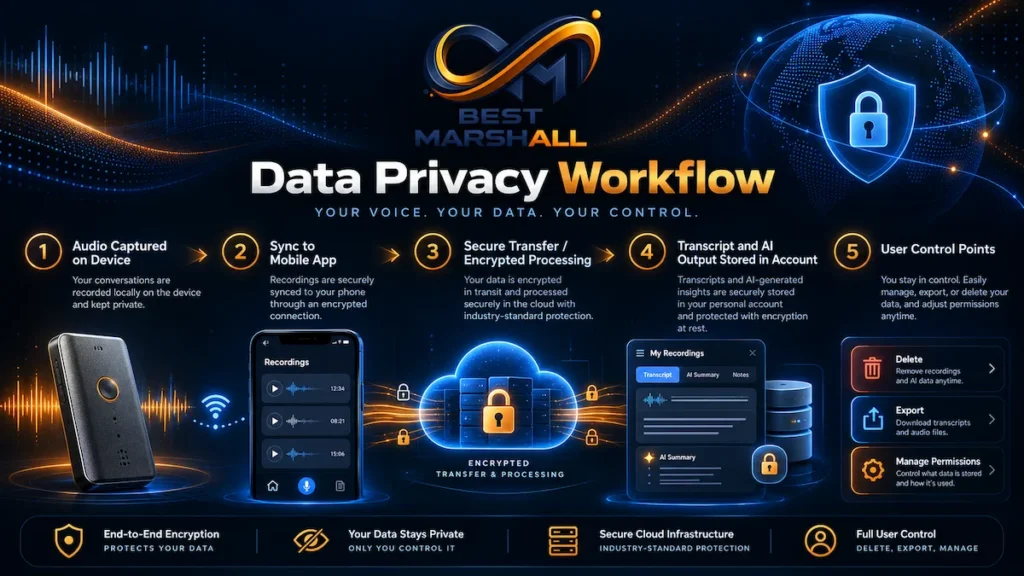
According to Plaud, recordings are initially stored locally on the device.
The device can therefore capture audio without continuously streaming it to a server.
AI Processing Requires Data Transfer
When the user requests transcription or summarization, relevant data must be transmitted for processing.
Plaud states that its AI processing infrastructure uses enterprise arrangements with external AI providers and that customer content is not used for model training.
According to current Plaud documentation, AI subprocessors operate under zero-retention arrangements for the processing request.
Private Cloud Sync
Plaud’s Private Cloud Sync determines whether recordings, transcripts, and summaries remain persistently synchronized in the Plaud cloud.
If cloud sync is disabled, Plaud states that recordings can remain local and cloud infrastructure is contacted when AI processing is explicitly requested.
If Private Cloud Sync is enabled, the account’s content can remain synchronized between Plaud App, Plaud Web, and Plaud Desktop.
The important point is:
“Recorded locally” does not mean “AI transcription happens locally.”
Those are separate stages.
Encryption and Security Standards
Plaud currently lists several security and privacy frameworks, including:
- ISO/IEC 27001;
- ISO/IEC 27701;
- SOC 2 Type II;
- HIPAA-related compliance/validation;
- GDPR compliance;
- EN 18031.
Plaud also states that:
- transmissions are protected using TLS;
- stored cloud data uses AES-256 encryption;
- AI-provider processing is subject to zero-retention arrangements;
- customer content is not used for AI-model training under the company’s stated policies.
These controls are relevant, but certification language should not be treated as automatic approval for every possible professional workflow.
For example, an organization handling protected health information may still require:
- a signed Business Associate Agreement;
- internal security review;
- approved retention settings;
- patient consent;
- organizational policy compliance.
Plaud currently states that a BAA can be requested for qualifying healthcare use.
Compliance is a workflow responsibility, not merely a product feature.
Recording Consent in the United States
The Note Pro can record discreetly, but technical capability does not determine legal permission.
U.S. recording laws vary by state, location, type of conversation, and circumstance.
Plaud explicitly states that it does not obtain consent on the user’s behalf.
Before recording:
- determine where each participant is located;
- follow applicable state and federal law;
- follow workplace or institutional policy;
- inform participants when required;
- obtain and document consent when necessary.
For sensitive professional conversations, obtaining clear permission before recording is generally the safer operational practice.
The recorder should never be treated as a tool that makes consent requirements disappear.
Professional Evaluation Criteria for PLAUD Note Pro
1. Audio Capture Environment
The stated 16.4-foot range is useful, but placement still matters.
For critical transcription:
- place the device centrally;
- reduce background noise;
- avoid obstructing microphone openings;
- minimize speaker overlap;
- position quiet speakers closer.
The maximum range should be treated as an operating boundary, not the ideal placement distance.
2. Transcription Accuracy
Accuracy depends on more than the AI model.
Important factors include:
- clean source audio;
- speaker separation;
- correct transcription language;
- technical vocabulary;
- accents;
- room reverberation;
- microphone distance.
Independent evaluations of the Plaud ecosystem have generally reported useful transcription and summary performance, but no automated transcription system should be assumed to produce a legally or professionally perfect verbatim record.
Critical text should be reviewed.
3. Workflow Integration
Evaluate whether you need:
- mobile access;
- web access;
- desktop meeting capture;
- SRT export;
- DOCX/PDF exports;
- custom vocabulary;
- AI summaries;
- structured templates;
- cross-recording search.
A professional transcription device provides less value if the output cannot enter the tools you actually use.
4. Subscription Economics
Hardware cost is only part of the ownership model.
Estimate the number of minutes you expect to transcribe each month before choosing a membership tier.
5. Privacy Requirements
Ask:
- Can audio leave the device?
- Do you need persistent cloud sync?
- Does your organization permit third-party AI processing?
- Is a BAA or DPA required?
- What retention policy applies?
- Who may access exported transcripts?
These questions become more important as the sensitivity of the recorded material increases.
Standards, Requirements, and Important Precautions
Use the Correct Charging Cable
The Note Pro uses a proprietary four-pin charging connector.
Plaud recommends the supplied cable.
Charging takes approximately two hours, and the device draws approximately 5V/0.5A.
Higher-wattage USB adapters do not necessarily charge it faster because the device controls the amount of current it draws.
The proprietary connector is a practical disadvantage compared with native USB-C charging because losing the cable can interrupt use until a compatible replacement is obtained.
Keep Firmware and Software Updated
Firmware can affect:
- recording modes;
- battery management;
- file transfer;
- compatibility;
- stability;
- security.
Plaud’s Adaptive battery behavior and background-transfer capabilities are examples of features tied to specific firmware or app versions.
Do Not Treat AI Output as a Verified Record
AI summaries can omit context or interpret statements incorrectly.
For high-stakes uses, retain the original recording and review the transcript before relying on:
- legal notes;
- medical documentation;
- financial decisions;
- contractual commitments;
- quotations;
- compliance records.
Common Beginner Mistakes With PLAUD Note Pro
Mistake 1: Assuming It Transcribes While You Speak
It does not.
The Note Pro records first and processes the conversation afterward.
Mistake 2: Assuming Smart Dual-Mode Automatically Records Calls
It automatically chooses the capture mode.
You still start recording intentionally.
Mistake 3: Wearing Headphones During Phone-Call Recording
This can prevent the Note Pro from capturing the remote caller properly because the phone is not reproducing the other person’s voice through the expected acoustic path.
Mistake 4: Using Maximum Pickup Range as the Ideal Distance
Five meters is the manufacturer’s stated maximum Enhance Mode range, not the optimal distance for every speaker or room.
Closer, clearer speech generally produces better transcription input.
Mistake 5: Allowing Everyone to Talk at Once
Speaker diarization cannot completely solve overlapping acoustic signals.
Encourage turn-taking when accurate attribution matters.
Mistake 6: Expecting Unlimited Free Transcription
The hardware can keep recording, but AI transcription allowances are tied to the Plaud membership structure.
The Starter tier currently provides 300 minutes per month.
Mistake 7: Assuming 112+ Languages Means Multilingual Meetings Are Fully Supported
Plaud supports many individual languages but currently recommends a single dominant language per recording.
Mistake 8: Treating Transcription as Translation
They are different tasks.
Plaud currently does not position the system as a reliable translation platform.
Mistake 9: Enabling Cloud Features Without Reviewing Data Policy
Professionals handling confidential information should understand what is stored locally, what is uploaded for processing, and whether Private Cloud Sync is enabled.
Mistake 10: Assuming “HIPAA Compliant” Automatically Makes Every Clinical Workflow Compliant
Healthcare organizations may still require a BAA, documented consent, internal approval, retention policies, and other controls.
Mistake 11: Relying on AI Summaries Without Reviewing the Transcript
A polished summary can still inherit transcription errors or omit nuance.
Human review remains important for high-stakes information.
How to Choose Correctly: PLAUD Note Pro Technical Checklist
Before choosing the Note Pro, check the following.
Recording Environment
- Are most conversations in person, by phone, or both?
- How many participants typically speak?
- Are rooms quiet or noisy?
- Will speakers sit within 16.4 feet?
- Is speaker attribution important?
Transcription Volume
Estimate monthly usage.
- Under roughly 300 minutes: Starter may be sufficient.
- Regular professional use: evaluate Pro capacity.
- Heavy daily transcription: evaluate Unlimited terms and long-term cost.
Language Requirements
- Is the conversation primarily one language?
- Do you regularly switch languages?
- Do you require translation?
- Do you rely heavily on technical terminology?
- Will Custom Vocabulary help?
Data Requirements
- Can recordings be processed in the cloud?
- Do you need Private Cloud Sync?
- Does your organization require SOC 2 or ISO documentation?
- Is healthcare information involved?
- Is a BAA required?
Export Requirements
Confirm that your workflow can use:
- MP3/WAV audio;
- TXT transcripts;
- DOCX;
- PDF;
- SRT subtitles;
- Markdown summaries.
Phone-Call Workflow
- Can you attach the device properly?
- Do you normally use headphones?
- Do you use speakerphone?
- Does local law allow the recording?
- Can required consent be documented?
Which User Profile Is PLAUD Note Pro Best Suited To?
Beginner User
Focus on:
- one-button recording;
- automatic mode selection;
- correct placement;
- Starter transcription allowance;
- basic summaries;
- consent before recording.
The main objective should be capturing clean audio consistently.
Intermediate User
Consider:
- Custom Vocabulary;
- speaker labeling;
- structured templates;
- Highlights;
- Wi-Fi Fast Transfer;
- cloud-sync settings;
- DOCX/PDF/SRT exports;
- subscription-minute planning.
Advanced User
Evaluate:
- data residency;
- AI subprocessors;
- retention configuration;
- BAA/DPA requirements;
- bulk exports;
- Desktop workflows;
- standardized organizational templates;
- security documentation;
- audit requirements;
- verification of AI-generated output.
Advanced users should evaluate the complete data lifecycle, not merely the recorder.
Technical FAQ
Can the PLAUD Note Pro work without internet?
Yes for recording. Audio can be recorded and stored locally without internet access. Transcription, summaries, and other AI-processing features require connectivity later.
Does PLAUD Note Pro provide real-time transcription?
No. Plaud currently processes transcription after the recording rather than providing live speech-to-text.
How many microphones does the PLAUD Note Pro have?
It uses four MEMS microphones plus one VPU/contact-based voice pickup system.
How far away can it record?
Plaud specifies up to 16.4 feet in Enhance Mode and approximately 9.8 feet in Endurance Mode. Actual intelligibility depends on room acoustics, speaker volume, noise, and placement.
How long can it record continuously?
Up to approximately 30 hours in Enhance Mode or 50 hours in Endurance Mode under Plaud’s stated conditions.
How much audio fits on the 64GB storage?
Plaud currently specifies approximately 30 hours in Enhance Mode or 50 hours in Endurance Mode before transfer.
Does the PLAUD Note Pro automatically record calls?
No. It can automatically detect and switch to the appropriate call-recording mode, but the user must initiate recording.
Can I record a phone call while wearing AirPods or headphones?
Plaud advises against it. The Note Pro may not capture the other participant because the call audio is routed to the headphones instead of through the phone.
Can it record speakerphone calls?
Yes, but Plaud recommends removing the recorder from the back of the phone and placing it nearby to avoid duplicate acoustic/contact pickup and distortion.
Does the PLAUD Note Pro support 5GHz Wi-Fi?
Yes. Current specifications list dual-band 2.4GHz and 5GHz Wi-Fi.
Does it support Bluetooth?
Yes. The Note Pro uses BLE 5.4 for connectivity and standard transfer workflows.
How many languages can it transcribe?
Plaud currently lists more than 112 supported languages and regional variants.
Can it transcribe two languages in the same meeting?
Not reliably. Plaud currently recommends one dominant language per recording; multilingual conversations can reduce accuracy.
Can it translate a conversation into another language?
Plaud does not currently position the platform as a reliable translation service.
Can it identify individual speakers?
Yes. Speaker diarization can separate speakers, and labels can be renamed. Auto Speaker Labeling can also learn frequently encountered voices, but performance depends on audio quality and limited cross-talk.
Can it learn technical terms?
Yes. Custom Vocabulary can improve recognition of names, acronyms, company terminology, and specialized vocabulary.
Does it require a subscription?
No paid plan is required simply to use the recorder. Current Plaud devices include a Starter tier with 300 transcription minutes per month. Higher transcription volumes and additional AI capabilities are available through paid plans.
Are recordings used to train AI models?
According to Plaud’s current data-policy documentation, customer recordings, transcripts, summaries, and related content are not used to train its AI models or third-party AI providers under the company’s stated enterprise-processing arrangements.
Is PLAUD Note Pro HIPAA compliant?
Plaud currently lists HIPAA-related compliance/validation among its security framework and makes a Business Associate Agreement available by request. Organizations handling protected health information should still complete their own compliance review before use.
Does PLAUD Note Pro automatically remove patient names or other identifying information?
No. Plaud states that patient-identifiable information is not automatically removed before AI processing. Workflows requiring de-identification must address that separately.
Can I export my recordings and transcripts?
Yes. Depending on platform, Plaud supports MP3 or WAV audio, TXT/SRT/DOCX/PDF transcripts, multiple summary formats, and mind-map exports.
Does it use USB-C charging?
The cable may connect to a USB power source, but the recorder itself uses Plaud’s proprietary four-pin charging interface rather than a standard USB-C socket on the device.
Does it support Apple Find My?
Yes. Current PLAUD Note Pro specifications include Apple Find My support.
Expert Conclusion: Who Should Consider the PLAUD Note Pro?
The PLAUD Note Pro is best understood as a dedicated conversation-capture endpoint connected to a larger transcription and AI knowledge-management system.
Its strongest hardware improvements over the original PLAUD Note are technically meaningful: four MEMS microphones instead of two, a maximum stated 16.4-foot Enhance Mode pickup range, smart automatic call/meeting mode selection, a 500mAh battery, up to 50 hours of Endurance recording, dual-band Wi-Fi, BLE 5.4, and a visible AMOLED status display.
But the software architecture is at least as important as the recorder itself.
The device does not perform full offline transcription or real-time transcription. AI processing depends on an internet-connected workflow. Multilingual conversations remain a limitation, subscription minutes can become a significant recurring cost for heavy users, and accurate results still depend heavily on recording quality.
For journalists, consultants, executives, researchers, sales teams, students, healthcare professionals, and others who repeatedly need to turn conversations into structured written information, the Note Pro’s specifications and workflow make a strong technical case.
For someone who only needs occasional voice memos, already receives adequate transcription from a phone, requires fully offline AI, needs live captions, or does not want an ongoing transcription service, much of the system may be unnecessary.
The correct buying decision therefore depends less on whether the Note Pro is a sophisticated gadget and more on one question:
How frequently do you need recorded conversations converted into organized, searchable, reusable information?
If that workflow is central to your work, the hardware and Plaud Intelligence ecosystem solve a specific and technically coherent problem. If it is not, a simpler recorder or software-only transcription workflow may be sufficient.
View Product Details on Amazon
One thought on “PLAUD Note Pro Technical Guide: Recording, Transcription, AI, Privacy, and Subscription Limits Explained”