

A laptop stand looks like a simple desk accessory, but choosing the wrong one can create new problems instead of improving your setup. A stand may raise the screen but wobble while you type, fit a 13-inch laptop but struggle with a heavier 17-inch model, or provide plenty of height while taking up more desk space than expected.
A good laptop stand should match your computer, desk, working position, and the way you actually use your keyboard and mouse.
For many desk setups, the main goal is to raise the laptop screen to a more comfortable viewing position while creating space for external peripherals. But height is only part of the decision. Stability, adjustability, laptop size, weight capacity, ventilation, grip, portability, and construction all matter.
For this guide, Best Marshall reviewed current workstation guidance, laptop-stand specifications, independent product evaluations, and recurring patterns in publicly available customer feedback.
Here is what to know before choosing one.
What Is a Laptop Stand?
A laptop stand is a platform or support designed to elevate, tilt, or reposition a laptop above the desk surface.
Its main purposes are typically to:
- raise the screen;
- adjust the viewing angle;
- create more usable desk space;
- improve airflow around the laptop;
- integrate the laptop more naturally into a desktop-style workstation.
Laptop stands range from simple fixed aluminum risers to fully adjustable models with articulated hinges, rotating bases, folding mechanisms, or desk-mounted arms.
There are also vertical stands, which hold a closed laptop upright to save desk space. Those serve a different purpose from stands designed to position an open laptop for viewing.
Why Screen Height Matters
Laptop design creates an ergonomic compromise: the screen and keyboard are physically attached.
If the keyboard is placed at a comfortable typing height, the screen may be too low. Raise the screen significantly, and the built-in keyboard can become uncomfortable to use for extended typing.
That is why laptop stands make the most sense when paired with an external keyboard and mouse.
OSHA’s computer-workstation guidance recommends placing the top of a display at or slightly below eye level and generally keeping the screen about 20 to 40 inches from the eyes, depending on the user and display.
OSHA also recommends a separate keyboard and input device when a laptop is used as a primary computer for prolonged work.
A stand should therefore be considered one component of a complete desk setup rather than an isolated ergonomic solution.
Types of Laptop Stands
Fixed Laptop Stands
Fixed stands hold the laptop at one predetermined height and angle.
Their main advantages are simplicity and stability.
They can work well in permanent desk setups where the same person uses the same laptop every day.
The trade-off is limited flexibility. If the fixed height does not match your chair, desk, and body dimensions, there may be no way to correct it.
Adjustable Laptop Stands
Adjustable models allow the height, angle, or both to be changed.
These are more versatile for:
- different users;
- sitting and standing positions;
- different laptop sizes;
- changing desk environments.
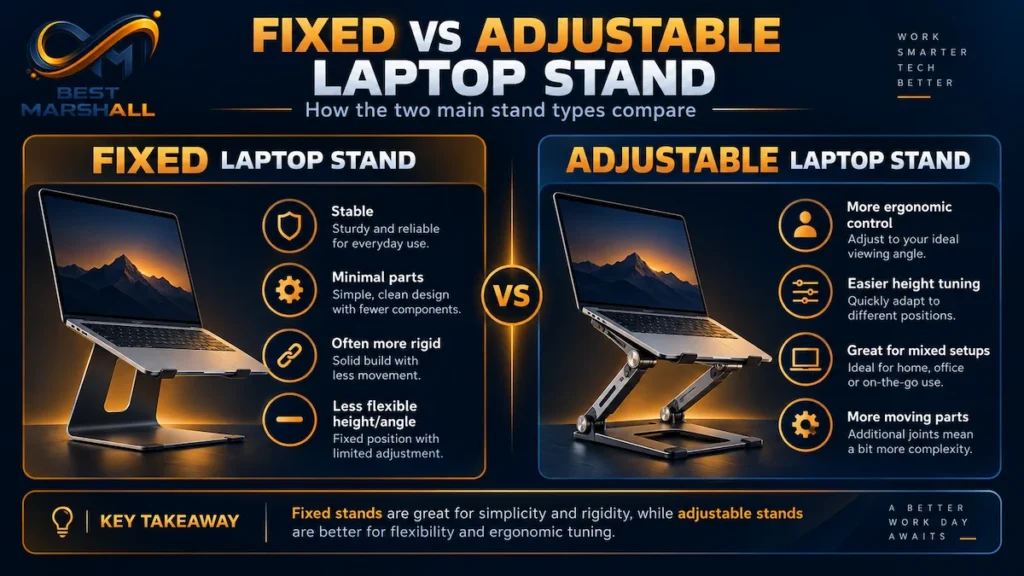
The quality of the hinge system matters considerably. A weak mechanism can gradually lower under the laptop’s weight, while an excessively stiff one may be difficult to adjust.
Foldable and Portable Stands
Portable stands collapse into a smaller form for travel.
They are useful for hybrid workers, students, and people who regularly move between home, office, and other locations.
The trade-off is that extremely lightweight designs may sacrifice some stability compared with heavier desktop stands.
Rotating Stands
Some adjustable stands include a 360-degree rotating base.
This can be useful when sharing the screen during:
- meetings;
- collaborative work;
- presentations;
- client discussions.
The rotating mechanism should still remain stable enough that ordinary typing or desk movement does not cause unwanted rotation.
Vertical Laptop Stands
Vertical stands hold a closed laptop on its edge.
They are primarily desk-organization accessories rather than ergonomic screen risers.
They can be useful when the laptop operates in closed-display mode with:
- an external monitor;
- external keyboard;
- mouse;
- docking station.
For vertical stands, laptop thickness and slot width become more important than screen height.
Laptop Stand Specifications That Actually Matter
| Feature | What to Check |
|---|---|
| Laptop compatibility | Supported screen size and physical dimensions |
| Weight capacity | Must exceed the laptop’s actual weight |
| Height adjustment | Enough range for your desk and seated position |
| Tilt adjustment | Allows comfortable screen positioning |
| Base size | Must fit your available desk space |
| Stability | Minimal wobble at intended working height |
| Contact surfaces | Rubber or silicone protection for laptop and desk |
| Ventilation | Open or perforated design around laptop intake areas |
| Material | Aluminum, steel, reinforced plastic, or combination |
| Foldability | Important if the stand travels regularly |
| Rotation | Useful for screen sharing, optional otherwise |
| Hinge tension | Should hold the laptop securely at the chosen position |
A long list of adjustments is not automatically better.
The stand needs to remain stable at the height you actually intend to use.
How to Choose the Right Height and Adjustability
The goal is not simply to raise the laptop as high as possible.
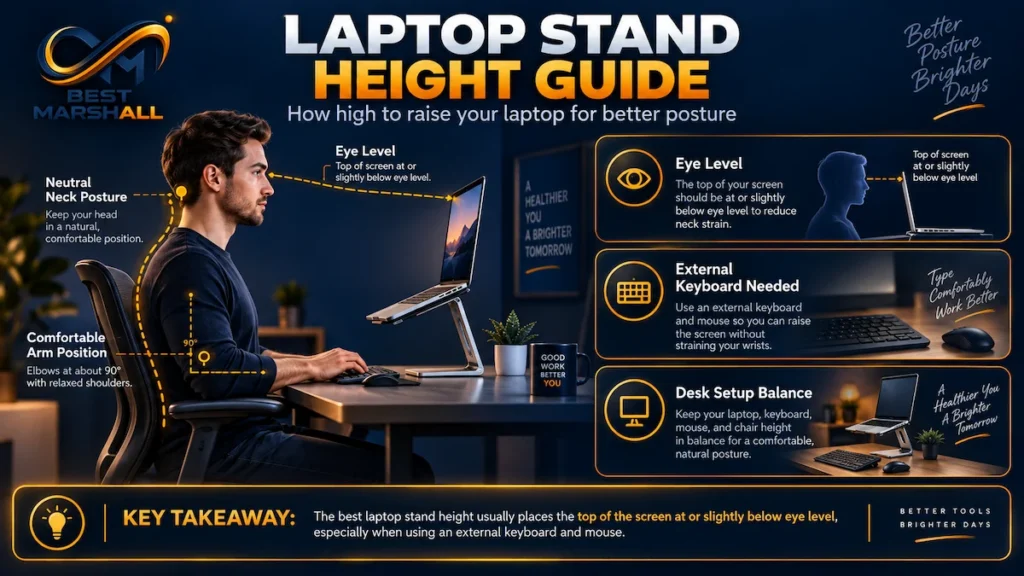
Position the screen so you can look at it without repeatedly bending your neck downward or tilting your head backward.
For most desk setups, the top portion of the screen should be around eye level or slightly below it.
For a more detailed explanation of screen position and ergonomic setup, see our guide on how high a laptop stand should be.
Your exact position will depend on:
- your height;
- chair height;
- desk height;
- laptop screen size;
- viewing distance;
- whether you wear bifocals or other corrective lenses.
An adjustable stand provides more flexibility than a fixed one when these variables change.
If several people use the same workstation, adjustability becomes particularly valuable.
Stability Matters More Than Maximum Height
One recurring lesson from independent laptop-stand testing is that maximum height and maximum stability do not always occur together.
Some adjustable stands remain solid at lower positions but become noticeably bouncier when fully extended.
That matters especially if you plan to type directly on the laptop.
A stand used mainly as a raised display with an external keyboard can tolerate some movement better than one being pressed repeatedly during typing.
When shopping, look for:
- a wide base;
- strong hinge resistance;
- substantial contact area;
- non-slip feet;
- secure laptop stops or hooks.
A heavier stand may be less portable but more stable.
Check Laptop Size and Weight Compatibility
Do not assume that a stand labeled for “laptops” will support every laptop.
A lightweight 13-inch ultrabook places very different demands on a stand than a large gaming or workstation laptop.
Check both:
supported laptop size
and
maximum weight capacity.
Size alone is not enough.
Two 16-inch laptops can differ substantially in weight.
Also examine the width and location of the support arms. They should not interfere with ports, ventilation openings, or the laptop’s rubber feet.
Ventilation and Cooling
An open stand can create more free space beneath a laptop than placing it directly on a solid desk.
That can be useful when the computer draws cooling air from the underside.
However, a stand should not automatically be treated as a cooling system.
Its main cooling advantage is usually that it avoids obstructing vents and allows air to circulate around the chassis.
Look for an open or perforated platform that does not cover the laptop’s intake areas.
If active cooling is your main goal, a dedicated cooling pad with fans is a different product category.
Should You Type Directly on a Laptop Stand?
At low angles, some sturdy stands can remain stable enough for occasional direct typing.
At higher elevations, this becomes less practical.
Independent hands-on evaluations repeatedly find that elevated stands can introduce:
- screen bounce;
- keyboard movement;
- steep wrist angles;
- uncomfortable reaching.
For prolonged desk work, the more practical configuration is usually:
laptop stand + external keyboard + external mouse.
This allows the screen and input devices to be positioned independently.
How to Set Up a Laptop Stand
A practical setup process looks like this:
- Place the stand directly in front of your normal seated position.
- Confirm that the base sits completely flat and does not rock.
- Adjust the stand to a moderate height before placing the laptop on it.
- Position the laptop securely against the stand’s front stops.
- Raise or lower the screen until the top is around eye level or slightly below.
- Keep the screen at a comfortable viewing distance.
- Place an external keyboard and mouse close enough that your elbows can remain near your body.
- Check that the laptop’s cooling vents are unobstructed.
- Verify that charging, USB, HDMI, and headphone ports remain accessible.
- Recheck hinge tension periodically on adjustable models.
If the stand requires excessive force to adjust, remove the laptop before making major changes unless the manufacturer specifically indicates that loaded adjustments are supported.
Main Benefits of a Laptop Stand
Better Screen Positioning
The primary benefit is the ability to place the laptop display independently from its built-in keyboard.
This can help reduce prolonged downward viewing.
More Flexible Desk Layout
Raising the laptop can free some usable space underneath and make it easier to integrate the computer with an external monitor, keyboard, or docking station.
Improved Airflow
Open designs can help prevent desk surfaces from blocking underside vents.
Better Video-Call Positioning
An elevated laptop camera can provide a more natural camera angle than a laptop sitting flat on the desk.
Easier Dual-Screen Setups
A stand can position the laptop display closer to the height of an external monitor, making the two-screen arrangement easier to organize.
Things to Consider Before Buying
Portability vs. Stability
A lightweight folding stand is convenient in a backpack.
A larger weighted aluminum or steel stand may be considerably more stable on a permanent desk.
Decide which matters more before buying.
Front Lip Height
The hooks that prevent a laptop from sliding forward can sometimes contact the wrists when typing directly on the built-in keyboard.
This matters less when an external keyboard is used.
Adjustability Can Introduce Wobble
More hinges mean more potential movement.
Highly adjustable models should be evaluated not only by their maximum height but by how securely they hold that height.
Large Laptops Need More Support
Heavy gaming laptops and workstation notebooks require stronger stands with appropriate load ratings.
Do not rely only on product photos.
Warranty and Support
Laptop stands contain fewer electronic components than most desk accessories, but warranty quality still matters—especially for adjustable designs.
Before purchasing, check:
- warranty duration;
- maximum supported weight;
- replacement-part availability;
- hinge-adjustment instructions;
- manufacturer support;
- whether tightening tools are included when required.
For folding or articulated stands, hinge performance is particularly important because repeated adjustment places mechanical stress on those components.
If purchasing through Amazon, verify the exact model, seller, warranty information, size compatibility, and current return conditions before ordering.
What Are Users Saying About Laptop Stands?
Across public customer feedback and independent evaluations, several patterns appear repeatedly.
Buyers commonly praise:
- improved screen height;
- adjustability;
- compact folding designs;
- sturdy metal construction;
- open ventilation;
- extra desk space;
- rubber grips that protect and stabilize the laptop.
Recurring complaints include:
- wobbling at maximum height;
- hinges becoming difficult to adjust;
- stands that are too small for heavier laptops;
- weak rubber grips;
- excessive movement when typing directly on an elevated laptop;
- ventilation openings that do not align well with some laptop designs.
These patterns show why construction quality and intended use matter more than appearance alone.
Is a Laptop Stand Worth Buying?
For people who use a laptop for extended desk work, a stand can be a practical addition—especially when combined with an external keyboard and mouse.
Consider a Laptop Stand If You:
- use a laptop as your primary work computer;
- regularly work for long periods at a desk;
- want the screen positioned higher;
- use an external keyboard and mouse;
- work with an external monitor;
- want a cleaner, more organized desk setup;
- frequently participate in video meetings.
You May Want to Skip One If You:
- primarily use the laptop on the couch or while traveling;
- need to type directly on the built-in keyboard most of the time;
- already use a separate external monitor as your primary display;
- have extremely limited desk space that cannot accommodate the stand’s base.
Final Buying Advice
The best laptop stand is the one that fits your laptop and your workstation, not necessarily the model with the greatest maximum height.
Start with four priorities:
- Laptop size and weight compatibility
- Appropriate screen-height adjustment
- Stability at the height you plan to use
- Enough room for an external keyboard and mouse
After those requirements are satisfied, consider portability, materials, rotation, ventilation, and aesthetics.
Once you know which features matter most for your setup, compare our picks for the best laptop stands in 2026.
For a permanent home-office desk, stability and adjustment range generally matter more than foldability.
For hybrid workers, a lighter folding design may be the better compromise.
And if you intend to raise the laptop significantly, plan on using an external keyboard and mouse rather than treating the stand as a platform for prolonged direct typing.
If a laptop stand matches your computer, desk space, and working setup, check its current pricing and availability on Amazon before making your final decision.
Excellent examples of laptop stands: fixed versus adjustable:
Frequently Asked Questions
Do I need an external keyboard and mouse with a laptop stand?
Usually, if the stand raises the laptop significantly. Elevating the screen can improve viewing position, but it can also make the built-in keyboard uncomfortable to reach for long periods. For a more ergonomic desk setup, a separate keyboard and mouse generally make more sense with elevated stands. Lower-profile stands may still allow comfortable use of the laptop’s built-in keyboard.
Can a laptop stand help keep my laptop cooler?
It can improve airflow, but the effect depends on the laptop and stand design. An open-frame stand may expose more of the laptop’s underside and reduce obstruction around ventilation areas. However, a passive stand does not actively cool internal components like a powered cooling pad. Avoid blocking intake or exhaust vents, especially on laptops with ventilation openings underneath.
How do I know if a laptop stand will support my laptop safely?
Check the stand’s stated size and weight limits, then compare them with your laptop. The platform should also provide enough surface area and grip to keep the computer stable without interfering with vents, ports, or hinges. Larger or heavier laptops may benefit from wider bases and more rigid construction rather than compact stands designed primarily for lightweight notebooks.
Is it comfortable to type directly on a laptop stand?
It depends on the stand’s height and angle. Low-angle stands can sometimes remain practical for short periods of direct typing, while heavily elevated stands usually place the keyboard too high or steep for comfortable extended use. If you plan to type on the laptop itself regularly, stability and keyboard angle deserve more attention than maximum screen elevation.
Is a portable laptop stand as stable as a full-size stand?
Not always. Portable stands prioritize low weight and compact storage, which can involve trade-offs in base width, rigidity, and adjustment mechanisms. A larger desk stand may provide greater stability for heavier laptops or frequent adjustment. A portable model can still be a better choice for travel or hybrid work when packability matters more than maximum rigidity.
Can the same laptop stand work for sitting and standing?
Sometimes, but only if it offers enough height adjustment for both positions. Many conventional laptop stands are designed mainly to raise a screen while seated and cannot reach a suitable standing-work height on their own. An adjustable standing desk or taller platform may still be necessary. Our laptop stand sitting vs. standing guide explains the setup differences in more detail.
Can a laptop stand damage the laptop hinge or chassis?
A properly sized stand should not, provided the laptop is supported securely and used according to the stand manufacturer’s instructions. Problems are more likely when a laptop rests unevenly, slips, or is supported at inappropriate pressure points. Make sure the stand does not obstruct the hinge mechanism and that protective contact surfaces are positioned correctly.


2 thoughts on “How to Choose a Laptop Stand: Complete Buying Guide for 2026”