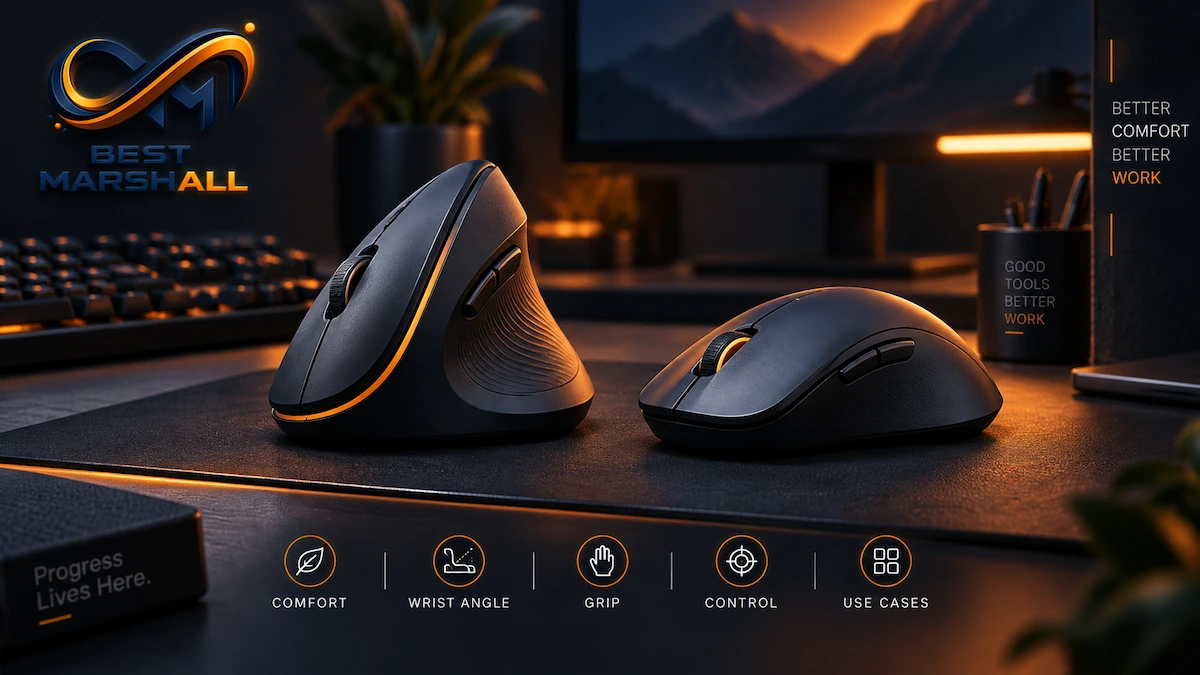
A vertical mouse and a regular mouse perform the same basic job: they translate hand movement and button inputs into pointer movement, clicks, scrolling, dragging, and other computer commands.
The main difference is not the sensor.
It is how the mouse positions your hand, wrist, and forearm while you use it.
A conventional mouse usually places the palm more horizontally toward the desk, which requires greater forearm pronation. A vertical mouse rotates the hand toward a more handshake-like position, reducing pronation and changing how the wrist and forearm muscles operate.
That biomechanical difference can matter for people who use a mouse for many hours each day.
However, a vertical design is not automatically healthier, more comfortable, or more accurate for every user. Research has found measurable improvements in forearm and wrist position with alternative and vertical mice, but some studies also report slower pointing performance, lower initial comfort, or an adaptation period. Evidence does not support treating a vertical mouse as a guaranteed way to prevent or cure conditions such as carpal tunnel syndrome.
This guide explains the technical differences between vertical and regular mice, what happens to the wrist and forearm with each design, how accuracy and productivity may change, which specifications matter, and how to decide which shape is more appropriate for your home-office setup.
Quick Answer: What Is the Difference Between a Vertical Mouse and a Regular Mouse?
A vertical mouse rotates the hand into a more upright, handshake-like position, reducing forearm pronation compared with a regular horizontal mouse. A regular mouse usually provides greater familiarity and often better immediate precision, while a vertical mouse may reduce certain biomechanical stresses but can require an adaptation period.
In practical terms:
| Characteristic | Vertical Mouse | Regular Mouse |
|---|---|---|
| Hand orientation | More upright | Palm faces more downward |
| Forearm pronation | Generally lower | Generally higher |
| Learning curve | Moderate for new users | Usually minimal |
| Initial pointing speed | May be slower | Usually faster for experienced users |
| Wrist posture | Can encourage more neutral positioning | Highly dependent on grip and placement |
| Gaming selection | More limited | Extensive |
| Handedness | Usually right- or left-specific | Many ambidextrous options |
| Size sensitivity | High | High |
| Best use case | Long office sessions, users seeking reduced pronation | General use, gaming, precision, familiarity |
| Medical benefit | Not guaranteed | Not inherently harmful when properly fitted and positioned |
The correct choice depends on the user, task, workstation, hand size, and how the mouse is actually positioned.
What Is a Regular Mouse?
A regular mouse—also called a conventional or horizontal mouse—typically has a relatively low-profile shell with the primary buttons facing upward.
When the hand rests on it, the palm generally faces downward toward the desk.
To achieve that position, the forearm rotates internally.
Anatomically, this rotation is known as pronation.
Forearm Pronation Explained
Stand with your elbows bent and your palms facing upward.
Now rotate your forearms until your palms face the floor.
That rotational movement is pronation.
A conventional mouse usually requires the forearm to remain partially or substantially pronated during use.
Pronation itself is a normal human movement. The issue is not that pronation is inherently dangerous.
The ergonomic concern is sustained positioning combined with repetition, force, poor wrist alignment, excessive reaching, or long periods without variation.
This distinction matters because many oversimplified ergonomic claims describe a standard mouse as if the hand position itself were automatically harmful.
It is not.
A properly sized conventional mouse positioned close to the keyboard and operated with a neutral wrist can form part of a well-designed workstation.
What Is a Vertical Mouse?
A vertical mouse rotates the primary buttons and grip surface onto the side of the device.
Instead of placing the palm mostly downward, it encourages the user to hold the device in a position closer to a handshake.
Different products use different angles.
Some are nearly vertical.
Others are semi-vertical or slanted mice, positioning the hand somewhere between a horizontal mouse and a fully upright design.
This distinction is important because ergonomic mouse design exists on a spectrum.
A 45-degree slanted mouse and a nearly 90-degree vertical mouse may both be marketed as ergonomic, but they create different forearm positions and can feel substantially different during use.
The Main Biomechanical Difference: Forearm Rotation
The strongest technical argument for a vertical mouse involves forearm pronation.
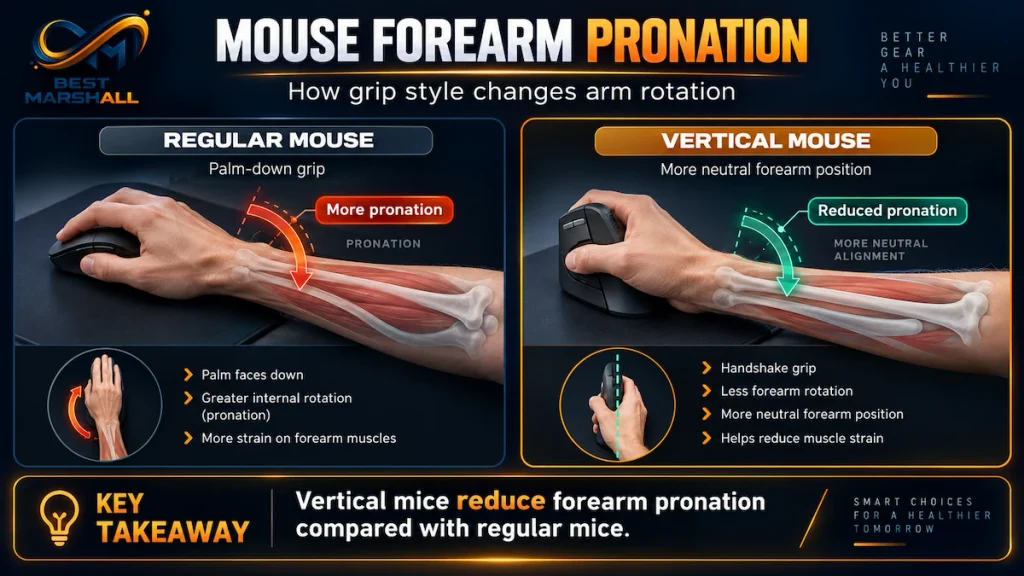
Laboratory research comparing conventional and vertical designs has consistently shown that more upright mouse designs can reduce pronation.
One published study comparing a standard and vertical mouse measured approximately:
- 42 degrees of forearm pronation with the standard mouse
- 28 degrees with the vertical mouse
The vertical design also produced lower activity in certain wrist and finger extensor muscles.
A separate study comparing flat, angled, and upright mouse designs similarly found that alternative shapes reduced forearm pronation relative to a traditional flat mouse.
That does not prove that every vertical mouse prevents injury.
It demonstrates something more specific:
mouse geometry can measurably change upper-extremity posture and muscle activity.
What Does a “Neutral” Forearm Position Mean?
A neutral forearm position lies between maximum pronation and maximum supination.
Think of holding your hand as though you were shaking someone’s hand.
Your thumb points upward rather than inward toward the opposite hand.
Vertical mice are designed to move the forearm closer to this orientation.
OSHA’s workstation guidance recommends maintaining neutral forearm and wrist positions when possible and avoiding repeated forearm rotation, particularly when the wrist is also bent.
But neutral does not mean perfectly vertical.
The body naturally operates across ranges of motion.
The objective is to minimize prolonged awkward positioning—not to freeze every joint at one mathematically ideal angle.
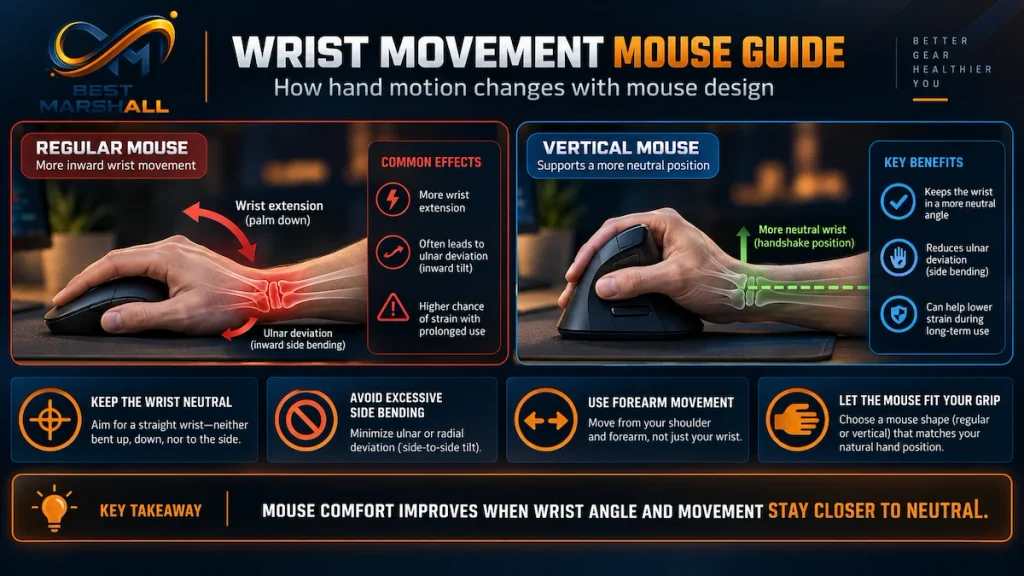
Vertical Mouse vs. Regular Mouse: Wrist Position
Forearm rotation is only part of the ergonomic equation.
The wrist can move in several directions.
Wrist Extension and Flexion
Extension bends the back of the hand toward the upper forearm.
Flexion bends the palm toward the underside of the forearm.
Radial and Ulnar Deviation
Looking down at your hand:
- bending the wrist toward the thumb is radial deviation;
- bending it toward the little finger is ulnar deviation.
An ergonomic pointing device should ideally allow the hand, wrist, and forearm to remain reasonably aligned.
OSHA recommends maintaining a straight wrist and avoiding excessive bending up, down, or sideways during computer input.
A vertical mouse can help with some aspects of positioning, but it does not automatically guarantee a neutral wrist.
A poorly sized vertical mouse can still create:
- wrist extension;
- ulnar deviation;
- finger strain;
- excessive gripping;
- contact pressure.
Fit remains critical.
What Research Says About Ulnar Deviation
One study involving people with carpal tunnel syndrome found that a vertical mouse significantly reduced ulnar deviation compared with a standard mouse.
However, the same study measured pressure inside the carpal tunnel and found that the vertical mouse did not significantly reduce carpal tunnel pressure.
That distinction is extremely important.
A device can improve a biomechanical variable without necessarily improving every physiological factor associated with a medical condition.
The researchers therefore did not make a strong recommendation either for or against vertical mice for people with carpal tunnel syndrome.
This is why vertical mice should be considered ergonomic input alternatives, not medical treatments.
Does a Vertical Mouse Reduce Muscle Activity?
Some research suggests that it can reduce activity in certain forearm muscles.
In one biomechanical study, the vertical mouse produced lower activity in muscles including the wrist extensors compared with a standard mouse.
Another study comparing neutral and pronated mouse positions found lower activity in forearm extensor muscles and the first dorsal interosseous muscle when participants used the more neutral hand position.
This could matter during repetitive computer work because lower continuous muscle activation may reduce one component of physical workload.
However, muscle activity is only one ergonomic variable.
Other factors include:
- duration;
- repetition;
- grip force;
- workstation position;
- shoulder posture;
- mouse sensitivity;
- breaks;
- task type.
Changing the mouse alone does not eliminate these factors.
Does a Vertical Mouse Prevent Carpal Tunnel Syndrome?
There is not enough evidence to make that claim.
Carpal tunnel syndrome involves compression of the median nerve within the carpal tunnel at the wrist.
Its causes and risk factors are multifactorial.
Research examining computer work and carpal tunnel syndrome has historically produced mixed results, and systematic reviews have not established a simple causal relationship in which ordinary mouse use alone reliably causes the condition.
More importantly, research directly measuring carpal tunnel pressure while using ergonomic devices found that although a vertical mouse improved certain wrist positions, it did not significantly lower carpal tunnel pressure in participants with diagnosed carpal tunnel syndrome.
Therefore:
A vertical mouse may alter posture, but it should not be marketed or treated as a cure for carpal tunnel syndrome.
Persistent numbness, tingling, weakness, or pain should be medically evaluated rather than managed solely by purchasing a different pointing device.
Vertical Mouse vs. Regular Mouse: Accuracy and Performance
Ergonomics are only one part of choosing a mouse.
A pointing device must also allow users to perform tasks accurately and efficiently.
This is where conventional mice often have an advantage initially.
Most computer users have accumulated years of motor learning with standard mice.
The brain has already learned:
- pointer acceleration;
- hand displacement;
- clicking force;
- cursor correction;
- dragging;
- scrolling.
Moving to a vertical mouse changes some of those physical relationships.
What Studies Have Found
In one controlled comparison, the vertical mouse reduced pronation and extensor-muscle activity, but users took longer to reach on-screen targets.
Average target time was approximately:
- 4.2 seconds using the vertical mouse;
- 3.4 seconds using the standard mouse.
The researchers concluded that training and familiarization may be necessary.
Another study evaluating several alternative shapes found no performance difference between the standard mouse and some partially angled concepts, while the fully upright mouse produced the poorest pointing performance in that comparison.
This suggests an important trade-off:
More vertical is not necessarily better for performance.
Semi-vertical designs may provide a useful compromise for some users.
Why Vertical Mice Require an Adaptation Period
Your brain builds a motor map for repeated movements.
Moving a conventional mouse two inches to the right produces a movement that experienced users perform almost automatically.
A vertical mouse changes:
- hand orientation;
- grip pressure;
- button angle;
- wrist position;
- movement mechanics.
The pointer still behaves normally, but the body controls the device differently.
At first, this can cause:
- overshooting targets;
- slower pointer movement;
- accidental button presses;
- less precise dragging;
- awkward repositioning.
Research indicates that instruction and training can improve the ergonomic benefits of alternative mouse designs.
This means first impressions should be interpreted cautiously.
Using a vertical mouse for five minutes is not necessarily enough to determine long-term suitability.
Vertical Mouse vs. Regular Mouse for Productivity
For routine office work, either design can provide excellent productivity once properly configured.
Common tasks include:
- email;
- spreadsheets;
- browser navigation;
- document editing;
- accounting software;
- project-management systems.
A conventional mouse typically provides immediate familiarity.
A vertical mouse may initially slow certain tasks but can become substantially more natural after adaptation.
Productivity also depends heavily on:
- cursor sensitivity;
- button configuration;
- scroll-wheel behavior;
- software shortcuts;
- mouse placement.
The physical design alone does not determine efficiency.
Vertical Mouse vs. Regular Mouse for Gaming
For competitive gaming, conventional mice generally have a much stronger market position.
Modern gaming mice are commonly optimized for:
- extremely low weight;
- high polling rates;
- precise optical sensors;
- high maximum tracking speed;
- configurable lift-off distance;
- low-latency wireless communication;
- rapid button actuation;
- multiple grip styles.
Vertical gaming mice exist, but the category is much smaller.
The grip geometry can also make extremely fast lateral movements and repeated lifting or repositioning feel less natural to users trained on conventional gaming shapes.
For casual gaming, this may not matter.
For competitive FPS, MOBA, or other performance-sensitive games, users should examine sensor specifications and latency rather than choosing entirely on ergonomic shape.
Sensor Technology: Vertical and Regular Mice Work the Same Way
A vertical mouse does not require a fundamentally different tracking technology.
Both types commonly use optical sensors.
The sensor captures repeated images of the surface beneath the mouse and calculates movement based on changes between those images.
Important specifications may include:
- DPI/CPI sensitivity;
- polling rate;
- maximum tracking speed;
- acceleration tolerance;
- lift-off distance.
Ergonomic shape does not determine sensor quality.
A high-end conventional mouse can have an exceptional sensor.
A high-end vertical mouse can also have a capable sensor.
Likewise, inexpensive examples of either design can perform poorly.
What Does DPI Mean?
DPI is commonly used to describe mouse sensitivity.
Technically, manufacturers often use DPI and CPI interchangeably in consumer specifications, although CPI—counts per inch—more accurately describes sensor output.
Higher sensitivity means less physical mouse movement is required to move the cursor across the display.
This can affect ergonomics.
OSHA notes that insufficient pointer sensitivity may require excessive wrist movement, while excessive sensitivity can demand continuous fine muscular control.
The correct setting is therefore not simply “maximum DPI.”
The goal is to move across the required screen area using comfortable movements while maintaining control.
Should You Move a Mouse With Your Wrist or Arm?
Ideally, movement should not come exclusively from one small joint.
Heavy reliance on repeated wrist deviation can increase localized motion.
Larger movements can involve the forearm and shoulder, while fine adjustments involve the hand and fingers.
The exact movement pattern depends on:
- sensitivity;
- task;
- mouse size;
- available desk area.
A vertical mouse does not remove the need for proper movement technique.
If the mouse sensitivity is extremely low, users may still perform excessive repetitive movements regardless of shell orientation.
Mouse Placement May Matter as Much as Mouse Shape
A highly ergonomic mouse can become poorly ergonomic if positioned incorrectly.
OSHA specifically recommends placing the pointing device close to the keyboard.
If the mouse is too far to the side, users may need to:
- abduct the shoulder;
- reach repeatedly;
- rotate the torso;
- extend the arm.
That can shift workload from the wrist to the shoulder.
The mouse should ideally remain:
- near the keyboard;
- on approximately the same working plane;
- within easy reach;
- close enough that the elbow remains near the torso.
This applies to vertical and regular mice equally.
Why Keyboard Width Matters
A full-size keyboard with a numeric keypad pushes a right-handed mouse farther away from the body’s midline.
For people who use the mouse continuously, that additional distance can matter.
Possible alternatives include:
- compact keyboards;
- tenkeyless keyboards;
- separate number pads;
- centrally positioned pointing devices.
Reducing reach may provide ergonomic benefits independently of mouse shape.
A vertical mouse placed far beyond a wide keyboard can still produce poor shoulder positioning.
Vertical Mouse vs. Regular Mouse: Grip Style
Regular mice are commonly associated with three broad grip styles.
Palm Grip
Most of the palm rests on the mouse.
Advantages:
- larger contact area;
- relaxed-feeling support for many users.
Disadvantages:
- requires a mouse that fits the hand well;
- may encourage whole-hand movement.
Claw Grip
The palm may touch the rear while fingers arch toward the buttons.
Advantages:
- rapid button control;
- popular in gaming.
Disadvantages:
- greater finger flexion and tension for some users.
Fingertip Grip
Only the fingers substantially control the mouse.
Advantages:
- agile;
- small contact area.
Disadvantages:
- may require more finger effort.
Vertical Grip
A vertical mouse generally encourages a more constrained palm-style or handshake grip.
This reduces the range of grip styles available but helps maintain the intended hand orientation.
Hand Size Is Critical With a Vertical Mouse
Vertical mice are particularly sensitive to fit.
If the body is too large:
- fingers may not align with buttons;
- reaching for the wheel may become awkward;
- the hand may slide downward.
If it is too small:
- the palm may lack support;
- the fingers may curl excessively;
- the grip may tighten.
OSHA specifically recommends selecting pointing devices that fit the intended user’s hand.
When manufacturers provide hand-size charts, they are technically relevant rather than merely marketing information.
Measure from the base of the palm to the tip of the middle finger when the manufacturer uses that dimension.
Weight Matters Differently on Vertical Mice
Vertical mice can be heavier because their shells are physically taller.
Weight influences movement.
Heavier Mouse
Potential advantages:
- planted feel;
- less accidental displacement.
Potential disadvantages:
- more force needed for repeated repositioning;
- potentially more fatigue at low sensitivity.
Lighter Mouse
Potential advantages:
- easier movement;
- lower inertia.
Potential disadvantages:
- may feel less stable to some users.
There is no universally ergonomic mouse weight.
Sensitivity, grip, surface friction, and movement style all interact with mass.
Vertical Mouse vs. Regular Mouse: Side-by-Side Comparison
| Factor | Vertical Mouse | Regular Mouse |
|---|---|---|
| Forearm position | More neutral / less pronated | More pronated |
| Wrist alignment | Can improve with correct fit | Can be neutral with correct fit |
| Initial learning curve | Higher | Low |
| Initial pointing speed | Often slower for new users | Familiar and usually faster |
| Precision potential | High after adaptation; varies by model | Very high; broad market selection |
| Gaming options | Limited | Extensive |
| Hand-size sensitivity | Very high | High |
| Ambidextrous availability | Less common | Common |
| Forearm muscle demand | Some studies show reductions | May be higher in certain muscles |
| Carpal tunnel pressure | No proven reduction | No inherent advantage |
| Button selection | Moderate | Extremely broad |
| Portability | Often bulkier | Many compact options |
| Best suited to | Users prioritizing reduced pronation | General use, gaming, established workflows |
Neither design wins every category.
Is a 45-Degree Mouse Better Than a Fully Vertical Mouse?
Possibly for some users.
Research comparing flat, slanted, and vertical mouse designs suggests that partially angled designs can provide a compromise between biomechanical improvement and familiar performance.
A slanted mouse:
- reduces some pronation;
- preserves more conventional control geometry;
- may require less adaptation.
A fully upright mouse:
- generally reduces pronation further;
- creates the largest change from conventional mouse technique;
- may require greater adaptation.
This illustrates why “maximum vertical angle” should not be treated as an automatic quality metric.
The best angle is the one that improves hand and forearm positioning while still allowing comfortable and precise control.
Can a Regular Mouse Still Be Ergonomic?
Absolutely.
“Ergonomic mouse” does not automatically mean “vertical mouse.”
A well-fitted conventional mouse can support good ergonomics when:
- it matches hand size;
- the wrist remains straight;
- grip force is low;
- sensitivity is properly adjusted;
- the mouse sits close to the keyboard;
- the elbow stays near the body;
- work includes movement and breaks.
OSHA does not prescribe vertical mice as the universal solution.
Its guidance focuses on neutral positioning, appropriate fit, low force, proper placement, and limiting prolonged repetitive exposure.
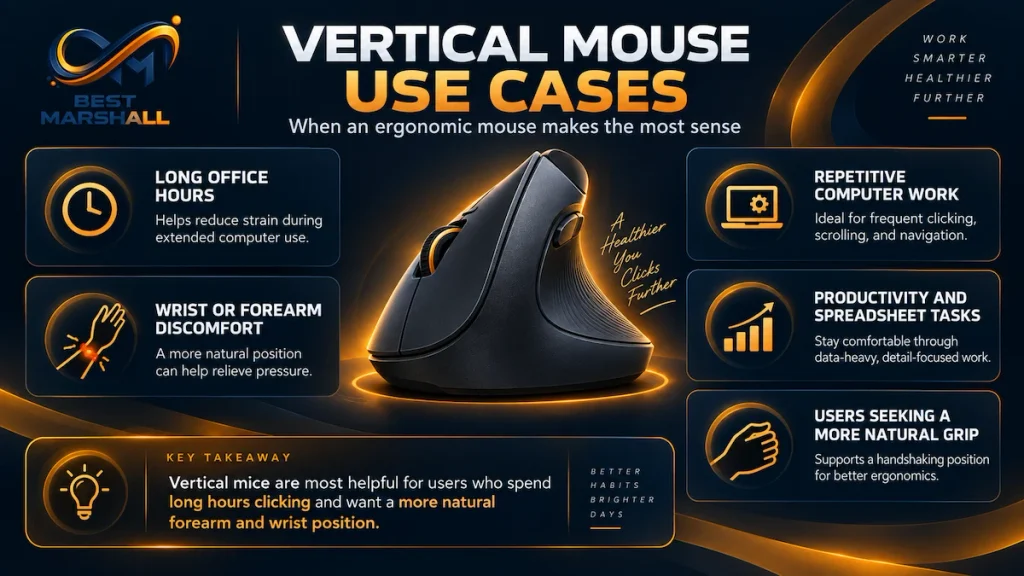
When a Vertical Mouse May Make More Sense
A vertical design may be worth considering if:
- you use a mouse for many hours each day;
- you prefer a handshake-style grip;
- you want to reduce forearm pronation;
- a conventional mouse feels uncomfortable despite proper workstation adjustment;
- you do primarily office and productivity work;
- you are willing to adapt to a different pointing technique.
The available research provides reasonable evidence that vertical or angled designs can reduce some biomechanical exposures.
It provides much weaker evidence for claiming that a vertical mouse prevents a particular medical disorder.
When a Regular Mouse May Make More Sense
A conventional mouse remains logical if:
- it is comfortable;
- your wrist stays reasonably neutral;
- you do not grip it tightly;
- it fits your hand;
- you prioritize gaming;
- you require very fast precision;
- you switch between computers frequently;
- you prefer ambidextrous use;
- you do not want an adaptation period.
Replacing a comfortable, properly positioned regular mouse solely because vertical designs are marketed as “healthier” is not automatically necessary.
Standards, Guidelines, and Important Ergonomic Principles
There is no universal safety standard stating that office workers must use a vertical mouse.
OSHA instead recommends evaluating the complete workstation.
Important principles include:
- maintain straight, neutral wrists;
- keep forearms reasonably aligned;
- keep elbows close to the torso;
- keep the mouse close to the keyboard;
- avoid excessive reaching;
- choose a mouse that fits the hand;
- use comfortable sensitivity settings;
- avoid excessive gripping force;
- vary tasks;
- take short recovery breaks.
OSHA also notes that alternative devices—including trackballs, touchpads, and other pointing designs—may be less fatiguing for certain tasks or users.
The implication is important:
ergonomic equipment should fit the person rather than forcing every person into the same equipment category.
Common Beginner Mistakes When Switching to a Vertical Mouse
Mistake 1: Expecting Immediate Comfort
A new hand orientation changes learned movement patterns.
Some adaptation is normal.
Mistake 2: Assuming the Most Vertical Design Is Automatically Best
More upright designs may reduce pronation further but can also affect comfort and performance.
Mistake 3: Buying the Wrong Size
Hand fit matters substantially.
Use manufacturer sizing information when available.
Mistake 4: Keeping the Mouse Too Far Away
A vertical mouse does not fix shoulder reaching.
Keep it near the keyboard.
Mistake 5: Gripping It Tightly
Users unfamiliar with vertical mice sometimes squeeze the body to keep control.
The mouse should be movable with relatively light force.
Mistake 6: Using Extremely Low Sensitivity
Large repetitive movements can undermine some ergonomic benefits.
Adjust pointer sensitivity so the screen can be covered comfortably.
Mistake 7: Assuming It Will Cure Existing Pain
A vertical mouse is an input device, not medical treatment.
Mistake 8: Ignoring the Rest of the Workstation
Chair, desk, keyboard, monitor, forearm support, and work duration all influence comfort.
Mistake 9: Judging It After Only a Few Minutes
Research indicates that training and familiarization can affect performance and biomechanical outcomes.
Mistake 10: Continuing to Use Any Mouse That Causes Persistent Symptoms
Changing mouse type repeatedly is not a substitute for evaluating persistent numbness, weakness, tingling, or pain appropriately.
How to Choose Between a Vertical Mouse and a Regular Mouse
Check Your Current Posture
While using your existing mouse, examine:
- forearm rotation;
- wrist extension;
- sideways wrist bending;
- shoulder reach;
- grip tension.
Do not assume the mouse is the problem until its position is also assessed.
Measure Your Hand
For either design, choose an appropriate size.
Pay particular attention to vertical mice because their fixed grip architecture provides less freedom to reposition the hand.
Consider Your Primary Tasks
For:
- spreadsheets;
- email;
- web browsing;
- office software;
either format can work well.
For:
- competitive gaming;
- rapid graphics work;
- highly precise pointer tasks;
a conventional mouse may provide greater product choice and immediate familiarity.
Consider Daily Usage Time
The more hours you spend mousing, the more important small differences in positioning and force may become.
Evaluate Sensitivity
Configure the pointer so you can cover the required screen area without repeatedly reaching extreme wrist positions.
Consider Connectivity
Both mouse types may offer:
- Bluetooth;
- proprietary 2.4GHz wireless;
- USB receivers;
- wired USB.
Connectivity affects latency, battery life, device switching, and compatibility but is independent of the ergonomic shell design.
Vertical Mouse Selection Checklist
If choosing a vertical mouse, examine:
- hand size;
- right- vs. left-handed design;
- vertical angle;
- weight;
- button location;
- scroll-wheel position;
- thumb support;
- sensor sensitivity;
- adjustable DPI/CPI;
- wireless latency;
- battery type;
- rechargeable vs. replaceable battery;
- software compatibility;
- multi-device switching;
- desk clearance.
Do not choose based only on the word “ergonomic.”
Regular Mouse Selection Checklist
For a conventional mouse, evaluate:
- shell size;
- palm, claw, or fingertip suitability;
- weight;
- symmetry;
- sensor quality;
- DPI range;
- polling rate;
- button force;
- scroll-wheel design;
- wireless latency;
- battery performance;
- software;
- button customization.
A well-matched conventional mouse can provide neutral wrist positioning and excellent comfort.
Beginner, Intermediate, and Advanced Users
Beginner User
Prioritize:
- proper size;
- comfortable grip;
- mouse close to the keyboard;
- neutral wrist;
- reasonable pointer sensitivity.
If experimenting with a vertical mouse, allow time to adapt.
Intermediate User
Evaluate:
- vertical angle;
- device weight;
- DPI;
- mouse movement technique;
- keyboard width;
- shoulder position;
- button customization.
A semi-vertical mouse may offer a useful transition from a conventional design.
Advanced User
Consider the entire input system:
- forearm pronation;
- ulnar/radial deviation;
- wrist extension;
- grip force;
- shoulder abduction;
- movement amplitude;
- pointer acceleration;
- polling rate;
- task precision;
- handedness;
- workload distribution.
For intensive professional use, objective workstation fit matters more than the ergonomic label attached to a product.
Other Alternatives to a Regular Mouse
A vertical mouse is not the only alternative pointing device.
Trackball
The device remains stationary while the user rotates a ball.
Potential advantage:
- minimal desk movement.
Potential disadvantage:
- concentrated thumb or finger motion depending on design.
Central Pointing Device
Roller-style devices sit near the keyboard’s center.
Research has found that centrally positioned pointing devices can reduce shoulder movement and certain wrist deviations in some tasks.
Touchpad
Requires little desk area and may reduce arm movement.
However, prolonged finger gestures may not suit every user.
Pen Tablet
Useful for:
- illustration;
- image editing;
- design.
Its movement pattern differs substantially from standard mousing.
No alternative is universally superior.
The best pointing device is task- and user-dependent.
Technical FAQ
Is a vertical mouse better than a regular mouse?
Not universally. A vertical mouse generally reduces forearm pronation, but conventional mice can provide excellent comfort and performance when properly fitted and positioned.
Is a vertical mouse more ergonomic?
It can improve specific biomechanical factors, particularly forearm pronation. Whether it is more comfortable or appropriate overall depends on fit, task, positioning, and the individual user.
Does a vertical mouse keep your wrist neutral?
It can help, but it does not guarantee neutral wrist posture. Device size, angle, desk height, placement, and user technique still matter.
Does a vertical mouse prevent carpal tunnel syndrome?
There is insufficient evidence to claim that it prevents carpal tunnel syndrome. Research has shown posture changes without demonstrating a corresponding reduction in carpal tunnel pressure.
Can a vertical mouse help wrist pain?
Some users may find an alternative hand position more comfortable, and research shows reduced pronation and certain muscular loads. Persistent pain should not be treated solely by changing the mouse.
Why does a vertical mouse feel strange at first?
It changes the orientation and movement pattern your nervous system has learned from conventional mouse use. Adaptation and training may improve control.
How long does it take to get used to a vertical mouse?
There is no universal adaptation period. It varies with previous mouse experience, vertical angle, task complexity, and frequency of use.
Are vertical mice slower?
They can initially be slower. Controlled research has found longer target-acquisition times with some fully vertical designs, though familiarity can improve performance.
Is a vertical mouse good for gaming?
It can work for casual gaming, but conventional gaming mice offer far more choices optimized for weight, sensors, polling rate, latency, and rapid movement.
Is a vertical mouse good for office work?
Yes, particularly for users who spend long periods performing conventional pointer tasks and prefer the more neutral forearm orientation.
Is a 45-degree mouse ergonomic?
A slanted mouse can reduce forearm pronation while preserving more conventional control geometry. Research suggests angled designs may provide a useful compromise for some users.
Should a vertical mouse be completely vertical?
Not necessarily. A fully upright design may reduce pronation more but can also require greater adaptation. Semi-vertical designs can be easier for some users.
Can a regular mouse be ergonomic?
Yes. Correct sizing, neutral wrist alignment, light grip, proper sensitivity, and close placement are more important than whether a device carries an “ergonomic” label.
Should my wrist rest on the desk while using a mouse?
Avoid placing continuous pressure directly on sensitive wrist structures. OSHA recommends that palm supports, when used, support the heel of the hand rather than compressing the wrist itself.
Where should the mouse be placed?
Close to the keyboard and at approximately the same working height so it can be reached without extending the arm or raising the shoulder.
Should I use a high DPI setting for ergonomics?
Not necessarily high—appropriate. Sensitivity should allow you to cover the screen without excessive wrist movement while remaining easy to control.
Is a heavy or light mouse better for ergonomics?
Neither is universally better. Higher mass requires more force to accelerate and reposition, while extremely light devices may feel less stable to some users.
Are vertical mice only for people with wrist problems?
No. They can be used by anyone who prefers their hand orientation. However, there is no need to switch solely because vertical designs are marketed as healthier.
Are vertical mice available for left-handed users?
Yes, but the selection is considerably smaller because most vertical shells are hand-specific.
Is an ergonomic mouse enough to fix a bad desk setup?
No. Mouse position, keyboard width, desk height, chair adjustment, monitor position, work duration, and breaks all affect the complete workstation.
Expert Conclusion: Vertical Mouse or Regular Mouse?
The defining difference between a vertical mouse and a regular mouse is biomechanics, not basic computer functionality.
A conventional mouse generally places the forearm in greater pronation.
A vertical or semi-vertical mouse rotates the hand toward a more neutral handshake orientation.
Research provides credible evidence that this design change can reduce forearm pronation and, in some studies, reduce certain forearm-muscle activity and wrist deviations.
But those findings do not establish that vertical mice universally prevent injuries or cure conditions such as carpal tunnel syndrome.
There are also trade-offs.
Fully vertical designs can require greater adaptation and may initially reduce pointing speed or perceived ease of use. Conventional mice offer vastly greater choice for gaming, ambidextrous use, lightweight designs, sensor performance, and specialized grip styles.
For long office sessions, a vertical mouse is particularly worth considering when reducing forearm pronation is a priority and the user is willing to adapt to a different control position.
For users already comfortable with a properly sized regular mouse, maintaining neutral wrists, light grip pressure, appropriate sensitivity, and good workstation placement may be more important than changing mouse architecture.
Most importantly, do not evaluate the mouse in isolation.
The pointing device should:
- fit your hand;
- sit close to the keyboard;
- require minimal reaching;
- allow relatively neutral wrist alignment;
- move easily without excessive grip force;
- provide appropriate pointer sensitivity;
- match the precision demands of your work.
From a technical perspective, the better mouse is therefore not automatically the one standing vertically or lying flat.
It is the one that provides the best combination of neutral positioning, fit, control, task performance, and long-term usability for the individual user.