The AirTag 2 is Apple’s second-generation item tracker, designed to help locate personal belongings such as keys, backpacks, luggage, wallets, equipment cases, and other objects through the Find My network.
At first glance, the second-generation AirTag looks remarkably similar to the original 2021 model. The important changes are internal: Apple added its second-generation Ultra Wideband chip, expanded Precision Finding range, increased Bluetooth finding range, and redesigned the speaker system to make the tracker easier to hear.
Understanding how an AirTag actually finds an object is more important than simply reading the range claims. An AirTag does not contain GPS, cellular service, or its own internet connection. Instead, it combines Bluetooth, Ultra Wideband, NFC, Apple’s Find My network, and nearby Apple devices to provide different types of location information depending on how far away the item is.
This technical guide draws on current Apple documentation, published specifications, independent evaluation, and established Bluetooth-tracker principles to explain how AirTag 2 works, what changed from the original model, which Apple devices unlock its advanced features, how privacy protections operate, and where the technology still has important limitations.
What Is AirTag 2 and How Does It Work?
AirTag 2 is a small battery-powered Bluetooth and Ultra Wideband tracking accessory.
Its purpose is to help locate objects, not to function as a conventional GPS tracker.
That distinction is fundamental.
A GPS tracker generally determines its own geographical position using satellite signals and may use a cellular network to transmit that position.
AirTag works differently.
It uses several technologies together:
- Bluetooth helps nearby Apple devices detect the AirTag.
- The Find My network uses participating Apple devices to relay an AirTag’s approximate location.
- Ultra Wideband, or UWB, enables Precision Finding when a compatible Apple device is close enough.
- NFC allows someone who finds a lost AirTag to access Lost Mode information using a compatible smartphone.
- The built-in speaker helps locate an AirTag acoustically when it is nearby.
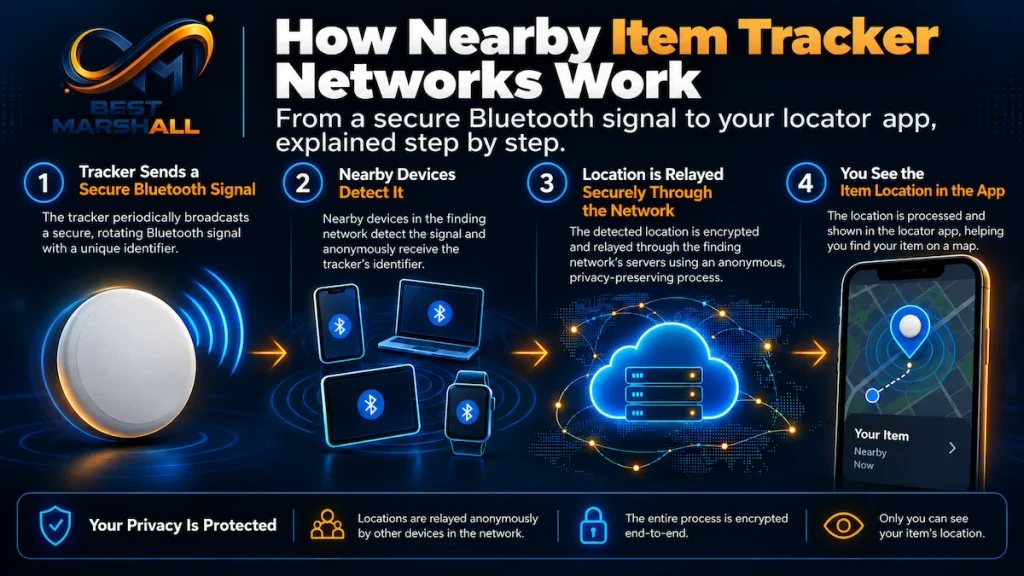
This layered architecture explains why an AirTag can sometimes appear on a map from many miles away while Precision Finding works only when you are physically much closer to it.
AirTag 2 Technical Specifications
| Specification | AirTag 2 |
|---|---|
| Generation | Second generation |
| Introduced | 2026 |
| Diameter | 1.26 in / 31.9 mm |
| Thickness | 0.31 in / 8.0 mm |
| Weight | 0.42 oz / 11.8 g |
| Proximity connectivity | Bluetooth |
| Precision location | Second-generation Apple Ultra Wideband chip |
| Lost Mode interaction | NFC |
| Speaker | Built-in |
| Battery | User-replaceable CR2032 |
| Rated battery life | More than one year under Apple’s stated typical-use conditions |
| Sensor | Accelerometer |
| Water and dust resistance | IP67 under IEC 60529 |
| Maximum tested immersion | 1 meter for up to 30 minutes |
| Operating temperature | -4°F to 140°F / -20°C to 60°C |
| Main ecosystem | Apple Find My |
| Precision Finding on Apple Watch | Supported on compatible recent models |
| Location storage on AirTag | No location history stored directly on the AirTag |
The physical dimensions remain essentially unchanged from the original AirTag, which helps preserve compatibility with many existing accessories.
The new model is slightly heavier: approximately 0.42 ounce compared with about 0.39 ounce for the first generation.
Quick Answer: Does AirTag 2 Have GPS?
No. AirTag 2 does not contain a GPS receiver or cellular modem. It determines nearby position through Bluetooth and Ultra Wideband, while distant location updates are provided through Apple’s crowdsourced Find My network when compatible Apple devices detect the AirTag.
This is one of the most important technical concepts to understand before purchasing an AirTag.
How the Find My Network Locates an AirTag
If an AirTag is close to its owner’s iPhone, the phone can communicate with it directly.
If it is far away, another mechanism takes over.
The AirTag emits a secure Bluetooth signal.
Nearby Apple devices participating in the Find My network can detect that signal and relay an approximate location to Apple’s infrastructure. The owner can then see the resulting position through the Find My app.
Apple describes the network as containing more than a billion Apple devices.
This creates an important practical difference between an AirTag and an ordinary short-range Bluetooth tracker.
An AirTag does not need to remain within Bluetooth range of its owner.
It needs to come within detection range of some compatible device participating in the Find My network.
Why Population Density Matters
The system’s effectiveness therefore depends partly on where the AirTag is located.
In places with many Apple devices, such as:
- airports;
- cities;
- shopping centers;
- offices;
- public transportation;
- hotels;
location updates may occur frequently.
In an isolated rural environment where few compatible devices pass nearby, updates can be much less frequent.
AirTag therefore does not provide the same independently connected tracking capability as a cellular GPS tracker.
Precision Finding Explained
Precision Finding solves a different problem from Find My network location.
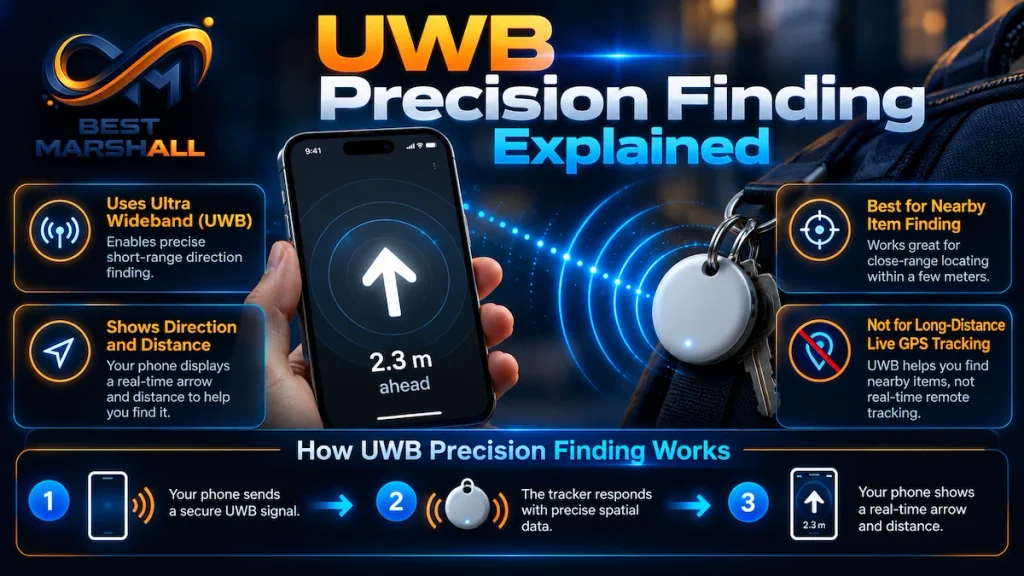
The network helps answer:
“Approximately where is my item?”
Precision Finding helps answer:
“Exactly where is it from where I am standing?”
AirTag 2 includes Apple’s second-generation Ultra Wideband chip.
Ultra Wideband uses extremely short radio pulses across a wide frequency range to provide spatial information with much greater precision than conventional Bluetooth signal-strength estimates.
When a compatible iPhone is sufficiently close, Precision Finding can display information such as:
- distance;
- direction;
- visual guidance;
- haptic feedback;
- audio feedback.
This is particularly useful when an item is somewhere inside:
- a room;
- a vehicle;
- a house;
- an office;
- luggage;
- furniture.
How Much Better Is AirTag 2 Precision Finding?
Apple states that the second-generation model can provide Precision Finding from up to 50% farther away than the previous AirTag when used with compatible newer Apple hardware.
Independent testing by Tom’s Guide provides useful context.
Using an iPhone 17 Pro, its evaluator reported approximately:
- 74 feet for AirTag 2
- 50 feet for the original AirTag
That result represents roughly a 48% improvement in that specific environment and is broadly consistent with Apple’s up-to-50% claim.
This should not be interpreted as a guaranteed 74-foot range.
UWB performance can vary because of:
- walls;
- furniture;
- human bodies;
- building materials;
- radio interference;
- device orientation;
- environmental conditions.
The important technical conclusion is that the new generation provides a materially larger Precision Finding zone rather than changing the underlying purpose of the feature.
Which iPhones Support the Improved Precision Finding Range?
This requires more attention than simply checking whether an iPhone supports Find My.
Apple’s current technical documentation states that the expanded second-generation Precision Finding experience works with:
- iPhone 15-series models and later with compatible second-generation UWB hardware;
- iPhone Air;
- excluding models that do not contain the required UWB capability, including iPhone 16e and iPhone 17e.
Regional UWB restrictions can also affect availability.
An older compatible iPhone may still work with the AirTag and Find My while not providing the newest extended Precision Finding capability.
This distinction is easy to overlook.
AirTag compatibility and full Precision Finding capability are not the same thing.
Precision Finding on Apple Watch
One of the most meaningful additions in the second-generation AirTag ecosystem is Precision Finding from Apple Watch.
Apple currently supports the function on:
- Apple Watch Series 9 or later, excluding SE models;
- Apple Watch Ultra 2 or later;
with compatible current watchOS software.
The watch displays distance and directional information as the user approaches the AirTag.
This can be convenient when the iPhone is:
- charging;
- in another room;
- packed in a bag;
- temporarily unavailable.
It also makes AirTag more integrated into Apple’s wearable ecosystem than the first-generation product was at launch.
The Louder Speaker: Why It Matters
Ultra Wideband is not always the final step in finding an object.
Once you are close, sound can be faster.
Apple states that AirTag 2’s redesigned internal speaker is approximately 50% louder than the previous generation and can be heard from as much as twice the distance under its stated conditions.
Independent evaluation also reported the new speaker as noticeably easier to hear.
The improvement matters when the AirTag is:
- underneath a couch cushion;
- inside a backpack;
- underneath clothing;
- inside luggage;
- behind furniture.
However, material surrounding the tracker can still attenuate sound.
A louder AirTag buried inside a heavily padded suitcase may remain more difficult to hear than one sitting openly on a table.
Bluetooth Range vs. Precision Finding Range
Bluetooth and Ultra Wideband serve different functions.
Bluetooth
Bluetooth is used for general proximity communication and for detection by Find My network devices.
Apple states that the newer Bluetooth hardware provides expanded finding range compared with the previous generation.
The company does not publish one universal real-world Bluetooth distance because environmental conditions substantially affect radio performance.
Ultra Wideband
UWB provides the precise distance and directional information used by Precision Finding.
It operates at closer range than the global Find My system but provides dramatically more spatial detail.
A useful mental model is:
Find My network → gets you to the general location
Bluetooth/UWB → helps establish that the AirTag is nearby
Precision Finding + speaker → helps locate the exact object
AirTag 2 vs. Original AirTag: What Actually Changed?
The second generation is evolutionary rather than a complete redesign.
| Feature | AirTag 2 | Original AirTag |
|---|---|---|
| Launch year | 2026 | 2021 |
| Dimensions | 31.9 × 8 mm | 31.9 × 8 mm |
| Weight | 11.8 g | 11 g |
| Ultra Wideband | Second-generation chip | First-generation U1 |
| Precision Finding range | Up to 50% greater with compatible hardware | Original range |
| Bluetooth | Updated hardware with expanded range | Original Bluetooth implementation |
| Speaker | 50% louder according to Apple | Original speaker |
| Apple Watch Precision Finding | Yes, on supported Watch models | Not equivalent at launch |
| Battery | Replaceable CR2032 | Replaceable CR2032 |
| Water/dust rating | IP67 | IP67 |
| NFC Lost Mode | Yes | Yes |
| Find My network | Yes | Yes |
For owners of the original model, the most meaningful improvements are therefore findability, not new categories of functionality.
The fundamental AirTag architecture remains the same.
Battery Life and CR2032 Replacement
AirTag 2 continues to use a replaceable 3V CR2032 lithium coin-cell battery.
Apple states that the tracker can operate for more than one year under typical-use assumptions involving normal sound playback and Precision Finding activity.
Actual battery life can vary with:
- frequency of Precision Finding;
- speaker usage;
- environmental temperature;
- battery manufacturer;
- replacement-battery quality.
The Find My app provides a low-battery warning when replacement is needed.
Why a Replaceable Battery Is Significant
A user-replaceable cell has two important advantages.
First, the AirTag does not become unusable simply because an internal rechargeable battery ages.
Second, no charging schedule is required.
The trade-off is that coin cells must be handled and stored responsibly.
CR2032 Safety
Coin-cell batteries are dangerous if swallowed, particularly for small children.
Apple specifically warns that the AirTag, battery cover, and coin battery can present choking or injury hazards.
The company recommends keeping them away from children.
Apple also notes an unusual compatibility issue: some CR2032 batteries with bitterant coatings may not make proper electrical contact with AirTag.
When buying a replacement, look for a battery explicitly identified as compatible with Apple AirTag.
Water and Dust Resistance: What IP67 Really Means
AirTag 2 is rated IP67 under IEC 60529.
The rating has two parts.
6 indicates protection against dust ingress.
7 means the product was tested under controlled conditions for immersion in water to a maximum depth of approximately 1 meter for up to 30 minutes.
This makes the tracker suitable for normal accidents such as:
- rain;
- spills;
- a wet backpack;
- briefly dropping keys in shallow water.
It does not make AirTag a permanent underwater tracking device.
Apple also specifically notes that water and dust resistance are not permanent conditions and can decline with normal wear.
If long-term exposure to water is expected, an appropriately sealed protective accessory may still be worth considering.
Lost Mode and NFC
If an item cannot be located immediately, the AirTag can be placed into Lost Mode through Find My.
The AirTag contains NFC technology.
If someone finds the item, they can tap the AirTag with an NFC-capable smartphone to access the information the owner has chosen to make available for recovery.
This is different from Bluetooth tracking.
NFC is a very short-range interaction used when the finder physically has the AirTag.
Lost Mode therefore combines two recovery paths:
- passive location through the Find My network;
- direct contact information when someone physically discovers the item.
Share Item Location for Lost Luggage
AirTag has become particularly relevant for luggage because Apple now supports Share Item Location.
This allows a user to generate a temporary location-sharing link that can be provided to an authorized third party, such as participating airline personnel.
Apple states that more than 50 airlines support the system.
The access is temporary:
- the owner can stop sharing;
- sharing ends when the item is recovered;
- the link automatically expires after seven days.
Apple cites data from aviation IT provider SITA indicating that airlines using the feature have seen reductions in baggage delays and unrecoverable luggage cases.
Those figures are third-party operational data rather than independent AirTag performance measurements, but they demonstrate how the Find My infrastructure is increasingly being integrated into formal lost-baggage workflows.
Can You Share an AirTag With Family Members?
Yes.
An AirTag can be shared with up to five additional people, creating a total group of six including the owner.
Members of a shared group can perform functions such as:
- view the AirTag’s location;
- use Precision Finding when supported;
- play a sound.
Sharing is especially useful for items used by several people, such as:
- family keys;
- shared luggage;
- bicycles;
- equipment bags.
People who have been intentionally included in the AirTag sharing group do not receive unwanted-tracking alerts for that shared AirTag.
Privacy: Does Apple Know Where Your AirTag Is?
According to Apple’s architecture, location history is not physically stored on the AirTag itself.
Apple states that Find My network communications use end-to-end encryption and that devices participating in the crowdsourced network do not reveal their identities to the AirTag owner.
The system is designed so that nearby Apple devices can contribute location information without becoming visible participants in the tracking process.
From a technical perspective, this is important because the network’s scale depends on millions of unrelated devices participating without their owners having to manually report lost AirTags.
AirTag 2 and Unwanted Tracking Protection
Item trackers introduce a serious safety issue: a product designed to find luggage or keys can also be misused to track a person without consent.
AirTag includes several countermeasures.
Apple and Google worked together on the Detecting Unwanted Location Trackers industry specification.
Compatible iOS and Android devices can detect supported unknown Bluetooth trackers that appear to be moving with a person over time.
Potential protections include:
- unwanted-tracking notifications;
- cross-platform detection;
- audible AirTag alerts;
- frequently changing Bluetooth identifiers;
- instructions for locating and disabling an unknown tracker.
Apple’s current AirTag documentation explicitly states that the product is designed for tracking objects rather than people or pets.
That distinction should be taken seriously.
Why AirTag Is Not a GPS Tracker
One of the most persistent misconceptions is that an AirTag provides continuous satellite tracking.
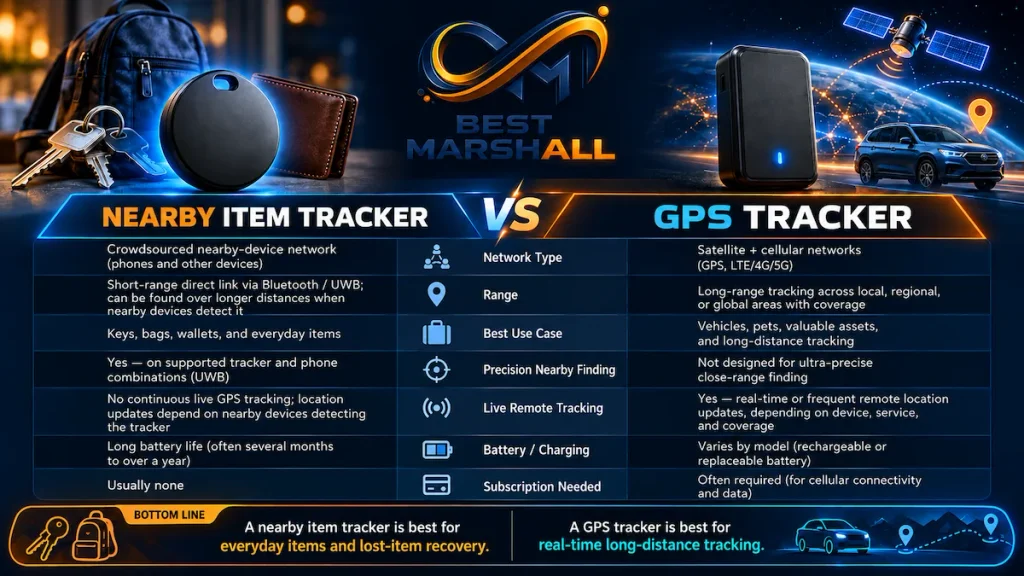
It does not.
AirTag lacks:
- GPS receiver functionality for independent positioning;
- cellular connectivity;
- a cellular subscription;
- continuous independent internet access.
A cellular GPS tracker can theoretically report its own location wherever it has suitable GPS reception and cellular coverage.
An AirTag relies on nearby Find My network devices to update remote location.
This makes AirTag particularly effective in populated environments but less predictable in isolated areas.
Why AirTag Is Not an Ideal Real-Time Vehicle Tracker
AirTag can be placed on personal property such as a vehicle or bicycle, but its architecture should not be confused with a professional vehicle-tracking system.
It does not provide guaranteed:
- continuous positioning;
- second-by-second location updates;
- cellular telemetry;
- speed history;
- route history;
- geofencing equivalent to professional fleet systems.
Anti-stalking protections may also alert a person traveling with an AirTag that does not belong to them.
For theft recovery, AirTag can be an additional locating tool, but it should not be treated as a substitute for a purpose-built anti-theft GPS system where continuous monitoring is required.
Is AirTag Appropriate for Tracking Pets?
Apple specifically describes AirTag as being designed to locate objects, not pets or people.
Technically, a pet carrying an AirTag may cause the tag to appear through the Find My network, but several limitations remain:
- no independent GPS;
- no cellular connection;
- update frequency depends on nearby Apple devices;
- no purpose-built pet-health or escape tracking;
- no guaranteed continuous route.
For a pet whose location requires reliable real-time monitoring, a dedicated pet tracker using GPS and cellular connectivity is a fundamentally different solution.
Professional Evaluation Criteria for AirTag 2
Ecosystem Compatibility
AirTag’s strongest technical advantage is also its largest limitation: deep integration with Apple hardware.
For an iPhone owner, setup and Find My integration are unusually streamlined.
For an Android-primary user, AirTag is not an equivalent full-featured tracker.
Android devices participate in safety mechanisms and can read an AirTag via NFC when appropriate, but AirTag ownership and Find My management remain Apple-centered.
Find My Network Density
Remote tracking performance depends partly on the presence of participating Apple devices.
This is why a tracker can be very effective in an airport yet provide limited updates in an isolated wilderness location.
Ultra Wideband Support
Do not assume every AirTag-compatible iPhone provides the same locating experience.
If Precision Finding is important, confirm the exact iPhone model contains compatible UWB hardware.
Accessory Compatibility
AirTag still lacks an integrated key-ring hole.
It typically requires a holder for:
- keys;
- backpack attachment;
- luggage straps;
- pet collars, although Apple does not position it as a pet tracker.
Because the external dimensions remain essentially unchanged, many existing first-generation AirTag accessories remain physically compatible.
Replaceable Battery
The CR2032 system reduces long-term dependence on rechargeable-battery health but introduces a maintenance requirement and a child-safety concern.
Resistance Rating
IP67 is useful protection for accidental environmental exposure but should not be interpreted as permission for permanent submersion.
Common Beginner Mistakes With AirTag 2
Mistake 1: Thinking AirTag Has GPS
It does not.
Remote location depends on the Find My network.
Mistake 2: Expecting Constant Live Tracking
The location shown in Find My is based on the latest available detection.
It may not update continuously when the AirTag is away from participating devices.
Mistake 3: Assuming Any iPhone Gets Full Precision Finding
Basic compatibility and advanced UWB functionality differ.
The newest extended-range Precision Finding requires suitable recent UWB-equipped Apple hardware.
Mistake 4: Using AirTag as a People Tracker
AirTag is specifically designed not to serve this purpose and includes cross-platform anti-stalking systems.
Mistake 5: Treating It as a Dedicated Pet GPS
The lack of GPS and cellular connectivity creates fundamentally different behavior from a dedicated pet tracker.
Mistake 6: Expecting Unlimited Bluetooth Range
Bluetooth remains a short-range radio technology.
Remote finding works because other Find My devices can detect the AirTag—not because the owner’s phone has a Bluetooth connection across miles.
Mistake 7: Ignoring the Battery
The battery lasts a long time, but it is not permanent.
Replace it promptly after a low-battery warning.
Mistake 8: Assuming Any CR2032 Will Work Perfectly
Some bitterant-coated batteries can create contact problems.
Check compatibility before replacing the cell.
Mistake 9: Assuming IP67 Means Waterproof Forever
Water resistance can decrease with age and wear.
Mistake 10: Buying AirTag for an Android-Centered Household
Android has unwanted-tracker protections, but the complete AirTag ownership and Find My experience requires Apple’s ecosystem.
How to Choose Correctly: AirTag 2 Technical Checklist
Before choosing an AirTag 2, verify:
Your Phone
- Do you use a compatible iPhone as your primary phone?
- Is it running current AirTag 2-compatible iOS?
- Does your iPhone include Ultra Wideband if Precision Finding matters?
Your Use Case
AirTag is particularly appropriate for objects such as:
- keys;
- backpacks;
- luggage;
- camera bags;
- equipment cases;
- purses;
- frequently misplaced personal items.
It is less appropriate when you require:
- constant GPS updates;
- historical routes;
- fleet tracking;
- pet-specific location services;
- cellular emergency tracking.
Your Environment
Ask whether Find My network density is likely to be sufficient.
Airports and cities provide a different operating environment from isolated rural areas.
Your Accessories
Determine whether you need:
- a key-ring holder;
- luggage enclosure;
- adhesive mount;
- protective case.
Accessory quality matters if the tracker is exposed to repeated impacts or weather.
Your Maintenance Plan
Be prepared to:
- replace the CR2032 battery;
- check for low-battery notifications;
- inspect accessories for damage;
- dry the tracker properly after significant water exposure.
Beginner, Intermediate, and Advanced AirTag Users
Beginner User
Focus on:
- correct Find My setup;
- enabling Location Services;
- understanding the difference between Find My network location and Precision Finding;
- using Lost Mode;
- replacing the battery safely.
Intermediate User
Consider:
- shared AirTags;
- luggage tracking;
- Share Item Location;
- Apple Watch Precision Finding;
- strategic accessory selection.
Advanced User
Understand the architectural limits:
- there is no GPS;
- there is no cellular modem;
- no user-configurable reporting interval exists;
- UWB availability depends on hardware and region;
- Find My network performance depends on nearby participating devices.
An advanced user requiring independent tracking should evaluate a different technology rather than trying to make AirTag behave like a cellular GPS tracker.
System Requirements and an Important Documentation Detail
Apple’s current setup support documentation specifies iOS or iPadOS 26.2.1 or later for adding a second-generation AirTag to Find My.
Some Apple product pages still use broader wording such as iOS 26 or later.
Because Apple’s iOS release documentation specifically states that iOS 26.2.1 added support for AirTag 2, the more conservative approach is to update the iPhone or iPad to 26.2.1 or newer, preferably the latest available compatible version, before setup.
Other requirements include:
- an Apple Account;
- Bluetooth enabled;
- Location Services enabled;
- Find My access to location;
- Precise Location for the most accurate experience;
- iCloud configuration required by Find My.
Technical FAQ
Does AirTag 2 have GPS?
No. It uses Bluetooth, Ultra Wideband, and Apple’s Find My network rather than an integrated GPS-and-cellular tracking system.
Does AirTag 2 require a monthly subscription?
No. AirTag does not require a recurring cellular or tracking subscription.
How far can AirTag 2 be tracked?
There is no single maximum global tracking distance. When the AirTag is away from its owner, participating Find My network devices can relay its location from virtually any geographical distance. Direct Bluetooth and Precision Finding ranges are much shorter and environment-dependent.
How far does Precision Finding work on AirTag 2?
Apple states that the second-generation model provides up to 50% more Precision Finding range than the original when paired with compatible newer hardware. Independent testing by Tom’s Guide measured roughly 74 feet under one test condition compared with approximately 50 feet for the original AirTag.
Does AirTag 2 work with Android?
Not as a full ownership and tracking platform. Android devices can participate in unwanted-tracker detection and NFC interaction, but normal AirTag setup and Find My management require Apple’s ecosystem.
Can AirTag 2 work without an iPhone?
An iPad can perform some setup and Find My functions when it meets Apple’s current requirements, but the product is fundamentally designed around the Apple Find My ecosystem. Precision Finding depends on compatible UWB-equipped hardware.
Does AirTag 2 work with Apple Watch?
Yes. Precision Finding is supported on compatible Apple Watch Series 9 or later and Apple Watch Ultra 2 or later running the required watchOS version. Apple Watch SE models do not provide the required UWB Precision Finding capability.
How long does the AirTag 2 battery last?
Apple rates normal use at more than one year from a replaceable CR2032 battery. Actual duration varies with usage, environmental conditions, and battery quality.
Is the AirTag 2 rechargeable?
No. It uses a replaceable CR2032 coin-cell battery.
Is AirTag 2 waterproof?
It is rated IP67 under IEC 60529, meaning it was tested for dust resistance and water immersion up to 1 meter for up to 30 minutes under controlled conditions. That does not make it permanently waterproof.
Can I put AirTag 2 in checked luggage?
AirTag is widely used for luggage and Apple’s Share Item Location feature is specifically integrated with participating airlines to assist with lost-baggage recovery.
Can an airline see my AirTag permanently?
No. Share Item Location is temporary. Apple states that access can be ended by the owner, stops when the item is recovered, and automatically expires after seven days.
Can several family members track the same AirTag?
Yes. The owner can share an AirTag with up to five other people.
Can AirTag track a stolen car in real time?
Not reliably in the way a dedicated cellular GPS vehicle tracker can. Location updates depend on the Find My network, and AirTag includes unwanted-tracking protections.
Can AirTag 2 track my dog?
It may technically produce location updates if attached to an item moving with a pet, but Apple explicitly designs AirTag for objects rather than pets. Dedicated GPS/cellular pet trackers are more appropriate when continuous pet location is important.
Can someone secretly track me with an AirTag?
Apple and Google have implemented cross-platform unwanted-tracking alerts intended to identify compatible unknown trackers that appear to be moving with a person over time. AirTag can also emit an alert sound when separated from its owner under relevant conditions.
Does an AirTag store my location history?
Apple states that the AirTag itself does not physically store its location history. Find My communications are designed around encrypted network reporting.
Does AirTag 2 fit old AirTag accessories?
Because the second-generation model retains the same 31.9mm diameter and 8mm thickness as the original, many existing holders should remain physically compatible. Accessory manufacturers may still specify their own fit requirements, so exact compatibility should be verified.
Expert Conclusion: Who Is AirTag 2 Actually For?
AirTag 2 improves Apple’s tracker where the underlying technology benefits most: finding the object once you start looking for it.
The second-generation Ultra Wideband chip extends Precision Finding range by up to 50% with compatible recent Apple hardware. The improved Bluetooth implementation expands proximity detection, and the redesigned speaker is 50% louder according to Apple, making nearby items easier to locate acoustically.
The fundamental architecture, however, remains unchanged.
AirTag 2 is not a GPS tracker, does not contain cellular connectivity, and cannot promise continuous live location updates. Its long-distance usefulness depends on Apple’s crowdsourced Find My network.
For iPhone users tracking keys, bags, luggage, equipment, and similar personal belongings—especially in environments with many Apple devices—the technology is particularly well matched to the task.
For Android-first households, real-time vehicle tracking, pet monitoring, wilderness tracking, or applications requiring independent GPS telemetry, a different technology is generally more appropriate.
Before choosing AirTag 2, verify three things above all: your Apple hardware supports the finding features you expect, the Find My architecture matches your use case, and you understand the difference between network-assisted location and true GPS tracking.
View Product Details on Amazon