The Wyze Cam v4 is a compact wired smart security camera designed for indoor and outdoor monitoring. Its feature set includes 2.5K QHD video, color night vision, an integrated spotlight, local microSD recording, two-way audio, motion detection, smart-home integrations, and optional cloud-based AI services.
On paper, that makes it look simple: connect the camera, point it at the area you want to monitor, and start receiving alerts.
In practice, several technical details materially affect how well the camera fits a security setup.
The Cam v4 uses 2.4GHz Wi-Fi rather than 5GHz. Outdoor installation requires more than simply placing the IP65-rated camera outside because the supplied indoor power hardware is not intended to serve as the complete outdoor power solution. Local microSD recording and cloud event recording also behave differently, and some advanced object-recognition features require a paid Wyze service.
There are also important distinctions between image resolution, frame rate, field of view, color night vision, AI processing, and actual identification capability.
This guide draws on current Wyze technical documentation, support materials, firmware information, independent evaluations, and broader security-camera principles to explain how the Wyze Cam v4 works, which specifications matter, what users frequently misunderstand, and what to verify before choosing it.
What Is the Wyze Cam v4 and How Does It Work?
The Wyze Cam v4 is a fixed-view, wired IP security camera.
Unlike a battery camera, it requires continuous external power. Unlike a pan-and-tilt camera, the lens does not physically rotate to follow activity across a room or yard.
Instead, the camera monitors the area inside its fixed field of view, processes video and motion information, and makes the resulting live or recorded footage available through the Wyze ecosystem.
At a basic level, the system consists of five important layers:
- The camera sensor and lens capture the scene.
- Image processing converts the sensor data into usable video.
- Motion and AI systems analyze activity within the image.
- Wi-Fi connects the camera to the Wyze app and cloud services.
- Video can be stored locally on microSD or, depending on service level, in the cloud.
Understanding those layers helps explain why features that sound similar can behave very differently.
Wyze Cam v4 Core Specifications
According to current Wyze technical documentation, the Cam v4 uses the following core specifications:
| Specification | Wyze Cam v4 |
|---|---|
| Model | WYZEC4 |
| Maximum resolution | 2560 × 1440, 2.5K QHD |
| Daytime frame rate | 20 FPS |
| Nighttime frame rate | 15 FPS |
| Diagonal field of view | 115.8° |
| Horizontal field of view | 98.5° |
| Vertical field of view | 53.1° |
| Night vision | Color + infrared |
| Infrared LEDs | 4 × 850nm |
| Integrated spotlight | 2 LEDs, approximately 72 lumens |
| Two-way audio | Yes, simultaneous |
| Siren | 99dB manufacturer specification |
| Wi-Fi band | 2.4GHz |
| Bluetooth | 5.2 |
| Local storage | microSD |
| Weather rating | IP65 |
| Operating temperature | -4°F to 122°F |
| Power | 5V/1A wired |
| Smart-home integrations | Alexa, Google Assistant, IFTTT |
| Warranty | 1 year |
The camera also supports Wide Dynamic Range, or WDR, which is intended to improve images containing both bright and dark areas.
How 2.5K QHD Video Affects Image Quality
The Wyze Cam v4 records at 2560 × 1440 pixels, commonly described as 2.5K QHD or 1440p.
That is substantially more image information than conventional 1920 × 1080 Full HD.
What Higher Resolution Actually Does
Additional pixels can improve:
- facial detail at useful distances;
- clothing detail;
- object recognition;
- digital cropping;
- digital zoom;
- general scene clarity.
However, resolution should not be treated as synonymous with identification accuracy.
A 2.5K camera can still produce weak evidence if:
- the subject is too far away;
- lighting is poor;
- motion creates blur;
- the lens is dirty;
- the camera is mounted at a poor angle;
- digital zoom is pushed too far;
- video compression removes fine detail.
Independent evaluation by Tom’s Guide found the Cam v4’s 2.5K image notably sharp for its market segment, particularly in daylight and low-light environments.
That testing also identified one of its technical compromises: frame rate.
Frame Rate: Why 20 FPS and 15 FPS Matter
The Cam v4 records at approximately:
- 20 frames per second during the day
- 15 frames per second at night
That is sufficient for normal home-surveillance activity, but it is lower than 30 or 60 FPS video commonly associated with smoother consumer video.
The practical consequence is straightforward:
Higher resolution improves spatial detail, while lower frame rate reduces temporal smoothness.
A stationary person may look clear.
Someone running across the frame may be harder to capture sharply.
Independent evaluation has noted occasional choppiness in Cam v4 footage, which is consistent with the camera’s stated frame rates.
For general property monitoring, this is usually a reasonable compromise. For applications where identifying fast-moving objects is critical, frame rate deserves as much attention as resolution.
Field of View: How Much Area Does the Camera Actually See?
Wyze specifies:
- 115.8° diagonal
- 98.5° horizontal
- 53.1° vertical
The horizontal measurement is particularly useful for placement planning.
A wider field of view allows one camera to cover more of:
- an entryway;
- room;
- patio;
- garage;
- driveway.
But wider is not always better.
As field of view increases, each distant object occupies fewer pixels in the image.
That creates an important surveillance trade-off:
Wide coverage helps detect activity, while narrower framing generally helps identify detail at distance.
The Cam v4 is therefore better suited to monitoring a defined residential area than trying to identify small details across a very large property.
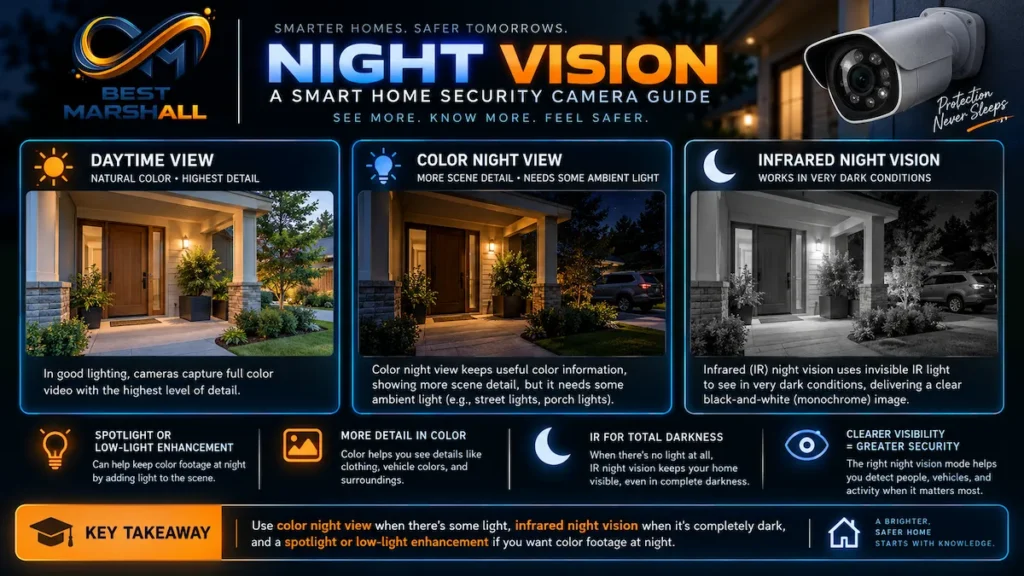
Color Night Vision vs. Infrared Night Vision
The Wyze Cam v4 supports both infrared illumination and color low-light imaging.
These technologies should not be confused.
Infrared Night Vision
The camera contains four 850nm infrared LEDs.
Infrared illumination allows the camera to see when visible light is extremely limited.
The resulting footage is generally monochrome.
Infrared mode is valuable because it does not require the scene to be visibly illuminated with white light.
Color Night Vision
Color night vision attempts to preserve color information in low-light conditions.
Color can matter for identifying:
- clothing;
- vehicles;
- packages;
- objects;
- environmental details.
However, color night vision still depends on available light and sensor performance.
It does not mean the camera can reproduce daylight-quality colors in complete darkness.
Independent testing has shown that the Cam v4 can produce useful nighttime color footage, although other testing has also observed that colors can become somewhat exaggerated or inaccurate in difficult low-light scenes.
Integrated Spotlight
The Cam v4 also includes two white LEDs rated at approximately 72 lumens.
The spotlight can provide visible illumination to help the camera obtain additional color information.
That is useful, but 72 lumens should not be confused with a security floodlight.
It is supplemental camera illumination rather than a replacement for exterior lighting.
Quick Answer: Does the Wyze Cam v4 Need a Subscription?
No. The Wyze Cam v4 can operate without a subscription, including live viewing, motion and sound alerts, and continuous or event-based local recording when a compatible microSD card is installed. However, advanced smart detections, cloud event video storage, and several AI features require a paid Wyze service.
This distinction is one of the most important things to understand before buying the camera.
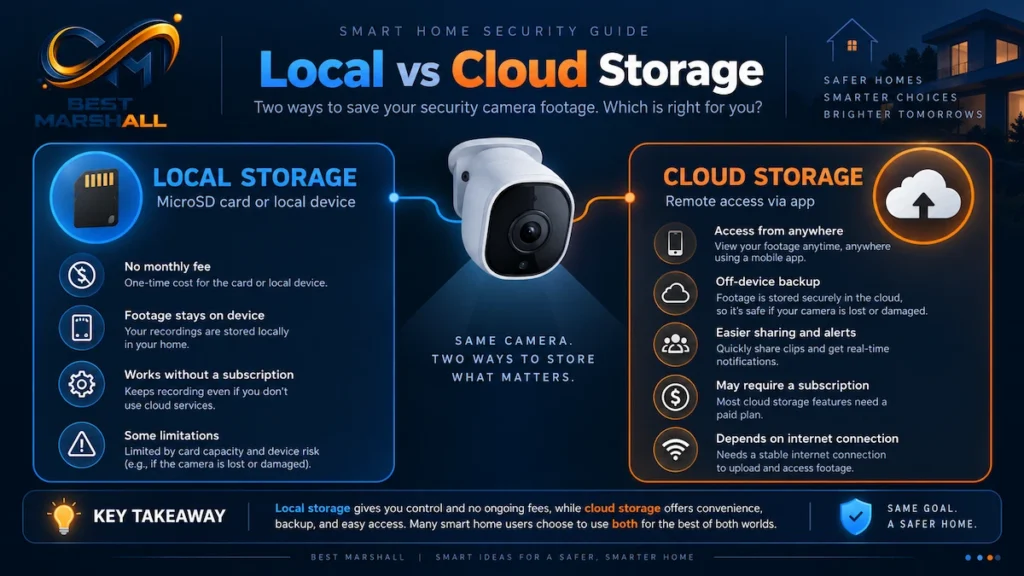
Local Storage vs. Cloud Storage
The Cam v4 supports both storage approaches, but they solve different problems.
Local microSD Recording
With a compatible microSD card, the camera can record:
- continuously;
- or only when events occur.
Continuous local recording does not require Cam Plus.
This is important because a continuously powered wired camera can maintain a full rolling local video record without requiring every minute of footage to be uploaded to the cloud.
The Wyze app provides access to local playback through a timeline.
A Documentation Conflict on microSD Capacity
There is currently an inconsistency in Wyze’s own documentation.
Current Wyze support documentation updated in 2026 lists the Wyze Cam v4 maximum at 256GB, with exFAT formatting.
However, at least one current Wyze commercial product page has listed support for up to 512GB.
Because the manufacturer’s current sources disagree, Best Marshall does not recommend assuming 512GB compatibility for every Cam v4 configuration.
The technically conservative approach is:
Treat 256GB as the officially supported capacity unless Wyze’s current support documentation for your exact hardware and firmware revision explicitly confirms 512GB.
This is preferable to purchasing a larger card based solely on a retail-page specification.
Cloud Recording
Without a paid plan, current Wyze documentation states that users receive basic motion and sound alerts and cloud image-based event information rather than full cloud event-video recording.
Cam Plus adds features including:
- complete event video clips;
- 14-day rolling cloud video storage;
- person detection;
- pet detection;
- vehicle detection;
- package detection;
- AI sound detections;
- additional smart-event functionality.
Local microSD recording and a cloud subscription are not mutually exclusive.
They can be used together.
Edge AI Does Not Mean All AI Features Are Free
The term Edge AI can easily cause confusion.
Edge processing means some analysis is performed on the camera rather than sending all information to cloud servers first.
The Cam v4 contains onboard AI-capable processing and uses it in features such as Smart Focus and portions of its detection pipeline.
However, buyers should not interpret this as meaning that every AI classification feature is available without a subscription.
Current Wyze support documentation states that advanced smart detections and the full Cam v4 Edge AI feature set—including paid person-detection functionality—depend on an eligible subscription.
Cloud-based Wyze AI can add classifications such as:
- person;
- pet;
- vehicle;
- package.
From a technical perspective, the important distinction is:
on-device processing describes where computation occurs; subscription status determines which services Wyze makes available to the account.
Those are separate questions.
Motion Detection: Why Camera Placement Matters
Basic Wyze motion detection relies heavily on pixel changes between video frames.
Large enough groups of changing pixels can trigger a motion event.
This means the camera does not inherently understand every moving object before deciding that movement occurred.
Potential triggers can include:
- people;
- vehicles;
- pets;
- moving branches;
- shifting shadows;
- headlights;
- insects close to the lens.
Detection Zones
Detection Zones allow the user to exclude areas that should not trigger relevant activity.
For example, a camera facing a driveway may be configured to exclude:
- a public sidewalk;
- a road;
- trees;
- neighboring property.
This can reduce unnecessary notifications.
For fixed cameras such as the Cam v4, careful framing and detection-zone configuration are among the most important parts of installation.
Smart Focus Explained
Smart Focus allows the system to highlight or digitally focus on activity while maintaining broader context from the full camera image.
This should not be confused with optical pan-and-tilt tracking.
The camera lens itself remains fixed.
The feature uses the recorded image to emphasize the subject digitally.
That means Smart Focus cannot physically look around a corner or follow someone outside the camera’s original field of view.
If physical 360-degree tracking is required, a pan-and-tilt camera is a different product category.
Professional Evaluation Criteria for the Wyze Cam v4
Image Quality
Do not evaluate image quality only by the 2.5K label.
Examine:
- resolution;
- frame rate;
- sensor performance;
- WDR;
- night imaging;
- compression;
- viewing distance;
- field of view.
The Cam v4 provides strong resolution for its class, but 20 FPS daytime and 15 FPS nighttime recording remain meaningful constraints for fast motion.
Network Architecture
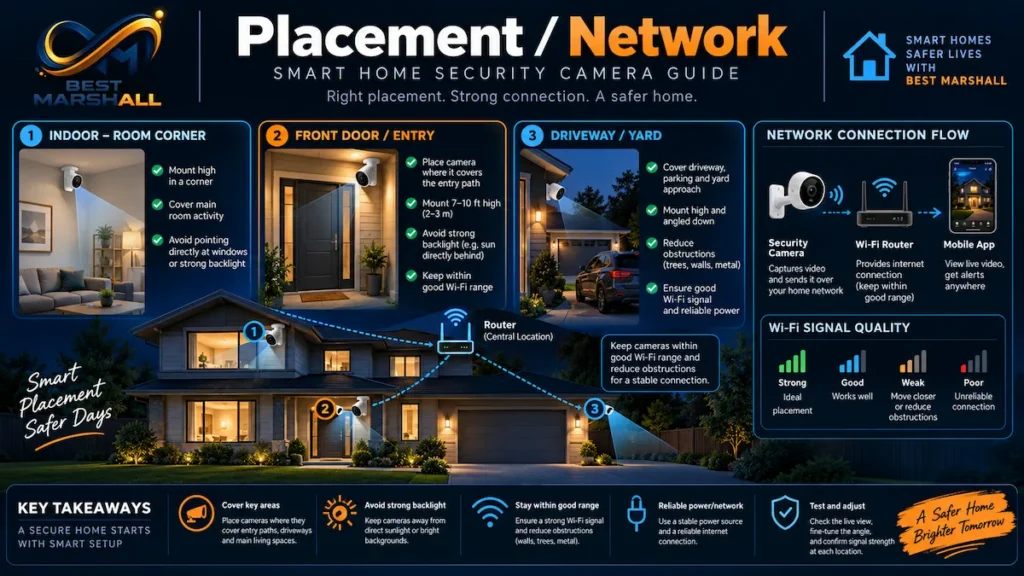
The Cam v4 operates on 2.4GHz Wi-Fi.
This matters because 2.4GHz typically provides better range and wall penetration than 5GHz but has less available spectrum and often experiences more interference.
Potential sources of 2.4GHz congestion include:
- neighboring Wi-Fi networks;
- Bluetooth devices;
- older smart-home products;
- microwave interference;
- dense apartment environments.
Wyze markets the Cam v4 with Wi-Fi 6 support, but that does not mean the camera supports the 5GHz band.
This is a common mistake.
Wi-Fi generation and Wi-Fi frequency band are different specifications.
The Cam v4 should therefore be planned around reliable 2.4GHz coverage.
Wired Power
The camera requires a 5V/1A wired power connection.
There is no internal battery for normal standalone operation.
Advantages include:
- continuous operation;
- continuous microSD recording;
- no battery charging schedule;
- no battery-related recording compromises.
Disadvantages include:
- placement depends on power access;
- outdoor cable routing requires planning;
- power failure stops operation unless backup power is provided.
For installations where running power is impossible, a battery security camera is the more appropriate technology.
Indoor and Outdoor Installation
The Cam v4 carries an IP65 weather-resistance rating.
What IP65 Means
The first digit, 6, indicates dust-tight protection.
The second digit, 5, indicates protection against water jets under the applicable IP test conditions.
IP65 does not mean the camera is intended for prolonged underwater immersion.
It also does not automatically make every accessory and connection weatherproof.
Outdoor Power Is a Separate Issue
This is one of the most important installation details.
The Cam v4 itself can be used outdoors, but Wyze states that outdoor use requires an appropriate Wyze outdoor-rated power adapter.
The included indoor adapter should not simply be exposed to weather because the camera body and its power equipment have separate environmental requirements.
Outdoor installations should also consider:
- covered electrical receptacles;
- cable routing;
- drip loops;
- direct sunlight;
- water pooling;
- mounting security;
- local electrical requirements.
The camera’s published operating range is approximately -4°F to 122°F (-20°C to 50°C).
Mounting Options
The Cam v4 supports several mounting methods.
These include:
- standing on its integrated base;
- magnetic mounting;
- the supplied wall-mount hardware;
- screw mounting;
- standard 1/4″-20 mounting hardware after configuring the base appropriately.
The magnetic system is convenient, but convenience and security are different concerns.
For easily reachable outdoor installations, a screw-secured mount may reduce the chance that the camera can simply be removed from its magnetic surface.
Smart-Home Compatibility
Current Wyze documentation lists native integration with:
- Amazon Alexa;
- Google Assistant;
- IFTTT.
This allows compatible smart displays and ecosystems to incorporate live video or automation functions.
Current official Cam v4 specification documentation does not list native Apple Home or Matter camera support.
That distinction matters for households trying to standardize on Apple Home or Matter.
Matter compatibility should never be inferred merely because a device is marketed as a modern smart-home product.
RTSP, NVRs, and Advanced Local Integrations
Advanced users frequently ask whether a consumer Wi-Fi camera can provide an RTSP stream to:
- an NVR;
- Home Assistant;
- surveillance software;
- third-party video-management systems.
The Wyze Cam v4 does not currently offer official stock RTSP support.
Wyze’s historical RTSP firmware was a beta solution for certain older models and required separate firmware. Current Wyze documentation does not include Cam v4 among those supported devices.
For advanced users who require open local streaming protocols, ONVIF, or straightforward NVR integration, this is an important limitation.
The Cam v4 should primarily be considered a Wyze ecosystem camera with local microSD capability, not a conventional open-protocol IP camera.
Security and Privacy Considerations
Internet-connected security cameras should be evaluated as network devices, not just cameras.
They can potentially expose:
- live video;
- recorded footage;
- audio;
- occupancy patterns;
- home routines;
- notification history.
Account Security
Current Wyze documentation states that two-factor authentication is enabled by default for new Wyze accounts using Wyze credentials.
Supported verification methods include options such as:
- authenticator applications;
- SMS;
- email.
An authenticator app generally reduces dependence on SMS and is worth considering for security-sensitive accounts.
Keep Firmware Updated
Firmware updates are not merely feature updates.
Wyze’s Cam v4 release history includes:
- security updates;
- live-stream fixes;
- network stability improvements;
- event-upload improvements;
- microSD playback fixes.
Running outdated camera firmware or an outdated mobile app can therefore affect both reliability and security.
VerifiedView
Wyze introduced VerifiedView as an additional account-to-media authentication layer.
According to Wyze, camera media and related data receive a user-specific identifier, and the system verifies that the requesting account matches the content before allowing access.
VerifiedView applies across supported Wyze cloud, mobile, and web workflows when compatible app and firmware versions are installed.
Historical Security Context
Privacy-conscious buyers should also understand Wyze’s history rather than evaluating only current features.
Wyze publicly disclosed a security incident on February 16, 2024, following a service outage. According to the company’s investigation, approximately 13,000 users received thumbnails associated with cameras that were not their own, and 1,504 users tapped those thumbnails; in some cases, event video could be viewed.
Wyze subsequently described changes to account-device verification and later introduced additional protections such as VerifiedView.
That history does not establish that the current Cam v4 is insecure, nor does later security work erase the relevance of previous incidents.
For any cloud-connected indoor camera, users should decide whether the vendor’s security architecture and incident history are appropriate for the location being monitored.
A reasonable privacy strategy is to avoid placing internet-connected cameras in unusually sensitive areas unless there is a compelling reason to do so.
Common Beginner Mistakes With the Wyze Cam v4
Mistake 1: Assuming Wi-Fi 6 Means 5GHz
It does not.
The Cam v4 uses 2.4GHz Wi-Fi.
A router can support Wi-Fi 6 while the camera still communicates only through the 2.4GHz band.
Mistake 2: Assuming IP65 Makes the Included Power Adapter Outdoor-Safe
The camera’s ingress-protection rating applies to the camera hardware as specified.
Outdoor installation requires the appropriate outdoor power solution.
Mistake 3: Assuming 2.5K Guarantees Identification at Any Distance
Resolution is only one part of surveillance image quality.
Distance, lighting, motion, lens angle, compression, and subject size remain critical.
Mistake 4: Installing the Camera Too High
Mounting a security camera extremely high can improve coverage while reducing facial detail.
For identification, a lower and more direct viewing angle can often provide more useful imagery than a dramatic overhead view.
Mistake 5: Pointing It Toward Busy Streets or Moving Trees
Basic motion detection can react to changing pixels.
Poor framing can create unnecessary alerts from vehicles, shadows, foliage, or other irrelevant movement.
Use detection zones and sensitivity controls.
Mistake 6: Assuming Smart AI Features Are All Included
Basic camera operation does not require a subscription.
Advanced object classifications and cloud event-video features may.
Check the current Wyze service matrix rather than assuming “AI camera” means all AI functionality is free.
Mistake 7: Buying a 512GB Card Without Checking Current Support
Wyze’s current documentation is inconsistent.
Its support materials indicate 256GB for Cam v4, while some commercial materials list 512GB.
Until those sources are reconciled, 256GB is the safer specification to follow.
Mistake 8: Treating a microSD Card as Permanent Archival Storage
Flash storage has a finite write endurance.
Continuous surveillance recording creates frequent write cycles.
For continuous recording, use a reputable card designed for high-endurance video applications and plan for eventual replacement.
Mistake 9: Ignoring Firmware Updates
Security cameras are network appliances.
Firmware maintenance affects security, connectivity, recording stability, and compatibility.
Mistake 10: Expecting Native NVR or RTSP Operation
The Cam v4 is not a conventional open-protocol surveillance camera.
Users requiring standardized NVR integration should verify protocol support before buying rather than trying to retrofit that requirement later.
How to Choose Correctly: Wyze Cam v4 Technical Checklist
Before choosing the Wyze Cam v4, verify the following.
Camera Placement
- Is there a suitable electrical outlet?
- Is the 98.5° horizontal field of view appropriate?
- Will the camera be close enough to capture useful detail?
- Will direct sunlight or bright windows dominate the image?
- Can detection zones exclude irrelevant movement?
Network
- Is reliable 2.4GHz Wi-Fi available at the mounting location?
- Is the network already congested with IoT devices?
- Does the router provide adequate outdoor coverage if the camera is outside?
Storage
- Do you want continuous recording?
- If so, will you install a high-endurance microSD card?
- Is 256GB enough for your retention needs?
- Do you also want off-site cloud event storage?
Smart Detection
- Is basic motion detection sufficient?
- Do you require person, pet, package, or vehicle classification?
- Are you comfortable paying for the service tier required for those features?
Outdoor Installation
- Is the location suitable for an IP65 device?
- Do you have an outdoor-rated power solution?
- Can the wiring be protected from weather and accidental damage?
- Is the camera mounted securely enough to resist easy removal?
Privacy and Security
- Will you enable strong account authentication?
- Are firmware and app updates part of your maintenance plan?
- Is the camera location appropriate for a cloud-connected device?
- Do all household members understand where cameras are operating?
Which User Profile Is the Wyze Cam v4 Best Suited To?
Beginner User
Prioritize:
- simple app setup;
- reliable 2.4GHz Wi-Fi;
- correct placement;
- microSD storage;
- basic motion zones;
- secure account authentication.
A beginner does not need to enable every AI feature immediately.
Intermediate User
Consider:
- continuous local recording;
- high-endurance microSD media;
- custom detection zones;
- automation with other Wyze devices;
- Alexa or Google integration;
- subscription AI if event classification saves meaningful time.
Advanced User
Pay close attention to limitations.
The Cam v4 may be less suitable if you require:
- RTSP;
- ONVIF;
- a traditional NVR architecture;
- 5GHz Wi-Fi;
- Power over Ethernet;
- fully local AI classification;
- open smart-home interoperability;
- advanced camera-management software.
For those requirements, a different class of network camera may be more appropriate.
Technical FAQ
Is the Wyze Cam v4 wireless?
Its network connection is wireless, but its power connection is not. The Cam v4 requires continuous wired power through a 5V/1A connection.
Does the Wyze Cam v4 support 5GHz Wi-Fi?
No. Current Wyze documentation specifies 2.4GHz Wi-Fi operation.
Does the Wyze Cam v4 support Wi-Fi 6?
Wyze markets the Cam v4 with Wi-Fi 6 capability, but it remains a 2.4GHz camera. Wi-Fi 6 support should not be interpreted as 5GHz support.
Can the Wyze Cam v4 record without a subscription?
Yes. A compatible microSD card allows continuous or event-based local recording without Cam Plus.
Can it record 24/7?
Yes. Wyze currently supports continuous 24/7 local recording on cameras such as the Cam v4 when an appropriate microSD card is installed and continuous recording is enabled.
What size microSD card should I use?
Current Wyze support documentation lists up to 256GB for the Cam v4, although another Wyze product page lists 512GB. Because the manufacturer’s documentation conflicts, 256GB is the conservative supported choice unless Wyze confirms otherwise for your exact configuration.
Does the Wyze Cam v4 keep recording if Wi-Fi goes down?
Local recording behavior can continue in certain configured offline scenarios as long as the camera remains powered and the required recording configuration was established beforehand. Remote viewing, cloud processing, and cloud notifications still depend on network availability.
Does the Wyze Cam v4 have free person detection?
Do not assume so. Current 2026 Wyze support documentation states that Cam v4 person-detection functionality and the full Edge AI feature set require an eligible paid plan, while standard motion and sound detection remain available without a subscription.
Does the Wyze Cam v4 support Apple Home?
Apple Home is not listed among the Cam v4’s current official native integrations. Wyze currently lists Alexa, Google Assistant, and IFTTT.
Does the Wyze Cam v4 support Matter?
Matter support is not listed in current official Cam v4 specifications.
Does it support RTSP?
Not as a standard official Cam v4 feature. Wyze’s historical RTSP beta firmware applied to selected older cameras rather than the Cam v4.
Is the Wyze Cam v4 waterproof?
It is IP65 weather resistant, not designed for underwater use. Outdoor installation also requires appropriate weather-rated power hardware.
Can I use the included power adapter outside?
Wyze indicates that an appropriate outdoor power adapter is required for outdoor Cam v4 use. Do not assume the included indoor adapter has the same weather protection as the camera body.
Is 2.5K noticeably better than 1080p?
It provides more pixels and can retain more detail, particularly when cropping or digitally zooming. Actual identification quality still depends on lighting, distance, motion, compression, and camera position.
Is the built-in spotlight a floodlight?
No. At approximately 72 lumens, it is primarily supplemental illumination for the camera rather than a substitute for dedicated exterior security lighting.
Is the Wyze Cam v4 suitable for a professional NVR system?
Generally not if your installation depends on standardized RTSP, ONVIF, PoE, or traditional VMS/NVR integration. The Cam v4 is primarily designed around the Wyze app, Wyze services, and onboard microSD storage.
Expert Conclusion: Who Should Consider the Wyze Cam v4?
The Wyze Cam v4 combines several technically useful capabilities in a compact consumer security camera: 2560 × 1440 video, WDR, color and infrared night vision, a built-in spotlight, simultaneous two-way audio, IP65 weather resistance, local microSD recording, 2.4GHz wireless connectivity, and mainstream smart-home integrations.
Its strongest technical advantages are high resolution relative to conventional 1080p cameras, flexible local recording, continuous wired operation, and indoor/outdoor hardware design.
Its limitations are equally important.
It is not battery powered. It does not use 5GHz Wi-Fi. It does not provide official stock RTSP or conventional NVR integration. Advanced smart detections depend significantly on Wyze’s paid-service ecosystem, and outdoor installation requires proper weather-rated power hardware.
The 20 FPS daytime and 15 FPS nighttime frame rates also mean buyers should not judge video capability from resolution alone.
For homeowners who want an affordable Wyze-centered monitoring system with local continuous recording, the specifications make the Cam v4 technically well suited to many entryways, indoor rooms, garages, porches, and similar fixed-view applications.
Advanced users requiring open surveillance protocols, fully local smart detection, PoE infrastructure, or deep Apple Home/Matter integration should verify those requirements before choosing it.
For any installation, the most important steps are straightforward: confirm reliable 2.4GHz coverage, plan power correctly, use an appropriate microSD card if local recording matters, configure detection zones carefully, keep the firmware current, and secure the account with strong authentication.
View Product Details on Amazon