An office chair can look comfortable in product photos and still be a poor fit for your body. A seat that’s too deep may make it difficult to use the backrest. Armrests that sit too high can interfere with your desk. Even an expensive chair with numerous adjustments may not accommodate your height or preferred working position.
That’s why learning how to choose an ergonomic office chair starts with fit—not price, appearance, or the number of features on the product page.
A suitable home office chair should support your body in comfortable working positions, offer the adjustments you actually need, remain stable during normal use, and work with the height and layout of your desk.
Before buying, focus on five things:
- Fit: Does the seat height, depth, and width accommodate your body?
- Support: Does the backrest provide comfortable lower-back support?
- Adjustability: Can you position the seat, backrest, and armrests appropriately?
- Safety and durability: Is the chair suitable for your size, weight, and intended use?
- Ownership: Are the warranty, return policy, and replacement-part options reasonable?
This guide explains how to evaluate those factors, interpret office-chair specifications, and avoid paying extra for features that may not improve your working experience.
What Makes an Office Chair Ergonomic?
An ergonomic office chair is designed to support seated work while accommodating differences in body size, posture, and working activities.
However, ergonomic is not a guarantee of comfort or a standardized product rating.
A chair can have an adjustable lumbar pad, reclining backrest, and movable armrests yet remain unsuitable for someone whose thighs are longer than its seat or whose desk prevents the armrests from fitting underneath.
A better approach is to assess whether the chair can be adjusted to the person and the workstation.
Ergonomic Fit vs. Ergonomic Marketing
A chair should allow you to work with your shoulders relaxed, your feet supported, your back comfortably positioned, and your hands at an appropriate height relative to the keyboard.
According to OSHA’s office chair ergonomics guidance, important design considerations include the seat, backrest, armrests, and base.
OSHA emphasizes individual fit, support, and adjustability rather than prescribing one universal chair design.
A well-fitting chair generally allows you to:
- Sit with your feet supported by the floor or an appropriate footrest.
- Use the backrest without excessive pressure behind your knees.
- Position your arms comfortably near your body.
- Change your seated position without losing useful support.
- Adjust the working height to coordinate with your keyboard and desk.
- Move and swivel without repeatedly twisting your torso.
These are practical selection criteria, not a promise that a chair will prevent pain or eliminate the need for movement.
Pay particular attention to the chair’s usable adjustment range. A feature that doesn’t adjust far enough for your body may provide little benefit, even if the manufacturer advertises it prominently.
Why the Chair Must Work With Your Desk
A chair doesn’t function independently from the rest of your home office.
Suppose you find a chair that supports your back and positions your feet comfortably on the floor. If your desk is too high, you may still have to raise your shoulders to type.
Raising the chair might improve your arm position, but it could also leave your feet dangling.
In that situation, a suitable footrest, lower keyboard surface, or adjustable desk may be more useful than replacing the chair again.
Chair selection should therefore consider the relationship between seat height, keyboard height, armrest clearance, monitor placement, and available legroom.
Before buying a chair, measure the height of your desk or keyboard surface and check whether the chair can position your hands comfortably without compromising foot support.
Understand the Main Types of Office Chairs
Office-chair names describe general design categories, but they don’t establish ergonomic suitability on their own.
Adjustable Task Chairs vs. Executive Chairs
An adjustable task chair is designed for computer-based work and usually prioritizes practical seating controls.
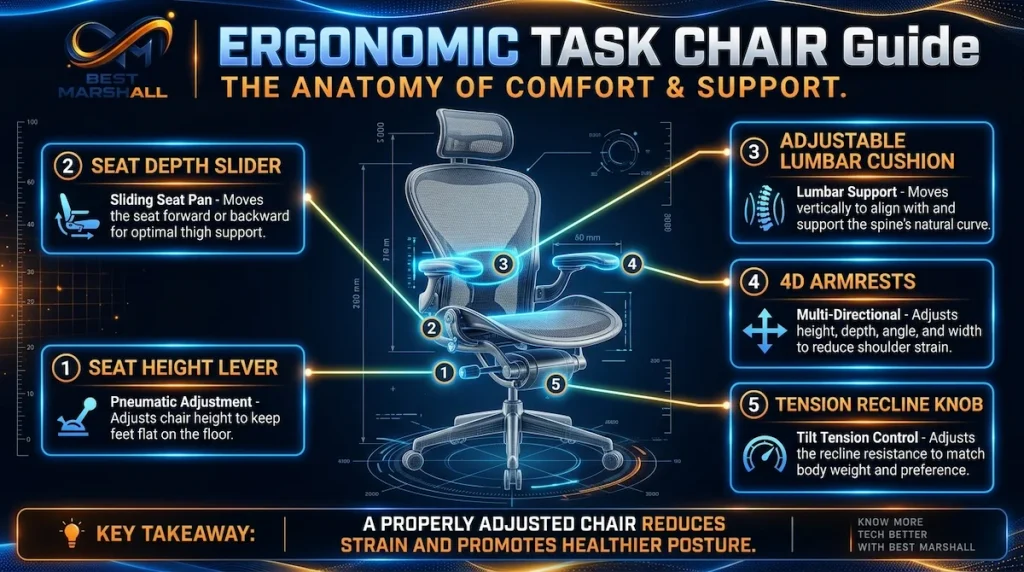
Depending on the model, it may offer seat-height adjustment, armrest movement, lumbar support, seat-depth adjustment, and a reclining backrest.
An executive chair often features a taller backrest, substantial cushioning, or decorative upholstery. Some are highly adjustable; others prioritize appearance and padding over fine positioning.
Neither category is automatically better.
For computer-intensive work, prioritize the adjustments that let you align the chair with your body and desk.
A large executive chair with fixed armrests and an overly deep seat may provide less practical flexibility than a simpler task chair with appropriate dimensions.
Gaming chairs are another nearby category. Their design often emphasizes styling and pronounced side bolsters, although features vary widely.
A gaming chair can be suitable for office work if its dimensions and adjustments fit the user. However, gaming-specific styling should not be confused with verified ergonomic performance.
Mesh, Padded, and Hybrid Chairs
Construction affects how a chair feels, ventilates, and distributes contact pressure.
Mesh chairs use tensioned fabric for the backrest, seat, or both. Depending on the construction, mesh may allow more airflow than heavily padded upholstery.
However, mesh tension, frame design, and edge support can substantially affect fit.
Padded chairs typically use foam and fabric or synthetic upholstery. They offer different combinations of cushioning, firmness, and surface texture.
The long-term experience depends on the foam’s construction, the upholstery, and how those components respond to repeated use.
Hybrid chairs commonly combine a mesh backrest with a padded seat. This can offer a balance of ventilation and cushioning, but the combination itself doesn’t establish superiority.
When evaluating any material, consider its performance in the complete chair rather than assuming that a particular surface is inherently more ergonomic.
Petite, Big-and-Tall, and Specialized Seating
Standard-size chairs don’t fit everyone.
A shorter user may need a lower minimum seat height, shallower seat, or narrower armrest spacing.
A taller user may need greater usable seat depth, a suitable backrest, and adjustment ranges that accommodate longer legs.
Larger-framed users may require both increased seat dimensions and a higher manufacturer-rated weight capacity.
These are separate considerations: a chair with a high weight rating can still have an unsuitable seat shape.
Alternative seating products, including saddle stools, kneeling chairs, and leaning stools, introduce different postures and support characteristics.
They aren’t automatically replacements for conventional office chairs, particularly when the user needs back support during prolonged computer work.
Choose specialized seating according to its intended purpose and the user’s requirements rather than treating novelty as an ergonomic benefit.
Start With the Right Seat Size and Fit
Seat dimensions are among the most important specifications to evaluate before purchasing an office chair.
The seat should accommodate your body while allowing the backrest, armrests, and desk to work together.
A chair can provide many adjustments and still fail the most basic fit requirements.
Seat Height: Finding a Usable Adjustment Range
Seat height determines how your legs interact with the floor and how your arms align with the work surface.
When seated with your back supported, your feet should rest comfortably on the floor or a stable footrest, without excessive pressure under your thighs.
The chair should also allow you to position your hands at a comfortable height for computer work.
OSHA’s workstation purchasing guide provides a general reference seat-height adjustment range of approximately 15–22 inches.
That range is useful for understanding common workstation requirements, but it is not a guarantee of fit for every individual.
For example, a chair advertised with a minimum seat height of 18 inches may be too high for someone with relatively short lower legs, even though 18 inches falls within OSHA’s broader reference range.
A footrest may help if the chair must be raised to accommodate the desk. However, needing additional equipment should be part of the purchasing decision.
When comparing product listings, check both ends of the seat-height range—not only the maximum.
Also remember that cushioning can compress when occupied. Published dimensions may not perfectly represent the actual position of the seated user.
If a manufacturer’s listing doesn’t explain how seat height is measured, ask whether the figures refer to the top of the unoccupied seat and whether the adjustable range includes the configuration being sold.
What matters: whether the chair can place your body and hands appropriately relative to the desk while preserving reliable foot support.
Seat Depth and Width: Why Body Proportions Matter
Seat depth is the front-to-back dimension of the sitting surface.
A seat that’s too deep can prevent you from resting against the backrest without pressing the front edge into the area behind your knees.
A seat that’s too shallow may leave too much of your thighs unsupported.
When evaluating fit, sit with your back against the backrest and check whether the seat supports much of your thighs without pressing uncomfortably against the backs of your knees.
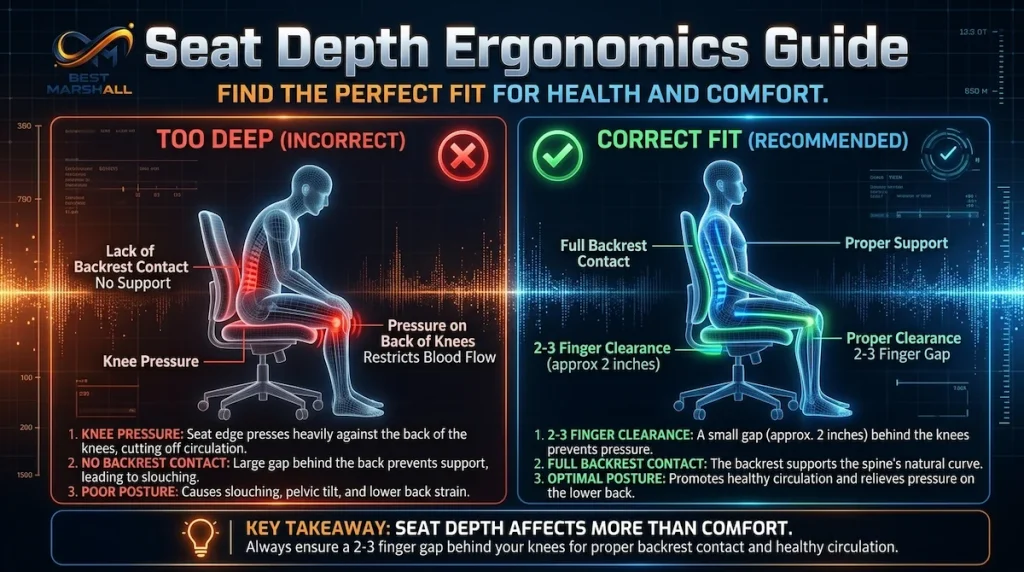
Some chairs include a seat-slide adjustment, allowing the seat pan to move forward or backward relative to the backrest.
Others adjust effective seat depth by moving the backrest.
Either approach can improve fit when its adjustment range accommodates the user.
The presence of a seat-depth adjustment is particularly valuable for shared workstations and people who have difficulty finding suitable fixed-depth seating.
Width matters, too.
A chair should provide enough space for the hips and thighs without restricting normal movement.
However, an excessively wide chair may place fixed armrests too far apart, making useful forearm support difficult.
Be careful when reading specifications:
- Seat width describes the usable sitting surface, although manufacturers may measure it differently.
- Overall chair width includes components such as armrests or the frame.
- Seat depth may describe the cushion dimension rather than the effective sitting depth.
- Adjustable depth range may be more informative than a single fixed measurement.
For chairs with pronounced side bolsters or raised seat edges, the usable sitting width can be smaller than the widest external dimension.
Ask for actual seating-surface measurements when a listing provides only overall dimensions.
If the listing doesn’t make these distinctions clear, request clarification before purchasing.
Weight Capacity and Chair Stability
A chair’s published weight capacity matters for safety, but it should never be treated as the only sizing criterion.
A chair rated to accommodate a heavier user may still be too narrow, too shallow, or otherwise unsuitable.
Compare the user’s weight with the manufacturer’s stated capacity while separately confirming seat dimensions and adjustment ranges.
Also evaluate the base.
For conventional computer task chairs, OSHA recommends a stable five-leg base with appropriate casters.
A five-leg base is a useful structural characteristic, but base design, materials, manufacturing quality, correct assembly, and intended use also matter.
Check that the casters suit the intended floor surface and permit controlled movement.
For users with mobility or transfer requirements, alternative caster or glide arrangements may be appropriate, depending on the circumstances.
Follow the manufacturer’s assembly and safety instructions, including any restrictions on leaning, standing on the chair, or using it on unsuitable flooring.
Never assume a chair is safe for a particular weight simply because it looks heavily built or has a large seat.
Evaluate Lumbar Support and Backrest Adjustments
The backrest should provide comfortable support and permit useful changes in seated position.
An aggressive lumbar curve or large backrest doesn’t automatically make a chair ergonomic.
Fixed vs. Adjustable Lumbar Support
Lumbar support is intended to support the lower-back region while sitting.
On some chairs, the support is built into the backrest’s shape. Others provide an adjustable pad, sliding support, or a mechanism that changes its position or prominence.
Different adjustments serve different purposes.
Lumbar height adjustment changes where the support contacts your back.
Lumbar depth adjustment changes how prominently the support presses forward.
Backrest positioning may affect the relationship between the support and your body.
More prominent support is not necessarily better.
The goal is comfortable, appropriately positioned contact—not pressure that forces an unnatural seated shape.
A chair with a well-fitting fixed contour may be satisfactory for one person, while someone with different proportions may benefit significantly from adjustable lumbar positioning.
For this reason, lumbar fit should be evaluated while actually sitting against the backrest, not inferred from promotional photographs.
Recline, Tilt Tension, and Backrest Locking
Office-chair listings frequently use terms such as tilt, recline, synchronous mechanism, and tilt lock.
These mechanisms aren’t identical.
| Feature | What it generally controls | Why it can matter |
|---|---|---|
| Backrest recline | Backrest angle relative to the seated position | Permits different supported postures |
| Tilt tension | Resistance felt while reclining | Helps the movement respond to the user |
| Tilt lock | Restricts movement at supported positions | Allows a preferred stable working position |
| Synchronous tilt | Coordinated movement of seat and backrest | Can improve the interaction between seat and back during recline |
| Seat-angle adjustment | Inclination of the seat surface | Allows additional positioning options |
The exact behavior of these mechanisms varies by manufacturer.
For example, a synchronous mechanism may move the seat and backrest through different relative angles depending on its design. The name alone doesn’t specify the movement ratio or available locking positions.
A chair advertised with a particularly large recline angle isn’t automatically better for computer work.
More important considerations include controlled movement, suitable resistance, effective support, and the ability to return easily to a comfortable working position.
If you regularly alternate between typing, reading, and video meetings, a chair that allows comfortable supported position changes may offer meaningful flexibility.
But advanced tilt mechanisms are not a substitute for appropriate seat dimensions.
Do You Actually Need a Headrest?
Headrests can provide support in some reclined positions, particularly when the user leans back to read or rest briefly.
However, many people perform ordinary keyboard and mouse work without using a headrest.
A headrest that pushes the head forward during upright work may be undesirable.
If you want one, check that its height and angle can accommodate your body and typical reclined positions.
Also confirm that it doesn’t interfere with the head or neck during normal upright tasks.
For chairs offering substantial recline, check the manufacturer’s intended head-support configuration and applicable safety guidance.
A headrest should be chosen for a specific use case rather than treated as a mandatory sign of a premium ergonomic chair.
Choose Armrests and Adjustments That Fit Your Work
Armrests can support the forearms and help reduce unnecessary muscular effort, but their placement matters.
Poorly positioned armrests may raise the shoulders, restrict movement, or prevent the chair from moving close enough to the desk.
Armrest Height, Width, Depth, and Pivot
Adjustable armrests may offer several types of movement:
- Height: Raises or lowers the arm-support surface.
- Width: Changes the distance between the armrests.
- Depth: Moves the support forward or backward.
- Pivot: Rotates the support to a different angle.
Manufacturers sometimes describe these as 2D, 3D, or 4D armrests.
These labels generally refer to the number of adjustment directions, but the terminology and actual movement range vary.
A chair with so-called 4D armrests may still be poorly suited to your body if the minimum spacing is too wide or the supports cannot sit low enough.
What matters is whether the armrests let your shoulders remain relaxed, keep your elbows comfortably near your torso, and avoid interfering with the desk.
For a narrow home office, also check the chair’s overall width and whether the armrests fit beneath the desktop.
If the armrests are unsuitable, being able to lower or remove them may be more useful than having several adjustment directions.
Which Adjustments Are Worth Paying More For?
Not every advanced feature deserves an equal share of your budget.
The University of Pennsylvania’s office furniture guidance identifies chair features such as adjustable height, armrests, back support, tilt, and seat depth as important considerations for computer work.
Use the following matrix to prioritize upgrades according to the limitations of a particular chair.
| Adjustment or feature | Why it matters | When to prioritize it |
|---|---|---|
| Seat-height adjustment | Aligns seating with leg and work-surface requirements | Essential for most adjustable task chairs |
| Suitable seat depth | Supports thighs while preserving backrest contact | Essential fit requirement |
| Seat-depth adjustment | Accommodates different thigh lengths | Particularly valuable for shared chairs or uncertain fit |
| Adjustable lumbar support | Changes back-support positioning | Valuable when fixed contours do not fit |
| Height-adjustable armrests | Helps coordinate forearm support and desk clearance | High priority for keyboard-intensive work |
| Armrest width adjustment | Helps accommodate different torso and shoulder widths | Useful when fixed spacing is unsuitable |
| Adjustable recline tension | Changes resistance during reclining | Useful for comfortable posture variation |
| Advanced synchronized tilt | Coordinates movement of the seat and backrest | Consider when it improves your actual working positions |
| Adjustable headrest | Supports selected reclined positions | Optional and task-dependent |
A lower-priced chair with suitable core adjustments may be a better purchase than an elaborate chair whose dimensions don’t fit.
Likewise, a premium chair may justify its cost when its mechanisms, construction, and service support deliver meaningful benefits to the particular user.
The correct decision depends on what the chair solves—not how many features appear in the specification table.
Compare Chair Materials and Construction
A chair’s material influences temperature, cushioning, cleaning, and how contact forces are distributed.
There is no single material that guarantees superior ergonomic performance.
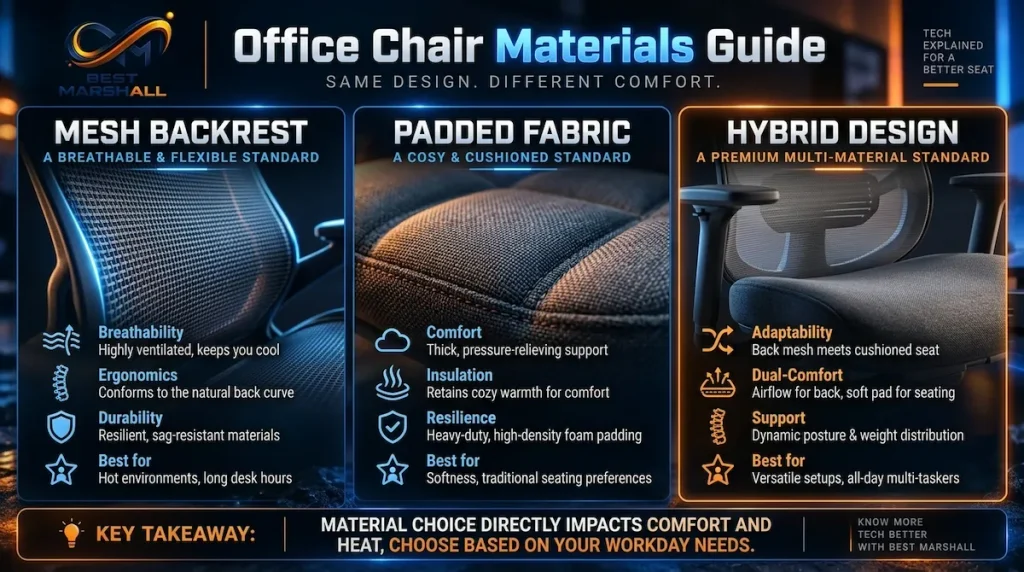
Mesh vs. Foam-Padded Seats
Mesh seating is often promoted as a cooler alternative to upholstered cushions.
Its open construction can permit airflow, but comfort depends on more than ventilation.
A mesh seat is supported by its tension and surrounding frame. If the frame edges or mesh tension don’t suit the user, the sitting experience may be uncomfortable despite the breathable construction.
Foam-padded seats offer a different type of support.
Comfort depends on cushioning thickness, firmness, shape, resilience, and the user’s body proportions.
A cushion that’s initially soft isn’t necessarily the most suitable option for extended computer work.
Conversely, a very firm cushion isn’t automatically more supportive.
When comparing designs, ask:
- Does the sitting surface provide comfortable, distributed support?
- Do the edges create unwanted pressure?
- Does the seat shape accommodate normal movement?
- Does the material feel suitable in the intended environment?
- Are there clear manufacturer instructions for cleaning and care?
Material choice should follow fit and usability, not replace those criteria.
Upholstery, Frame Quality, and Maintenance
Fabric upholstery offers many textures and constructions, while synthetic leather and coated materials may provide different cleaning and appearance characteristics.
However, coatings can age, surfaces can become warm, and fabrics can wear.
Durability depends on the specific materials, manufacturing methods, maintenance, and usage—not merely whether the product is labeled premium.
When evaluating construction, consider:
- Frame and base materials.
- Quality of moving components.
- Smoothness and reliability of adjustment controls.
- Upholstery and cushion construction.
- Availability of replacement arm pads or casters.
- Care and maintenance requirements.
- Manufacturer support for repairs.
Some chairs permit replacement of individual components rather than requiring replacement of the entire chair.
This can affect long-term ownership costs, especially when the chair is expected to remain in service for years.
Understand Office Chair Safety and Durability Standards
Product listings frequently mention BIFMA standards, laboratory testing, or ergonomic certifications.
These claims can be useful, but only when you understand what was actually evaluated.
What ANSI/BIFMA X5.1 Actually Tests
ANSI/BIFMA X5.1 is a recognized standard concerning the safety, structural adequacy, and durability of general-purpose office seating.
The standard includes testing relevant to different chair components and structural performance under specified conditions.
It should not be confused with a clinical assessment of comfort or a guarantee that a particular user will experience fewer musculoskeletal symptoms.
The edition identified in BIFMA’s furniture standards descriptions is ANSI/BIFMA X5.1-2017 (R2022).
Standards may subsequently be revised, so verify the edition referenced by a manufacturer when evaluating a specific purchase.
BIFMA also maintains separate standards for certain other seating categories, including general-purpose large-occupant office chairs. The applicable test standard depends on the chair’s intended use and category.
This distinction matters when evaluating chairs intended for higher user loads.
When a manufacturer refers to ANSI/BIFMA testing, verify:
- Which specific standard is claimed.
- Which edition or version is referenced.
- Whether the claim applies to the complete chair or selected components.
- Whether credible supporting test documentation is available.
- Whether the product model being sold matches the model covered by the claim.
Don’t assume that every statement mentioning BIFMA means the chair has undergone the same evaluation.
Also avoid interpreting an occupant-weight assumption within a test standard as an automatic weight rating for every product that refers to that standard.
The chair’s manufacturer-rated capacity must be checked separately.
Why Testing Claims Don’t Guarantee Ergonomic Comfort
Structural testing and ergonomic fit answer different questions.
A chair may satisfy a relevant durability test but still have unsuitable seat dimensions for a particular buyer.
Similarly, a product can provide comfortable support without having its quality established by an unfamiliar marketing badge.
Be cautious with expressions such as:
- “Medical-grade ergonomic chair.”
- “Orthopedic comfort technology.”
- “Scientifically perfect posture.”
- “Certified to prevent back pain.”
- “Universal ergonomic fit.”
Such phrases require evidence appropriate to the specific claim.
A safety or durability standard does not automatically support claims about treatment, prevention, or individual medical outcomes.
For purchasing decisions, consider documented construction quality and fit separately.
Both are important, but one cannot substitute for the other.
Check Warranty, Returns, and Long-Term Ownership Costs
Chair ownership doesn’t end when the product arrives.
Mechanisms can require maintenance, upholstery can wear, and components may eventually need replacement.
The quality of warranty coverage and after-sales support can therefore influence the practical value of a chair.
What an Office Chair Warranty Should Cover
A manufacturer’s warranty may address different chair components under different terms.
Before purchasing, check how coverage applies to:
- Structural frame and base.
- Recline and adjustment mechanisms.
- Gas-lift cylinder.
- Casters.
- Armrests and arm pads.
- Seat and back upholstery.
- Cushion or mesh performance.
- Labor and shipping for repairs.
Don’t assume that a long advertised warranty applies equally to every component.
Some warranties include exclusions, different coverage periods, or conditions related to normal wear, usage hours, assembly, or the user’s weight.
Also verify how the claim process works.
A warranty that requires expensive return shipping or complicated disassembly may have a different practical value from one that provides accessible replacement parts.
What to Verify Before Ordering Online
Buying an office chair online makes accurate specifications and return conditions particularly important.
Before placing an order, confirm:
- Complete seat-height, width, and depth measurements.
- Whether dimensions describe the usable seat or external chair frame.
- Backrest and lumbar adjustment details.
- Manufacturer-rated weight capacity.
- Actual armrest adjustment ranges.
- Applicable standards claims and supporting documentation.
- Assembly requirements.
- Shipping and delivery arrangements.
- Whether return shipping is paid by the buyer.
- Any restocking charges.
- Whether the original packaging must be retained.
- Replacement-part availability.
- Warranty exclusions.
If a dimension is missing or unclear, ask the manufacturer or seller how it was measured.
For instance, an advertised seat width measured across outer side bolsters may not represent the unobstructed space available to sit.
Missing technical measurements are a legitimate reason to delay a purchase or seek clarification.
If two chairs appear similar but one provides detailed measurements, transparent support documentation, and clear return terms, that information may reduce the uncertainty of purchasing without an in-person trial.
The cheapest advertised purchase price isn’t necessarily the lowest total ownership cost.
How to Choose the Right Chair for Your Needs
Once you understand the major features, you can turn those details into a structured selection process.
The following five-step framework is a Best Marshall editorial decision method—not a medical fitting test or official product certification.
A Five-Step Chair Selection Framework
Step 1 — Measure
Start with your body proportions, workstation height, available space, and applicable weight requirements.
You don’t need to calculate every anatomical measurement, but you should know enough to evaluate seat height, width, and depth.
Also measure desk clearance so you can determine whether the armrests and chair body will fit appropriately.
Step 2 — Fit
Filter out chairs whose fundamental dimensions or rated capacity are unsuitable.
Check the seat-height range, usable seat depth, width, back support, and armrest spacing.
Fit should be considered before comparing upholstery finishes or advanced mechanisms.
Step 3 — Adjust
Identify which adjustments you genuinely need.
A shorter user may prioritize minimum seat height and seat depth. Someone sharing the chair may value quick controls and a wider adjustment range. A user whose armrests regularly collide with the desk may need lower or removable supports.
Step 4 — Verify
Confirm the manufacturer specifications, relevant safety-testing statements, warranty, return policy, and replacement-part support.
If a product description makes a claim that cannot be substantiated, don’t treat it as an established advantage.
Step 5 — Decide
Compare the remaining options according to the factors that matter most to you.
Choose the chair that best satisfies your actual fit, support, adjustment, ownership, and budget requirements—not the chair with the longest feature list.
What to Prioritize on a Limited Budget
When your budget is constrained, spend it on the features most likely to affect daily usability.
Prioritize:
- Suitable seat dimensions and capacity.
- Functional seat-height adjustment.
- Comfortable back and lumbar support.
- Stable construction.
- Armrests that work with your desk.
- Reasonable warranty and return conditions.
Additional controls, decorative features, and specialty upholstery may be lower priorities unless they address a specific need.
For many buyers, a well-fitted conventional task chair is a sensible starting point.
However, inexpensive models shouldn’t be treated as automatically good value.
If a chair offers insufficient adjustment range, questionable stability, or no practical recourse when it doesn’t fit, the lower upfront cost may not compensate for those drawbacks.
How to Test an Office Chair Before Buying
If you can try a chair in person, use the opportunity to evaluate its fit and mechanisms during normal seated activities.
A useful trial involves more than sitting down for a few seconds.
Chair trial procedure
- Set seat height. Adjust the chair so your feet are supported and your working position is comfortable.
- Check seat depth. Sit fully against the backrest and confirm that the front edge doesn’t press into the backs of your knees.
- Evaluate lumbar support. Adjust the support, if available, and notice whether the contact feels comfortable.
- Position the armrests. Check shoulder relaxation, elbow position, and compatibility with a nearby work surface.
- Try the recline. Move through supported seated positions and evaluate the resistance and return movement.
- Operate each adjustment. Confirm that controls are reachable, understandable, and functional.
- Check stability and movement. Assess how the chair rolls, swivels, and behaves during ordinary repositioning.
- Simulate real work. If possible, sit long enough to type, use a mouse, read, and change posture rather than deciding solely from first impressions.
A brief showroom trial cannot establish long-term comfort or durability. It can, however, reveal obvious fit or usability problems before purchase.
When an in-person trial isn’t possible, compensate by checking detailed dimensions, seeking clarification about adjustments, and choosing a purchasing arrangement with reasonable return protection.
Which Chair Features Matter for Your Situation?
Different users should prioritize different chair characteristics.
| Your main requirement | Prioritize | Be cautious about |
|---|---|---|
| Limited budget | Core fit, stable base, essential controls, returns | Paying for cosmetic upgrades |
| Long desk-work sessions | Support, recline control, usable adjustments, durable mechanisms | Assuming any chair guarantees all-day comfort |
| Shorter body proportions | Low seat-height minimum, shallow or adjustable seat depth | Chairs with oversized fixed dimensions |
| Taller body proportions | Adequate seat depth, backrest fit, usable height range | Choosing solely by “high-back” labeling |
| Larger body dimensions | Suitable width, verified rated capacity, stable construction | Weight rating without dimensional fit |
| Shared workstation | Broad adjustment range, easy controls | Highly individualized fixed seating |
| Small home office | Compact footprint, armrest clearance, suitable casters | Large chairs that obstruct movement |
| Warm working environment | Breathable materials with appropriate support | Assuming all mesh constructions feel alike |
| Long-term ownership | Serviceable components, warranty clarity, replacement parts | Warranty duration without examining exclusions |
Use this matrix to reduce the number of chairs worth investigating.
It is not a product ranking. A given chair may suit one scenario while being a poor fit for another.
Office Chair Buying Checklist
Use this checklist when comparing chair specifications, visiting a showroom, or reviewing an online listing.
A chair that doesn’t meet essential fit or safety requirements should not be selected merely because it offers appealing optional features.
Fit and Dimensions
- The seat-height range is compatible with my body and workstation.
- The seat depth supports my thighs without uncomfortable pressure behind my knees.
- The usable seat width accommodates my body without restricting movement.
- I can use the backrest while keeping my feet appropriately supported.
- The manufacturer-rated weight capacity is suitable for the intended user.
Backrest and Adjustments
- The backrest provides comfortable lower-back support.
- Lumbar support adjustments, if present, operate within a useful range.
- Recline and tilt controls are appropriate for my tasks.
- Armrests can be positioned comfortably without raising my shoulders.
- The chair allows useful changes in sitting position.
Workstation Compatibility
- The chair works with the height of my desk or keyboard surface.
- The armrests don’t prevent me from getting close enough to the desk.
- The chair fits within my available workspace.
- The base and casters are suitable for the intended floor.
- I have adequate legroom and freedom of movement.
Construction and Safety
- The chair is stable and its controls operate reliably.
- Any advertised testing or standards claims can be identified and checked.
- The materials and upholstery are suitable for my working environment.
- The chair can be assembled and used according to manufacturer instructions.
Warranty and Buying Conditions
- I understand the warranty’s coverage and exclusions.
- I know whether replacement parts are available.
- Return deadlines and charges are clear.
- Shipping and assembly requirements are acceptable.
- The listed dimensions are sufficiently detailed for a reliable fit assessment.
- I understand the total cost, not just the advertised chair price.
This is a consumer decision checklist, not a medical assessment or an independent certification of a chair’s safety.
Frequently Asked Questions
Is an expensive ergonomic office chair worth it?
Sometimes, but price alone doesn’t establish value.
A higher-priced chair may offer broader adjustment ranges, more sophisticated mechanisms, serviceable components, or stronger warranty support. Those advantages matter only if they suit the intended user and working environment.
A less expensive chair that fits properly and provides reliable essential adjustments may be a more sensible purchase than a premium model whose dimensions are unsuitable.
Compare actual fit, documented features, ownership support, and total cost before deciding.
Can an ergonomic office chair prevent back pain?
No chair can guarantee that a person will avoid back pain.
Appropriate seating can help improve workstation fit and reduce unnecessary exposure to some awkward positions, but back pain can have many contributing causes.
A chair should be considered one part of a broader working environment that also includes desk height, equipment placement, movement, and individual needs.
Persistent or worsening pain, numbness, weakness, or other concerning symptoms should be evaluated by an appropriate healthcare professional rather than treated solely through furniture changes.
Final Takeaway: Choose Fit Before Features
The best ergonomic office chair for your home office isn’t necessarily the chair with the highest price, deepest cushioning, or greatest number of adjustments.
It’s the chair whose dimensions, support, and controls accommodate your body and work environment while offering reasonable construction quality and ownership support.
Start with seat height, depth, width, and capacity. Evaluate back support and adjustments. Check compatibility with your desk. Then verify the warranty, returns, and relevant safety information.
The entire decision can be reduced to five actions:
Measure → Fit → Adjust → Verify → Decide.
That approach gives you a more dependable way to compare office chairs than relying on marketing labels or assuming that one model works equally well for everyone.